
A new hire can involve Finance, Recruiting, Legal, and the hiring manager long before an offer is made. Budgets, approvals, and candidate information travel between separate systems, leaving plenty of room for delays and manual rework.
With Tines, hiring requests can be connected to approvals, the ATS, and offer preparation, with compensation details visible only to those who need them.
How it works

Requests come in from a form or Slack.




Featured build
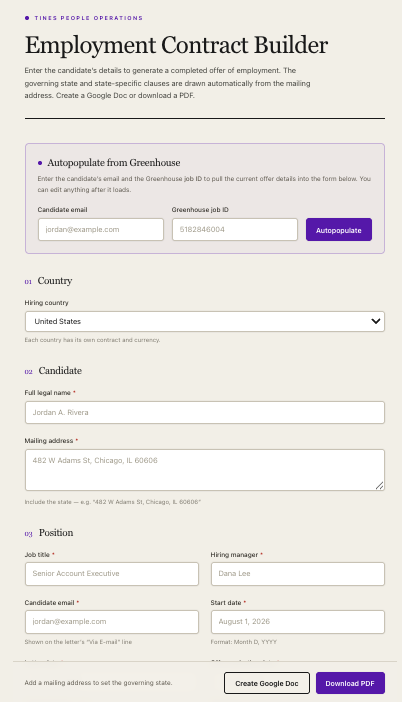
Employment contract generator with Greenhouse integration
An employment contract automation workflow for recruiting teams. Pulls candidate and offer data from Greenhouse, applies jurisdiction-specific legal clauses based on location and role type, and generates completed contracts as Google Docs or PDFs. Replaces manual Word template copying and editing with an automated, legally-reviewed document generation process.
Examples
We’ve assembled a gallery of real-world, ready-to-use apps, agents, and automation templates. Start from a template or from a prompt, using natural language and your own expertise.
 HR & FinanceJob requisition approval workflow with Slack routing and ATS integration

 HR & RevOpsRecruiting dashboard synced to your ATS

 HR & RevOpsGreenhouse interview scorecard builder from job kit
- HRInterview case study generator with dummy datasets
Offer and contract generator
Contracts drafted from approved offer details in the ATS, sent for signature.
 HR & RevOpsCandidate debrief prep assistant for final-round hiring decisions
Headcount versus plan tracker
Approved roles against the plan finance signed off.
Related use cases
 Onboarding and offboardingGive new starters a great first day, and make departures smooth and quick.
 Employee requests and directoryAnswers, requests and a directory employees actually use.
 HR case managementEvery employee issue logged, routed and resolved, with sensitive cases kept private.
 Engagement and surveysSurveys people answer, feedback someone reads, and actions that get done.
 People analytics and complianceLive headcount, attrition and compliance reporting without the monthly export.