You're never locked out of what Tines Stories generates. Every App is a full React application, and the Code tab gives you complete access to it.
You don't need to touch the code at all if you'd rather build entirely through natural language. But if you're curious, or if you want fine-grained control, the Code tab is where you'll find it.
From here, you can:
Browse the files that make up your App.
Search the codebase, with a toggle that lets you search either by file name or within the contents of your files. This makes it easy to jump straight to the file you need, or to find a specific piece of code, no matter which file it lives in.
Edit the code directly in the editor.
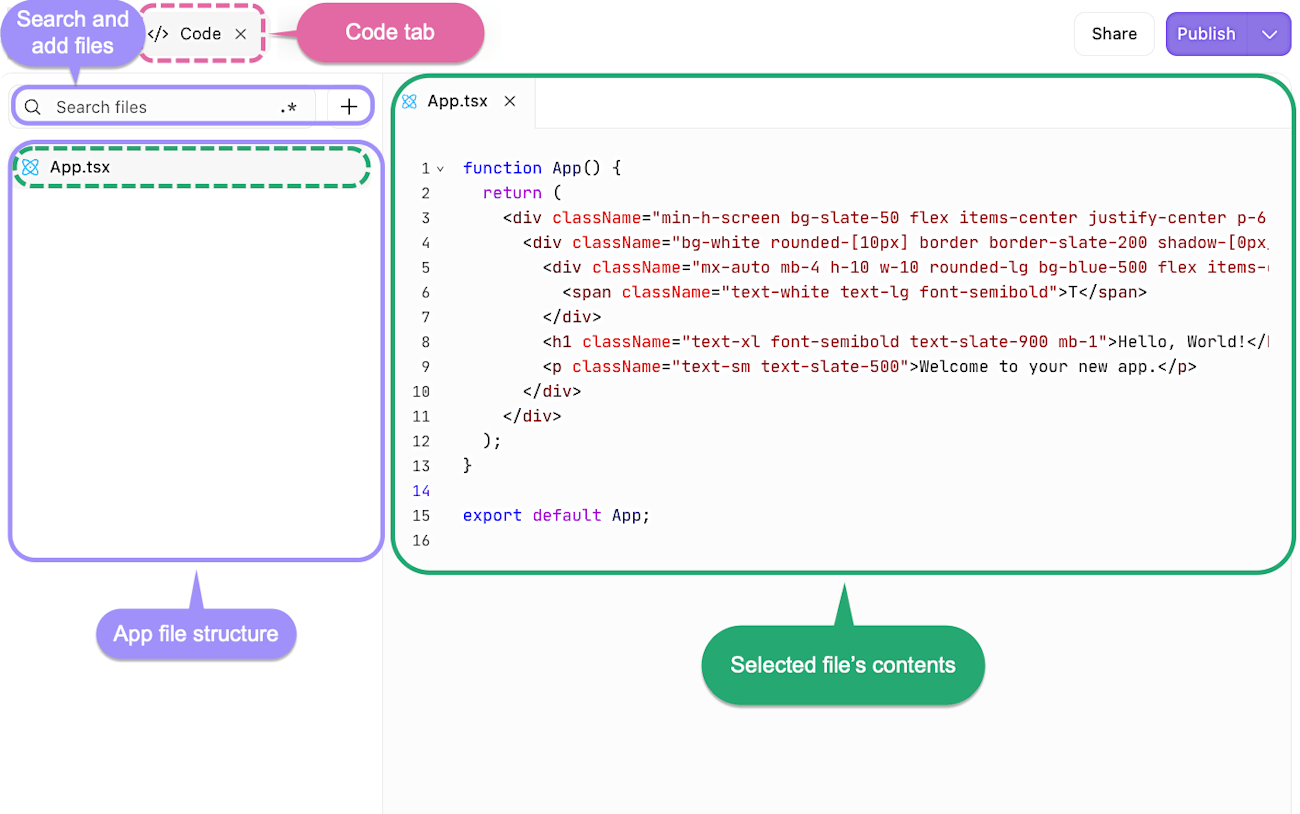
The Code tab, showing the file structure and code editor for an App's React codebase.
💡Note
If you do make manual edits, you'll want to save them. You can save an individual file with cmd + s (or ctrl + s on Windows), or save across all files at once with cmd + option + s (or ctrl + alt + s).
The key thing to remember is that natural language and direct code editing aren't either/or. You can move fluidly between them, prompting Workbench for big changes and tweaking the code yourself for the finer details. Use whichever approach suits the moment.