Publishing isn't the only way to capture your work. You can also save a version at any time, which creates a restore point without making anything live. This is really useful while you're still building: you can capture a known-good state, keep experimenting, and come back to that saved version if a later change doesn't pan out. Saving a version does not affect what your end users see.
Every time you save or publish, Tines Stories adds to your App's version history in the Versions section of the builder. Over time, this builds a complete, ordered record of your App:
Versions are stored in chronological order, so you can see exactly how your App has evolved.
You can rename versions, which is handy for meaningful labels like "Initial launch" or "Added approval step."
You can compare versions side by side to see what changed between them.
You can delete older versions you no longer need.
When you save a version, it becomes visible to and restorable by other editors on your team. Unsaved drafts, as we mentioned earlier, stay private to you. So saving a version is also the moment your work becomes shareable with your teammates.
🪄Tip
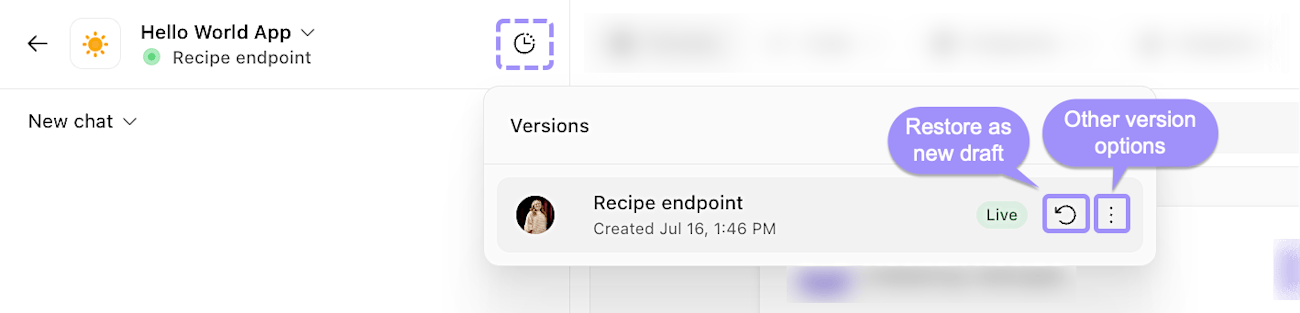
The Versions panel, showing a saved App version with options to restore or manage it.
Restore an App version
If a change doesn't work out, you can restore any previous version to make it the live one. The reassuring part is that restoring doesn't delete your newer versions. Say you publish version three, then realize version two was working better. You can restore version two, and version three stays safely in your history. You haven't lost anything, you've simply chosen which version is live right now.