
Most expenses are small and routine. Finance still ends up chasing missing receipts, checking claims against policy by hand, and holding up reimbursements while managers catch up on approvals.
With Tines 3B, you decide how expenses are checked, which ones a manager needs to see, and where AI helps. Claims that meet your policy move through on their own, and the exceptions reach the right approver with the reason already flagged.
How it works

Expenses come in from your expense system, with receipts matched and the details extracted.



Featured build
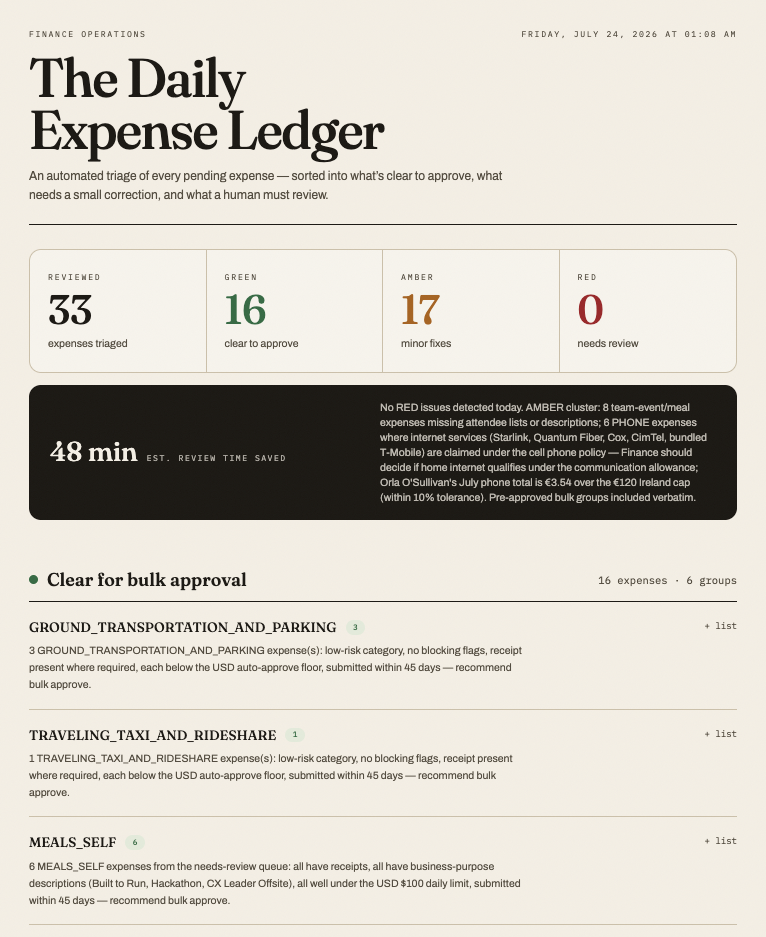
Expense approval automation with Navan and AI triage
This workflow automates daily expense approval for finance teams by pulling pending items from Navan, applying deterministic rules to bulk-approve compliant expenses, and routing ambiguous cases to a Claude AI agent that classifies them as Green/Amber/Red against company policy. Finance reviews only flagged exceptions via a dashboard instead of the entire queue, with all decisions audit-logged and fed back to improve future classifications. The system reduces manual review time while strengthening compliance oversight and accelerating employee reimbursements.



Related use cases
 Accounts receivableInvoices, receipts, and follow-ups, with overdue accounts chased on your terms.
 Vendor onboarding and accounts payableVendor setup, process invoices, review exceptions, and prepare payments.
 ProcurementPurchase requests, approvals, and purchase orders, with spend checked against budget before anyone commits.
 FP&AForecasts, drivers, and scenarios, with inputs pulled straight from the source.
 Finance helpdeskQuestions, requests, and status updates, with common answers handled automatically.
 Finance command centerWork, risks, and results across the team, with one view of where things stand.