AI credit limit alerts
Introduction
Within the AI credit limit alerts tenant owners can configure when and where notifications are sent when their tenant or teams are approaching monthly credit limits.
Tenant wide AI credit threshold: Notifications are sent at the selected percentage of total monthly credits reached
Unallocated AI credit threshold: Notifications are sent at the selected percentage of unallocated monthly credits reached
Team AI credit thresholds: Notifications are sent at the selected percentage of each team's monthly credit allocation reached
Workbench for Storyboard team AI credit thresholds: Notifications are sent at the selected percentage of each team's monthly credit limit reached
Configuring Tenant and Unallocated Alert Thresholds
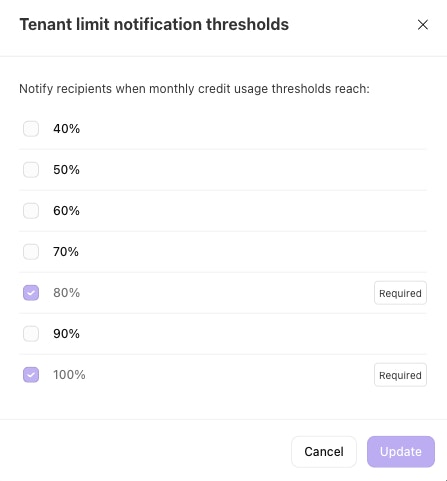
Click on the gear icon next to the Tenant wide AI credit threshold alerts or Unallocated AI credit threshold alerts.
Select the AI credit usage percentages at which you would like to receive notifications.
Configuring Team Alert Thresholds
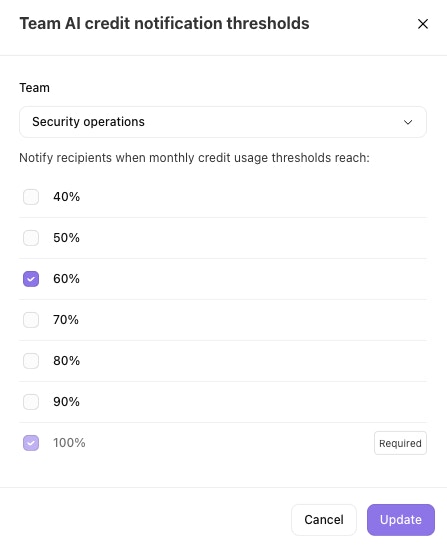
Click on the gear icon next to the Team AI credit threshold alerts.
Select a team from the dropdown.
Select the AI credit usage percentages at which you would like to receive notifications.
Configuring Subscribers
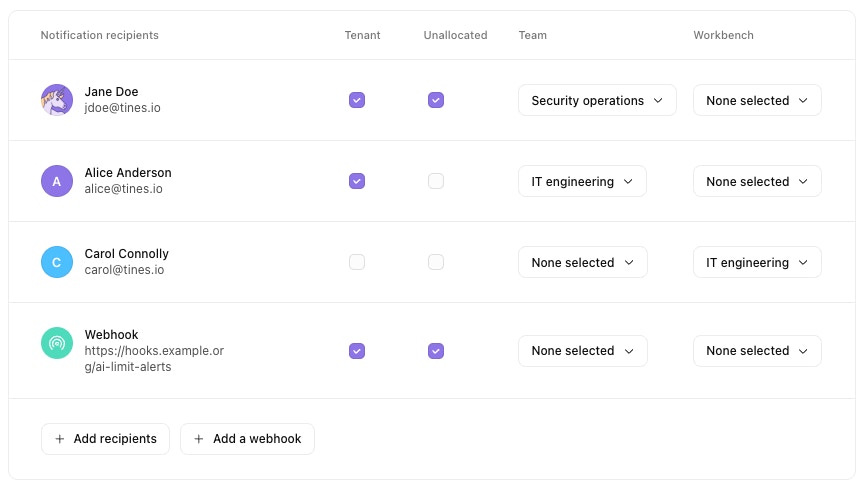
Click Add recipients or Add a webhook to add a new user or webhook recipient for notifications.
After adding a new user or webhook you can make updates to which types of notifications that user or webhook should receive. You can choose whether or not they should receive notifications for tenant and unallocated AI credit limits, as well as which teams they should receive notifications for.
Default Alerts
If you haven't chosen to customize your AI credit alerts, the default alert rules will apply:
All thresholds are set to 80% and 100%
All tenant admins are notified for tenant and unallocated AI credit limits, all team allocations and all Workbench for Storyboard limits (including personal teams)
All team admins are notified for their teams AI credit limits reached (including personal)
Only email notifications are sent
Customized Alerts
With custom alerts in place, any new tenant or team admins will not get automatically subscribed to any of the AI credit limits (except personal teams). Personal team members will get automatically subscribed to their own personal team limits. Custom alerts will also send in-app notifications to users, apart from email.