Security incident management is critical for organizations. It frames the overall effectiveness of an organization's cybersecurity program and acts as the final catch-all for an organization's security incident response. When security incident management fails, the impacts for organizations can be catastrophic.
However, security incident management is complex. It requires the coordination of multiple stakeholders, including the organization's security operations center (SOC), and specialized inputs that depend on the incident type. Each input operates under immense time pressure, with human and automated decisions needing to be made in seconds and minutes rather than hours and days.
This article outlines the best practices to bring structure, consistency, and automation to security incident management. Each best practice is targeted at experienced cybersecurity professionals and includes practical how-to guides that will assist them in building effective security incident management programs.
Establish a deterministic incident response plan
Effective security incident management begins with a well-structured, deterministic incident response plan (IRP). This plan defines the specific actions, roles, timing, tooling, and automation triggers that analysts and frameworks use to respond to incidents. When done effectively, organizations are assured of repeatable, time-bound responses, minimizing the risk from delays and inconsistent triage steps.
However, the reality for many organizations is different—response plans often border on one of two extremes. Either they are so detailed that it is almost impossible for analysts to figure out where to start and end their involvement, or they are so vague and open to interpretation that wildly divergent response outcomes become acceptable.
For instance, imagine that an organization has three simultaneous events occur. One is a suspected data exfiltration from a production server. A second is a correlated alert for potential lateral movement from a laptop deeper into the organization. Finally, the third is an alert that is triggered for a potentially unauthorized login from an unknown location.
Each of these potential events is important. Each should be treated as an incident and have the appropriate resources assigned. However, in a resource-constrained environment, each event does not have the same urgency. Defining the relative importance of each event and how it should be handled is the job of the incident response plan.
Without an effective definition for these events, the organization’s security incident management would fall apart. If the IRP is too convoluted and wordy, analysts will get lost in the details, taking so long to figure out what the “right” answer is that the event will be over and the impact will occur. If the IRP is too vague, events that are important-but-not-urgent will be prioritized over events that are important-and-urgent.
The rest of this section deals with some simple ways you can make sure that your events are correctly categorized and then routed to the appropriate people. It assumes that once this happens, an organization will have the right playbooks and processes in place to drive an incident through to completion.
Assign a severity level
Most cybersecurity professionals know the following generic risk calculation from risk management frameworks such as ISO/IEC 27005:
Severity = Impact × Likelihood
They are also comfortable using predefined metrics to calculate severity levels and required response times. However, several nuances need to be considered when assigning a severity level. Clarifying these levels and explicitly defining them enables security incidents and events to be correctly classified.
For instance, in the example described earlier, an organization is presented with three simultaneous events. Even though each of these events is important, analysts on the ground need to know how to prioritize them effectively. Some of their considerations could include:
Production vs. development: Assets in production are generally more sensitive than those in a development environment.
Number of impacted assets: Sometimes, the sheer quantity of impacted assets increases the severity all by itself. For instance, even a small disruption that targets all of your users can quickly increase the severity level.
Asset sensitivity: If an impacted asset is critical to your business operations, this will typically increase its severity level.
Sensitive data exposure: The exposure (or potential exposure) of sensitive data increases the severity level.
User account sensitivity: The relative privilege level of an account impacts severity. For instance, a highly privileged account should be prioritized above a low-privileged account.
Correlated alerts: Multiple alerts correlated together can increase the severity of what would normally be considered a low-level alert.
The IRP should specify exactly how each of these aspects should be calculated, based on each organization’s unique blend of risk tolerance, regulatory requirements, and business priorities. This brings consistency and faster decision-making to security incident management.
To implement this, create a clear prioritization matrix that allows your analysts and leadership to rapidly determine the relative severity of each incident. A very simplified example purely to demonstrate this concept is shown in the table below; most organizations would have a more complex table, with clearer definitions and calculations.
Map severity levels to information security roles
Once an alert has been effectively categorized, the next step in security incident management is assigning the right information security roles. Doing this effectively ensures that security incidents have the appropriate skill and leadership levels assigned, supported by clear metrics and expectations.
For instance, building on the contrived example introduced earlier, the next step for analysts would be to assign the incident to the right person. This should be clearly outlined in the IRP as shown below.
Automate triage and enrichment
The first 15 minutes after an alert surfaces are critical. This short window often determines whether a threat is quickly neutralized or allowed to escalate. However, the average SOC receives thousands of alerts per day. Left to their own devices, many of these alerts will be low value or not actionable, yet they still consume the cognitive and mental resources of the analysts processing them. In turn, this impacts security incident management.
A security capability that is overwhelmed with pointless or benign alerts is unable to effectively process real incidents that could have catastrophic impacts on the organization. When this happens, hasty decisions are made by exhausted analysts, who then have to clean up the mess that has been made.
Workflow orchestration and automation in triage and enrichment helps solve parts of this challenge. When done correctly, it shrinks response times and enriches alerts with decision-ready data, including user identity information, asset metadata, and threat intelligence.
To see this in action, consider a phishing alert involving a suspicious domain received by multiple employees. Traditionally, the analyst would manually verify the domain reputation, investigate user click behavior, and pull prior incident history. Each of these steps delays investigation and opens gaps in consistency.
A better approach is illustrated in this phishing triage and enrichment story. In this workflow, the system automates enrichment using:
VirusTotal for domain reputation and threat lookup
URLHaus for malware campaign associations
URLScan for webpage screenshots and redirect chains
All steps run concurrently. Once data is gathered, the alert is enriched, classified, and routed—without analyst intervention. This automation can reduce initial triage time to under a minute in tested environments, making allowances for infrastructure and API quotas.
Follow the three steps described below to start implementing automated triage and enrichment in your security incident management program.
Identify areas for workflow orchestration and automation
Not every workflow can or should be automated—there are some workflows that should always involve humans in the loop. On the other hand, there are some workflows that can be easily automated with minimal impact.
Start by identifying the areas that could benefit from workflow orchestration and automation. Focus on areas that are relatively linear in their application, with clear benefits to your security incident management process.
For instance, the workflow identified earlier is a very linear workflow that solves a real pain point for analysts. Implementing this workflow immediately helps analysts with their jobs because they no longer have to navigate to each platform and do this work themselves. Even better, the leadership of your security incident management process now has assurance that phishing domains have been searched using the tools identified; they don’t have to rely on their analysts to do so.
Create a test environment
Next, create a test environment where workflow orchestration and automation stories can be tested. This can be as simple as tagging workflow alerts with a “testing” tag or as complex as creating a parallel IRP environment where non-workflow alerts can be compared with workflow alerts.
Regardless of how you approach it, your goal is to test your workflow orchestration and automation outcomes before taking them live. This helps build confidence in the product while also helping to build the skill levels of your workflow experts.
Regularly review your progress
As you and your team build confidence in automating your triage and enrichment outcomes, take time to regularly review your progress. Set yourself milestones for implementing further triage and enrichment automation, and make sure to check in on the progress of your teams. This will help build depth into your workflow orchestration program and ensure that your security incident management program continues to benefit.
Prebuild contextual intelligence
Analysts who receive alerts without surrounding signals must dig through tools, recreate timelines, and guess intent, each of which delays triage and erodes consistency. Prebuilt context gives responders the whole picture at the moment of decision.
When these signals are embedded into alerts or case records, analysts can immediately understand what happened, who's affected, and what matters most. This reduces reliance on tribal knowledge, shortens investigation time, and increases confidence in escalation and dismissal.
Examples of practical contextual intelligence include:
Process trees from EDR/XDR tools
IP reputation and geolocation
IAM roles and user privileges
Asset criticality and CMDB ownership
Historical alert patterns and incident history
Indicators of attack (IOAs)
For example, a phishing alert enriched with user privilege, device history, and IAM role becomes far easier to triage. Likewise, EDR detections tied to process lineage and IP behavior shift from noisy to meaningful. Context doesn't just improve speed—it enables better judgment.
While automation helps collect these signals, the value lies in having the proper context at the right time, not just faster enrichment. Teams should focus on building context modules that serve the analyst, not just the system.
Prebuilt contextual intelligence vs. alert enrichment
Although prebuilt contextual intelligence and alert enrichment are often used interchangeably, there are several differences that should be considered.
Alert enrichment focuses on adding contextual information to a specific event. For instance, if an IP address is identified in an alert, alert enrichment might include information such as when the IP address was last seen in the environment and how frequently.
In contrast, prebuilt contextual intelligence provides more information about the context in which that event occurred. It expands the context of that alert to include other things that were happening at that time. For instance, an endpoint detection and response (EDR) alert might have contextual information about the process tree on the endpoint at the time the alert was fired as well as the IAM roles and user privileges for logged on users of the endpoint.
Centralize case mapping
A single alert or analyst rarely resolves an incident. Effective resolution depends on maintaining context across the investigation's lifecycle, from detection to containment to closure. Centralized case management enables this by unifying all relevant information: alert metadata, IOCs, user and asset context, timeline events, analyst actions, and containment outcomes.
A modern case management system should not be a passive ticketing tool. It must integrate directly into detection and response workflows, supporting real-time updates and collaboration. During active investigations, analysts should be able to tag artifacts, track containment status, assign follow-ups, and document findings within a unified interface.
Without centralized case management, response becomes fragmented. Analysts waste time hunting context, duplicating effort, or missing signals. With automation and integration, case records drive investigation continuity, knowledge transfer, and operational improvement.
Platforms like Tines Cases exemplify this approach. When an alert triggers a workflow, it can automatically create a case, populate it with enrichment data, and update it throughout the investigation. Timeline events, IOC tags, linked alerts, and analyst actions are all searchable, structured, and visible across teams. This ensures continuity during handoffs and enables post-incident review without gaps.
The following table summarizes key mapping features.
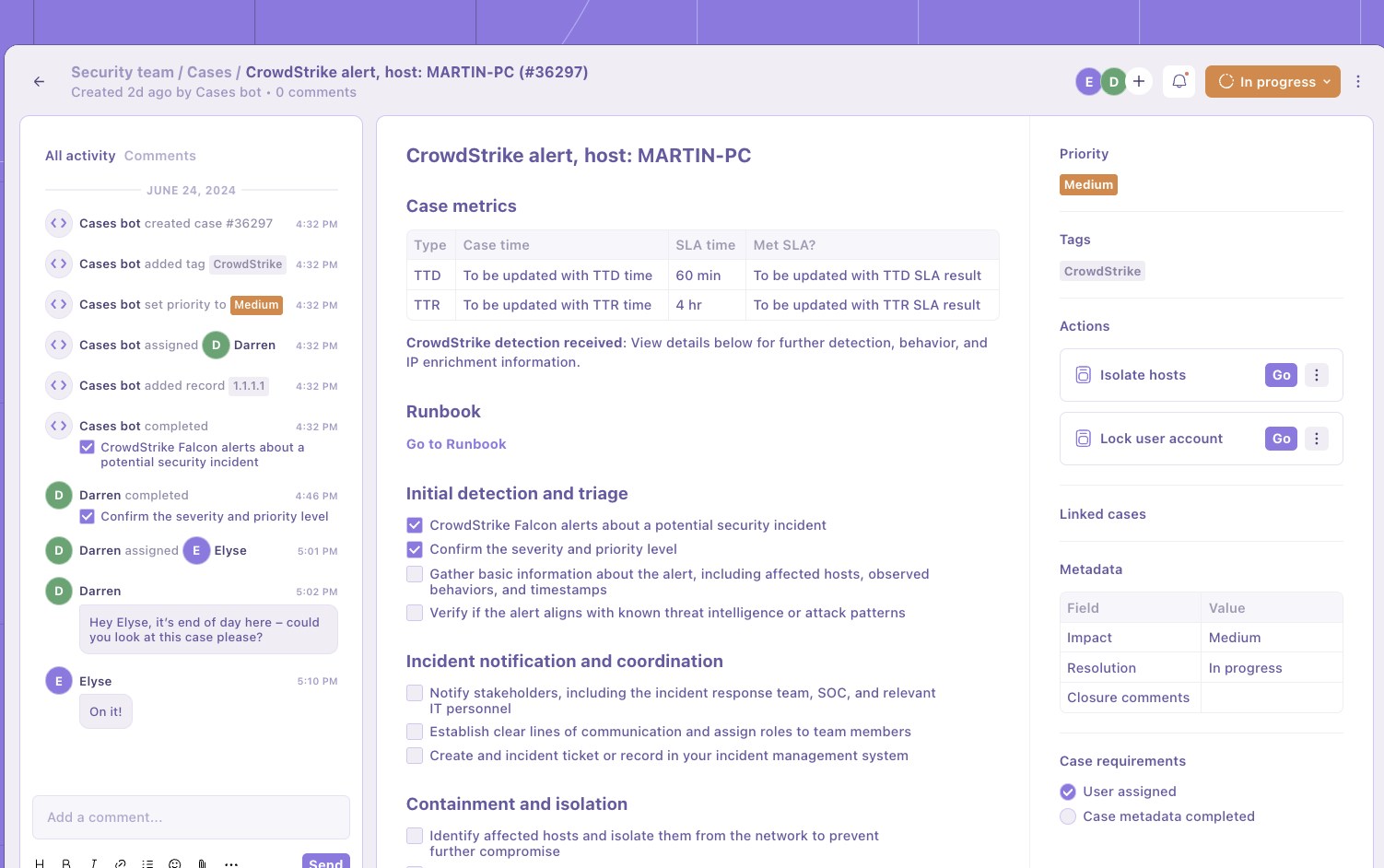
Example of Tines Cases (source)
Capture post-incident feedback
Every resolved incident should improve future detection accuracy and response effectiveness. This can only happen if post-incident actions are clear, consistent, and directly integrated into the feedback loop. High-severity incidents, in particular, require detailed root cause analysis (RCA), clear remediation actions, and learnings that influence detection logic and playbook design.
An effective RCA document should contain a summary of what occurred—attack vector, asset, timeline, etc.—what was detected and when, the gaps in detection or response, the containment actions taken, and the recommendations for prevention and future mitigation.
The table below outlines the minimum information that an RCA should include.
Note that modern platforms can auto-generate draft RCA documents using structured case metadata. Language models can help summarize timelines, correlate threat intelligence, and highlight improvement areas based on historical incident patterns. This significantly reduces analyst workload while ensuring documentation quality.
Closed cases should feed back into detection tuning, playbook enrichment, creating a post-incident report (PIR), and threat modeling. These inputs define how future threats are detected and handled, ensuring that each incident contributes to stronger, more resilient workflows. Without them, every response remains tactical and reactive; with them, the incident response process becomes self-optimizing.
Summary
Security incident management is the foundation of security operations. It is the final separation between an organization existing in a state of uncontrolled chaos when things go wrong or working through complex, time-sensitive issues in a controlled manner.
However, implementing good security incident management is not simple or easy. It requires a structured approach that includes guidance on how to handle security incidents, set analysts and teams up for success, and manage multiple events simultaneously.
The best practices in this article show you how to get security incident management right. By following them, you’ll set up a framework that will allow your organization to work through the most complex of scenarios in a clear, repeatable manner.