Security teams are facing increasingly complex cyber environments, making integrating automation into incident response essential. However, effective automation isn’t just about speed; it’s about precision, context, and designing workflows that stay reliable under pressure.
This article outlines best practices for implementing incident response automation. It’s written for security engineers and practitioners seeking to operationalize automation without compromising control, visibility, or forensic integrity. The recommendations focus on real-world examples and workflows that reduce noise, limit risk, and give teams more time to focus on what really matters.
Summary of key best practices for incident response automation
Automated incident response: What is it and why is it necessary?
Automated incident response (IR) allows systems to take immediate action when a threat is detected without waiting for a human to intervene. These actions can include actions like host isolation, account deactivation, or collecting evidence the moment something seems suspicious. The goal is to respond faster and more consistently, using structured logic that doesn’t rely on an analyst being available at exactly the right moment.
This overall approach has become essential because manual response simply doesn’t scale. As threat volumes grow and attackers move faster, security teams get flooded with alerts, many of which require investigation, triage, or action. It’s unrealistic to expect human analysts to keep up with that volume without assistance. Automation helps reduce alert fatigue and ensures that common threats are dealt with quickly, allowing teams to focus on the incidents that truly require human judgment.
However, the benefits of automation go beyond speed. It brings consistency to the response process, ensuring that key steps aren’t missed and decisions aren’t left to chance. When workflows are codified and repeatable, responses happen the same way every time. In modern environments where infrastructure changes frequently and threats move fast, that kind of reliability is critical to maintaining control.
Integrate workflow orchestration and automation
One of the fastest ways to improve incident response is to connect your detection systems directly to a central orchestration platform. This approach replaces manual steps and one-off scripts with structured workflows that are easier to manage, repeat, and scale.
When alerts feed straight into automated workflows, security teams can respond faster without having to jump between tools. The orchestration workflows take care of decision-making and keep track of what actions were taken and why. This makes the process more consistent and removes a lot of the uncertainty from alert handling.
Over time, using a central engine also helps with auditing and testing. It makes it much simpler to review how decisions were made, track outcomes, and adjust workflows without rewriting everything from scratch. When implemented effectively, it can also minimize false positives, since rules and logic are standardized in one place. In addition, it becomes easier to introduce approval steps or reporting without slowing down the core response.
Example: Automated response to high-severity login attempt failures
An organization connected its SIEM directly to an orchestration platform. When a privileged account experiences repeated failed login attempts, an alert is pushed to a webhook. The orchestrator evaluates the event and launches a workflow:
on_alert:
  if: alert_type == "auth_failure" and severity == "high"
  then:
    - fetch_user_context: lookup_user_directory(username)
    - block_ip: call_firewall_api(ip_address)
    - notify_team: post_to_chat("High-fail login attempt blocked for {{username}}")
This flow avoids manual escalation and eliminates the need for custom glue code between the SIEM, identity provider, and firewall. Analysts stay in the loop via their organization’s chat platform but don’t need to copy-paste IPs or correlate logs manually.
Alternatively, a workflow example that monitors Okta for invalid sign-in results is below:


Codify decision logic with context-aware triggers
Automation works best when it’s guided by more than just raw alerts; while these can sometimes be useful, they often lack the context needed to make informed decisions. Triggering response actions without enrichment can lead to false positives and unnecessary disruption.
This is why effective incident response automation starts by codifying decision logic that mimics how analysts would think. Instead of just acting immediately on an alert, orchestration systems can pull additional data to help make better-informed decisions.
Each decision works as a kind of function where inputs, including an alert and the relevant context, determine a consistent, reliable output. When that logic is clearly defined, the response becomes more predictable, accurate, and easier to explain.
Example: Handling a suspicious file alert
An organization’s SIEM flags that a sensitive document was accessed from an unusual geographic location. Rather than immediately disabling the user account, the workflow first enriches the alert with contextual data:
Is this IP part of a known VPN or travel pattern?
Is the device trusted?
Has this user triggered similar alerts before?
The system decides how to respond only after gathering this context. If the login looks suspicious, it might trigger a step-up authentication or notify an analyst. If the activity is explainable (like a legitimate login from a corporate VPN), the alert is logged without action.
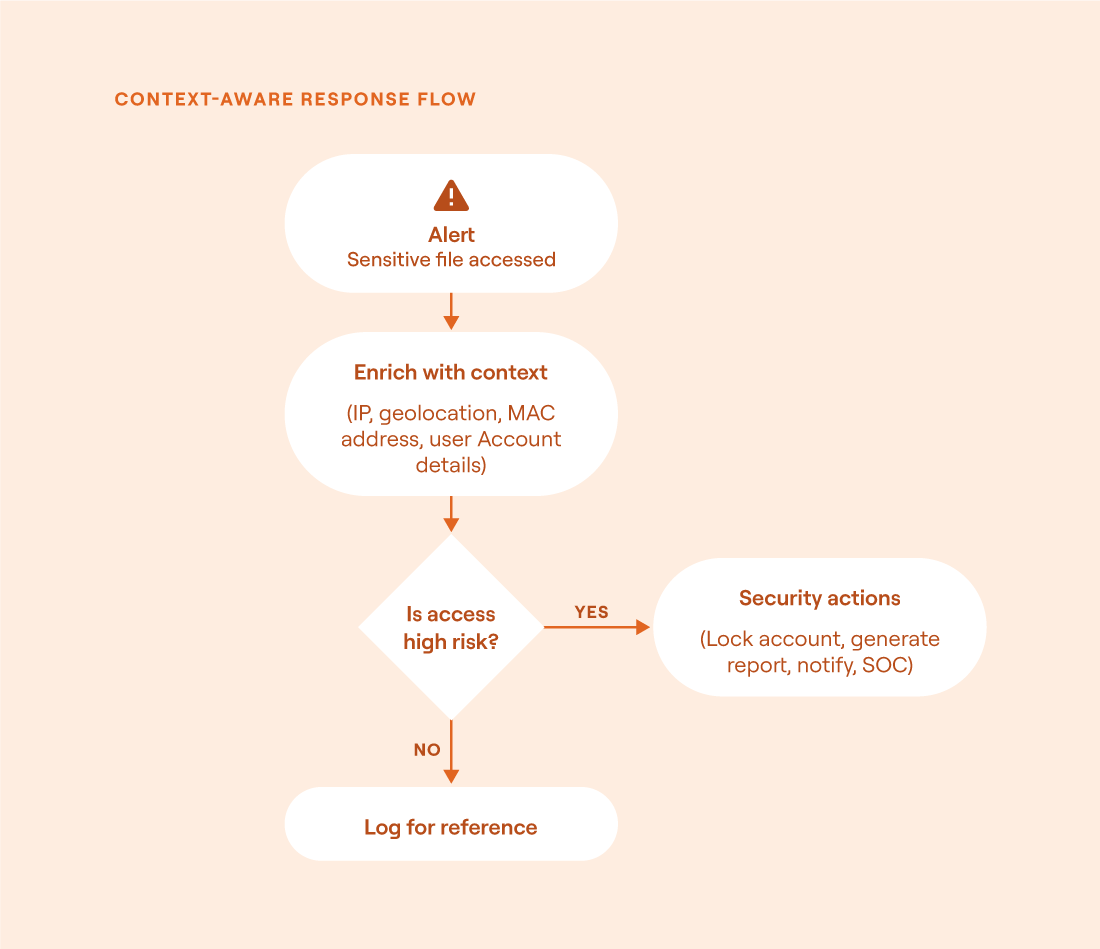
Decision flow for context-aware response: Enrichment helps determine whether an alert warrants action or can be safely logged without disruption (source)
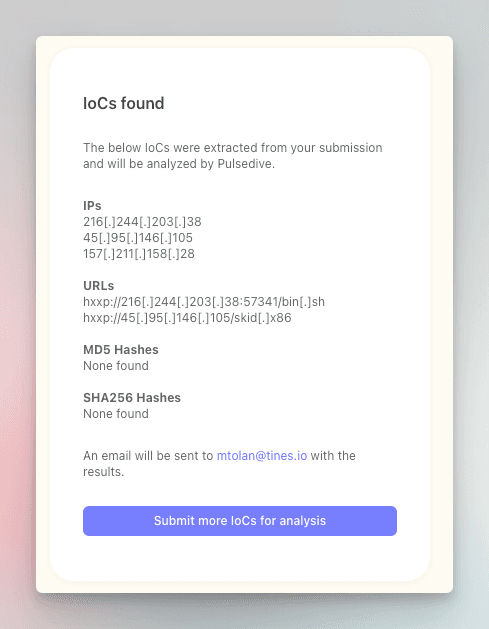
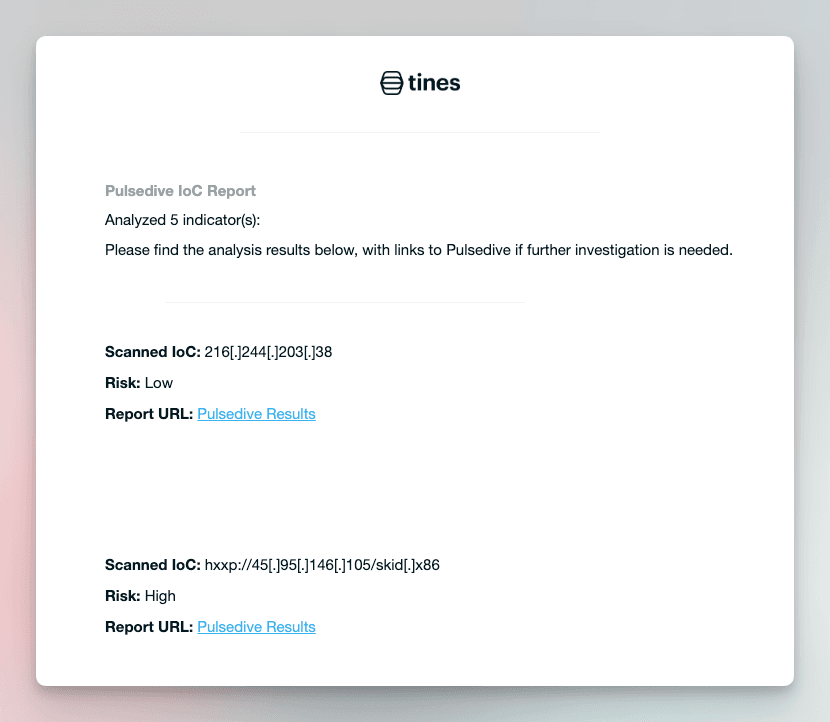
To see this in action, check out the workflow below:


Use tiered automation based on alert criticality
Not every alert deserves the same level of automation and response. Some incidents are clear-cut and safe to handle automatically, while others require follow-on layers of validation or human judgment. The most effective IR programs apply automation selectively by using severity and confidence to decide how far a system should go on its own.
For high-confidence, low-risk alerts (i.e., a verified malware hash seen on a non-critical test node), full automation may be appropriate. The system can contain the threat, log the event, and notify the security team all without human involvement. Conversely, for alerts that are more ambiguous or higher in severity, it’s often better to automate the initial steps, like enrichment and correlation, while leaving the follow-on actions to the analyst for subject-matter expert review.
Manual review should be reserved for cases where stakes are highest or data is unclear. This might include scenarios like potential insider threats, widespread lateral movement, or advanced attacks targeting critical infrastructure or unusual requests for highly sensitive data.
Tiered automation overview
The table below summarizes how IR can be structured using a tiered automation model. Each tier reflects a different balance between automation and human involvement based on the severity and confidence of an alert.
Popular Response Model References:
NIST SP 800-61 Rev. 3: Defines phases and recommended actions throughout the incident response lifecycle based on impact
FIRST CSIRT Framework: Provides guidance on how to categorize, prioritize, and escalate incidents across functional teams
MITRE ATT&CK Playbook Guidance: Aligns response playbooks with specific adversary behaviors and techniques to guide containment and investigation
CERT-RMM: Provides a structured framework for improving an organization’s operational resilience
Include humans-in-the-loop for all playbooks
Automation should act quickly and confidently but never without guardrails. When an automated response goes wrong, it can rapidly cascade across multiple systems, creating more disruption than the original threat. That’s why every response playbook should include built-in safety checks and clear stop conditions.
One common risk is scope creep, which occurs when a misfired detection or misclassified alert accidentally triggers an event, like isolation/blocking, across several machines. Without boundaries, that action could unintentionally disable critical infrastructure or flood the SOC queue with false positives. To prevent this, workflows need checks that can recognize when something is off. For example, in the Tines workflow below that limits automation based on request volume, the playbook implements rate-limiting logic as a protective measure, ensuring that the system doesn’t overreact to a single triggering event.


Playbooks should also include fallback paths. When a condition is outside expected bounds or context is missing, automation should pause, notify a human, or escalate to a manual review. It’s always better to slow down than to take action blindly.
Example: Built-in safeguards in a lateral movement response
A detection system flags a known lateral movement technique, like the use of non-local wmic or PsExec, spreading from one host to several others. The response workflow includes these checks:
on_alert:
  if: severity == "high"
  then:
    - check_scope:
        if: affected_hosts > 10
        then:
          - halt_workflow("Scope too broad, escalation required")
    - check_rate:
        if: executions_last_hour > 25
        then:
          - pause_workflow("Rate exceeded, review before continuing")
    - action:
        - isolate_host(endpoint_id)
        - notify_team(endpoint_id, "Host isolated for high-severity threat")
If the activity seems limited and well-defined, the system isolates the host and notifies the team. If it exceeds normal parameters, the workflow halts automatically, prompting human review.
Ensure your workflow orchestration and automation platform is secure
While automation speeds up IR, it also expands the attack surface. If an attacker can spoof inputs, abuse workflows, or trigger unintended actions, automation tools can quickly become liabilities. That is why automation environments should be secured in the same way as other critical systems.
Consider a scenario where an orchestrator is configured to automatically disable user accounts when it receives high-severity alerts from a cloud-based SIEM. A red team simulates an attacker with access to that SIEM’s alert API and submits a forged alert targeting a high-privilege user. Without proper validation, the system accepts the alert and disables the account. That one small blind spot in the workflow now becomes a high-impact vulnerability, leading to a loss of availability.
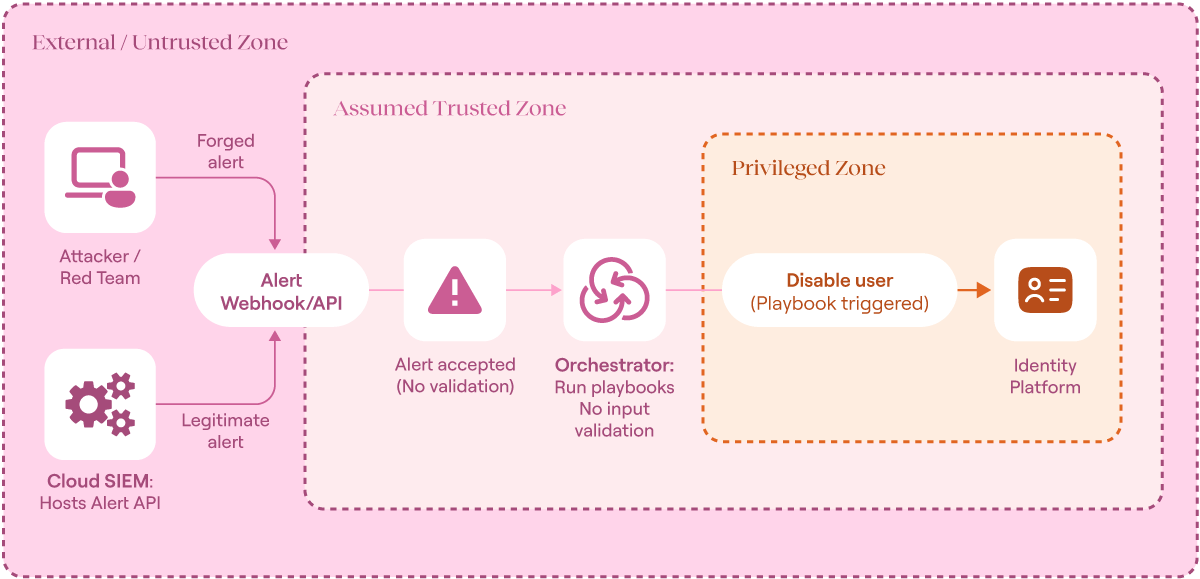
Trust boundary breakdown for red-teaming scenario (source)
To avoid this scenario, make sure your workflow orchestration and automation tooling meets or exceeds the same standards as the rest of your environment. At a minimum, this should include things like SOC2 certification, full audit log capabilities, and integrated identity management.
Then, validate all of the inputs and outputs for your chosen platform. Make sure that you are only passing in validated inputs, and that humans are included in the loop to prevent any unintended actions.
Preserve raw evidence and execution context for postmortem
Automated response should never come at the cost of losing critical evidence. Once a host is isolated or a service is blocked, it’s easy to forget that the most essential forensic data may have already been overwritten. Preserving raw inputs (logs, session history, memory snapshots, etc.) matters just as much as a quick response. Without it, security teams may be at a loss during post-incident reviews.
Workflow orchestration and automation playbooks should collect relevant artifacts before executing any destructive or disruptive actions. For example, an incident response pipeline might capture /var/log/auth.log, shell history, and a machine snapshot before isolating a host. These artifacts should be saved in a central, structured, and unaltered state (like an evidence vault in AWS S3) along with metadata that ties the files to the triggering alert.
Beyond incident reconstruction, evidence preservation is also tied to compliance. Many industries must follow strict retention and audit requirements that dictate how long logs and system artifacts must be stored. Regulations such as HIPAA, SOX, PCI DSS, and NERC all specify retention times and the integrity of stored records. This means automation pipelines cannot simply prioritize speed; they must ensure that evidence is captured, protected, and retained in ways that meet regulatory expectations as well as investigative needs.
For instance, the workflow below can be used to interact with an isolated endpoint from an Endpoint Detection and Response (EDR) tool. From here, another workflow could be orchestrated to extract any information you may need:


This type of logging supports incident reviews and builds confidence in the automation itself. Knowing that evidence is always safely captured allows security teams to move faster without second-guessing every action.
Final thoughts
Automation is a powerful force multiplier in incident response. The most resilient SOC teams treat automation as a tool that requires thoughtful design, rigorous safeguards, and continuous testing. Rather than blindly automating every task, automating with purpose enables context preservation, oversight, and proportionate response to risk.
Key takeaways:
Integrate orchestration early to reduce manual handoffs and improve workflow consistency.
Base triggers on enriched context rather than raw alerts to avoid poor decisions.
Tier response levels based on risk and certainty so that only appropriate actions are automated.
Add humans to the loop to stop automation from misfiring at scale.
Preserve raw evidence and execution logs before response to support follow-on investigations.