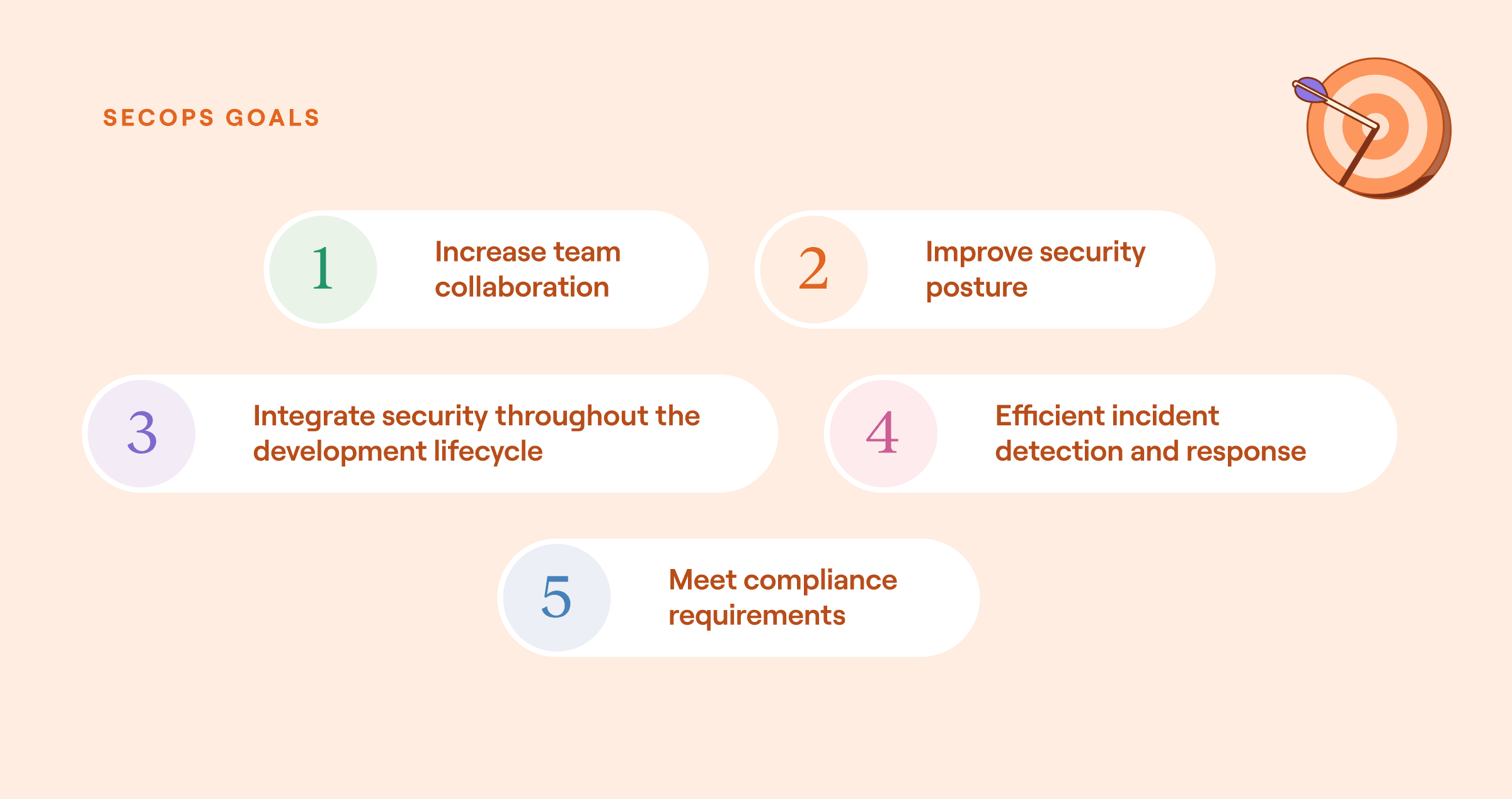
76% of security professionals report burnout, and 66% of security teams say they can't keep pace with alert volume, in the Voice of Security 2026 report. The global cybersecurity workforce gap also remains severe, according to the ISC2 workforce study.
Security teams have the skill, but the volume of manual work has outgrown what humans can sustain.
Most teams respond to this pressure by adding tools. Many teams now manage dozens of security products, each generating its own alerts, dashboards, and data formats. Adding another point product to a stack that already overwhelms the team compounds the problem.
Manual work between detection and response creates the bottleneck: adding context to alerts, correlating events across tools, routing tickets, documenting findings, and executing containment actions across disconnected systems.
Security automation is part of a broader shift toward the intelligent workflow platform model. In practice, teams often need governance, the full spectrum of execution, and integration across the stack in one place rather than another isolated product.
What is security automation?
Security automation is the use of technology to perform security tasks with minimal human intervention. Those tasks include data collection, event tracking, threat analysis, incident triage, and active threat response.
In practice, automated systems commonly collect and ingest alerts by pulling signals from security tools and centralizing them for triage, add context to events by layering in asset, identity, and threat intelligence data from multiple sources, and execute remediation actions such as blocking domains, revoking access, deploying patches, or isolating compromised endpoints.
The scope of security automation extends across the full security lifecycle.
Prevention: Automated scans catch vulnerabilities in code before deployment.
Detection: Correlation rules and behavioral analytics surface anomalies across millions of log events.
Response: Predefined playbooks can respond to threats in seconds, rather than the hours or days that manual processes require.
Compliance: Automated evidence collection replaces manual audit preparation.
The most effective implementations pair automated execution for high-volume, repetitive tasks with human judgment at decision points that require context, creativity, or risk assessment.
A phishing response workflow might automatically extract indicators, check them against threat intelligence feeds, and quarantine the message, but route the final determination on user account suspension to an analyst who understands the business context.
How security automation works
Security automation starts with integration. Security events flow from endpoints, firewalls, network devices, identity providers, cloud platforms, and applications into a central system, typically a Security Information and Event Management (SIEM) platform. From there, intelligent workflow platforms and other automation systems ingest those events and apply three core functions.
Orchestration: Coordinates inputs and outputs across multiple tools through API connections. When an Endpoint Detection and Response (EDR) alert fires, orchestration pulls context from the identity provider, queries the threat intelligence platform, checks the asset inventory, and assembles a complete picture of the event without requiring an analyst to open five browser tabs.
Automation: Executes predefined playbooks for repetitive tasks. Phishing triage, alert enrichment, IOC (Indicator of Compromise) lookups, ticket creation, and notification routing all follow predictable patterns that don't require human judgment for every instance.
Response: Issues commands back to security tools by isolating a host in the EDR, blocking an IP at the firewall, disabling a compromised account in the identity provider, or creating a forensic snapshot of a cloud instance before it terminates.
The trigger for any automated workflow can be an event (a new alert from an endpoint tool), a schedule (a poll for new vulnerabilities every two hours), or a manual action (an analyst submits a suspicious URL via a form). The workflow then branches based on conditions: severity level, asset criticality, prior alert history, or threat intelligence confidence scores.
Benefits of security automation
Well-implemented security automation delivers measurable improvements across speed, cost, team capacity, and compliance. The benefits below appear consistently in industry research and customer outcomes, and they compound as teams expand automation beyond initial use cases.
Faster threat detection and response: Speed has the most direct financial impact. The IBM breach report found that organizations with extensive security AI and automation detected and contained breaches faster than those with no such deployments. In prevention workflows specifically, extensive automation deployment also reduced detection and containment times.
Reduced breach costs: The IBM breach report also found that organizations with extensive security AI and automation saved money per breach compared with organizations with no such deployments.
Reduced alert fatigue and analyst burnout: The SANS SOC survey found that many SOC teams cannot keep pace with the volume of alerts they receive. Automation addresses both problems by suppressing known false positives, adding context to true positives before they reach an analyst, and handling low-complexity alerts end-to-end.
Scalability without proportional headcount: The cybersecurity workforce gap remains significant. Automation lets small teams operate at a larger scale.
24/7 continuous monitoring: Automated workflows keep running around the clock. For organizations that can't staff a 24/7 SOC, automation fills the gap by triaging alerts, taking initial containment actions, and queuing cases with added context for analyst review at the start of the next shift. AI agents extend this further by reasoning through alerts in real time, making autonomous triage decisions for lower-risk events, and escalating ambiguous cases to on-call analysts with full context attached, so that overnight coverage doesn't depend solely on predefined rules.
Improved compliance posture: Automation generates audit trails automatically. Every action taken, every decision made, and every data source queried is logged with timestamps and attribution. For organizations managing SOC 2, ISO 27001, HIPAA, PCI DSS, or FedRAMP requirements, automated evidence collection replaces manual audit preparation.
Types of security automation tools
Three categories of tools form the foundation of most security automation programs. In practice, they overlap significantly, and many organizations use automation capabilities embedded within their SIEM, threat intelligence platforms, or XDR rather than deploying a standalone SOAR product.
1. SIEM (Security Information and Event Management)
SIEM platforms aggregate and correlate log data from across the environment: endpoints, network devices, cloud services, identity providers, and applications. They apply correlation rules, generate alerts based on predefined or behavioral thresholds, and provide the searchable log repository that compliance frameworks require. SIEM persists in part because compliance mandates demand log aggregation and correlation.
2. SOAR (Security Orchestration, Automation and Response)
SOAR platforms combine incident response, orchestration and automation, and threat intelligence management capabilities. Where SIEM focuses on detection and log management, SOAR focuses on what happens after an alert fires.
That includes adding context to the alert, executing a response playbook, coordinating actions across multiple tools, and tracking the incident through resolution. SOAR relies on other tools (SIEM, EDR) to detect threats; it orchestrates the response rather than generating the signal.
3. XDR (Extended Detection and Response)
XDR platforms integrate detection and response capabilities natively across endpoints, networks, email, and cloud workloads. Where SOAR coordinates disparate tools through API integrations, XDR builds detection into the platform itself and uses built-in automation to correlate signals and trigger responses.
The tradeoff is ecosystem lock-in. XDR delivers tighter integration within a vendor's product family at the cost of flexibility across a heterogeneous tool stack.
4. Intelligent workflow platforms
A fourth pattern has emerged alongside those categories. Intelligent workflow platforms put governance first, support the full spectrum of execution (rule-based, AI-driven, and human-in-the-loop), and connect systems across the full tool stack through APIs. Teams can build and modify workflows directly in these platforms.
Security teams also use Tines within that model. Through Tines, teams build deterministic workflows for predictable processes, agentic workflows for complex decisions, and human-in-the-loop steps where judgment matters on the same surface. Stories, Tines' term for workflows, appear throughout the examples below. Across its customer base, the average customer connects 68 different tools through the platform.
Security automation use cases across the development lifecycle
Security automation has practical applications across preproduction and production environments. Several of these examples tie back to how teams use Tines in production.
Source code review and dependency management
Security automation lets organizations combine static application security testing (SAST) tools into a source code review and dependency management program. SAST assesses source code for vulnerabilities, application design flaws, and insecure code, and typically includes scanning both native source code and third-party library dependencies.
Teams can integrate code-scanning tools with popular IDEs to provide real-time vulnerability checks as developers write code, and dependency-alerting tools can surface vulnerabilities in packages used in a project's codebase.
Through Tines, teams build Stories that scale code-scanning output across the organization: as vulnerabilities are identified, the Story matches them against predefined thresholds and automatically creates Jira tickets for the responsible team.
The same script-replacement pattern appears in Personio, where the security team replaced fragile Python scripts and a manual alert-review backlog with automated Stories.


Query Snyk & gather a vulnerability report
Query each project within all Synk organizations for critical vulnerabilities. Create a custom report in Jira for each organization, containing only those Snyk projects which meet specific vulnerability severity.
Tools
Beyond SAST, security automation increasingly covers Software Bills of Materials (SBOMs). CISA SBOM guidance frames SBOMs as a security automation integration challenge: as adoption has grown, "the need for machine-processable formats that support scalable implementation and integration into broader cybersecurity practices has grown alongside it."
Active supply chain attack vectors including repository hijacks, poisoned packages, and typosquatting make automated SBOM ingestion and analysis a priority for any team managing third-party dependencies.
CI/CD pipeline security
Security automation increases the security of continuous integration / continuous deployment (CI/CD) pipelines and supports the integration of dynamic application security testing (DAST). Rapid deployment capabilities lose value if securing them requires more resources than previous methods. Automation preserves CI/CD speed while integrating security tooling at each stage.
Specific automatable CI/CD security controls include:
Container configuration: Automated secure container configurations, including EDR agent deployment, log specifications, and container secrets management.
Access control: Role-based access control enforcement throughout pipeline infrastructure with temporary credential creation and teardown.
Secrets and segmentation: Secrets management across pipeline stages and network segmentation during each pipeline phase.
Code and runtime testing: Static code analysis integrated into build steps and DAST against running applications.
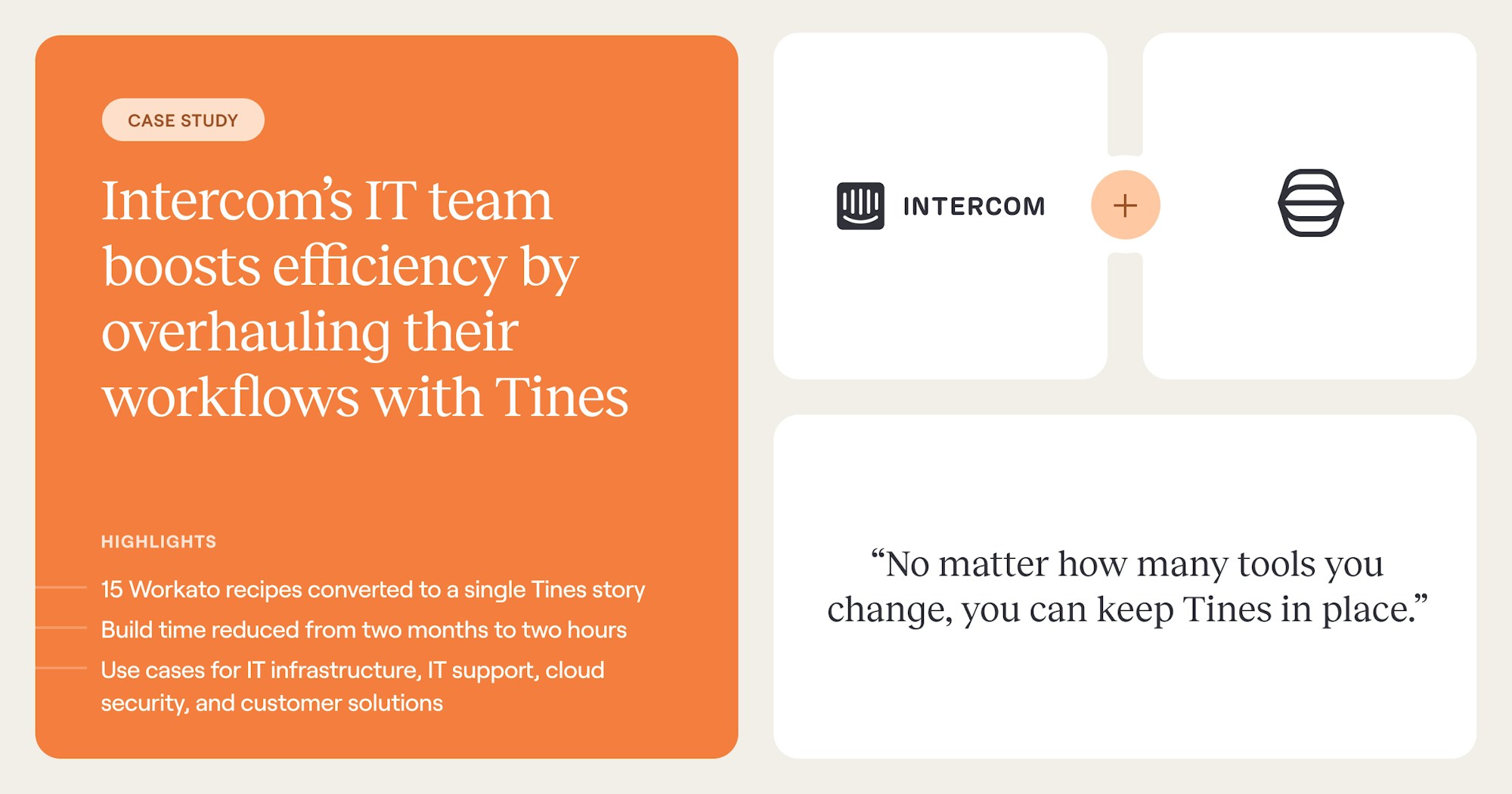
Beyond pure security teams, Intercom reduced build time from two months to two hours and consolidated 15 separate workflows into a single Tines Story, demonstrating how teams can simplify complex, multi-step operational processes on the same platform.
For DAST, tools such as vulnerability management scanners simulate attack sequences against running applications and observe how they respond. Using an intelligent workflow platform, a workflow can launch a scan of a specific web application each time a CI/CD pipeline completes, then automatically generate and route the results report to a decision-maker.
Infrastructure-as-Code (IaC) security adds another layer. As cloud infrastructure is increasingly defined in code (Terraform, CloudFormation, Kubernetes manifests), automated scanning of IaC templates catches misconfigurations, overly permissive IAM policies, and exposed storage buckets before they reach production.
User acceptance testing (UAT)
Security automation allows the integration of script-based UAT tests into code releases, testing applications with complex attack sequences in production-equivalent environments.
Consider an organization that wants to confirm that its production web app is not vulnerable to a remote file inclusion attack. A script passes a "malicious" remote file into all observed include locations and tests the response. If the script executes successfully, a vulnerability has been discovered, developers are notified, and a new release is pushed.
Organizations can use security automation to apply this script to every PHP code release across all projects and develop more complex scripts that cover the MITRE ATT&CK Framework and specific regulatory requirements. That library-and-scale approach matches what Personio achieved when its security team moved from brittle scripts to governed, auditable Stories.
As the library of UAT attacks grows, automation ensures that every code release is tested against all relevant attacks with no further involvement from individuals unless they need to fix a vulnerability they introduced.
Security automation in production operations
Once code ships, the operational side of security takes over, and that's where automation does some of its heaviest lifting. The sections below walk through how teams apply automation to day-to-day production work, from routine monitoring and maintenance to anomaly detection, incident response, root cause analysis, threat intelligence, and threat hunting.
Ongoing monitoring and maintenance
Production security automation usually starts with maintenance and monitoring, because those activities create steady operational load.
Maintenance: Rolling out scheduled updates securely is resource-intensive, especially when the process includes pilot testing, validation, and broader rollout. Through Tines, teams automate this end-to-end: identifying a new macOS update, deploying it to a pilot group, blocking non-pilot users, and triggering organization-wide deployment once testing completes, with Jira handling user tracking.
Monitoring: Initial event triage is achieved by integrating automation into existing SIEM, SOAR, and EDR tooling. Auto-triage suppresses false positives, adds context to real alerts, and takes initial containment actions when thresholds are met. If a managed threat-hunting service flags a device, automation contains it immediately, while a Story opens a Jira ticket and tags relevant SIEM logs for review.
Other practical initial triage activities include gathering network logs when a suspicious IP is detected, checking geolocation data for assets, and confirming threat intelligence alerts against network activity before passing them to investigation teams. Customer results are visible here.
IP Performance reduced alert-triage time by 95%, moving from a combined 20 hours per day to two people spending 30 minutes each, while serving 7+ customers with the same team.
Anomaly detection and event correlation
Integrating security automation into existing SIEM, SOAR, and EDR tools provides opportunities to add cross-tool context to anomaly detection. An intelligent workflow platform is a bridge between different tools, so data outputs from one can be compared with another for a deeper understanding of events.
Consider how the response to a sensitive S3 bucket exposure varies by context. If the only known event is the exposure itself, the incident is straightforward: capture the exposure duration, assess which access occurred, and remediate. But if cross-tool correlation reveals that the user profile responsible was created 24 hours ago with extensive administrator privileges, the investigation immediately escalates.
Questions about the profile's legitimacy arise, executive involvement increases, and the response changes completely.
Automation ensures this contextual enrichment happens for every defined event, every time, without relying on an analyst to remember to check predefined correlation points. The same pattern appears in customer environments such as Personio, where the security team replaced fragile Python scripts and a manual alert-review backlog with automated Stories.
Incident response
Each stage of the incident response lifecycle benefits from security automation.
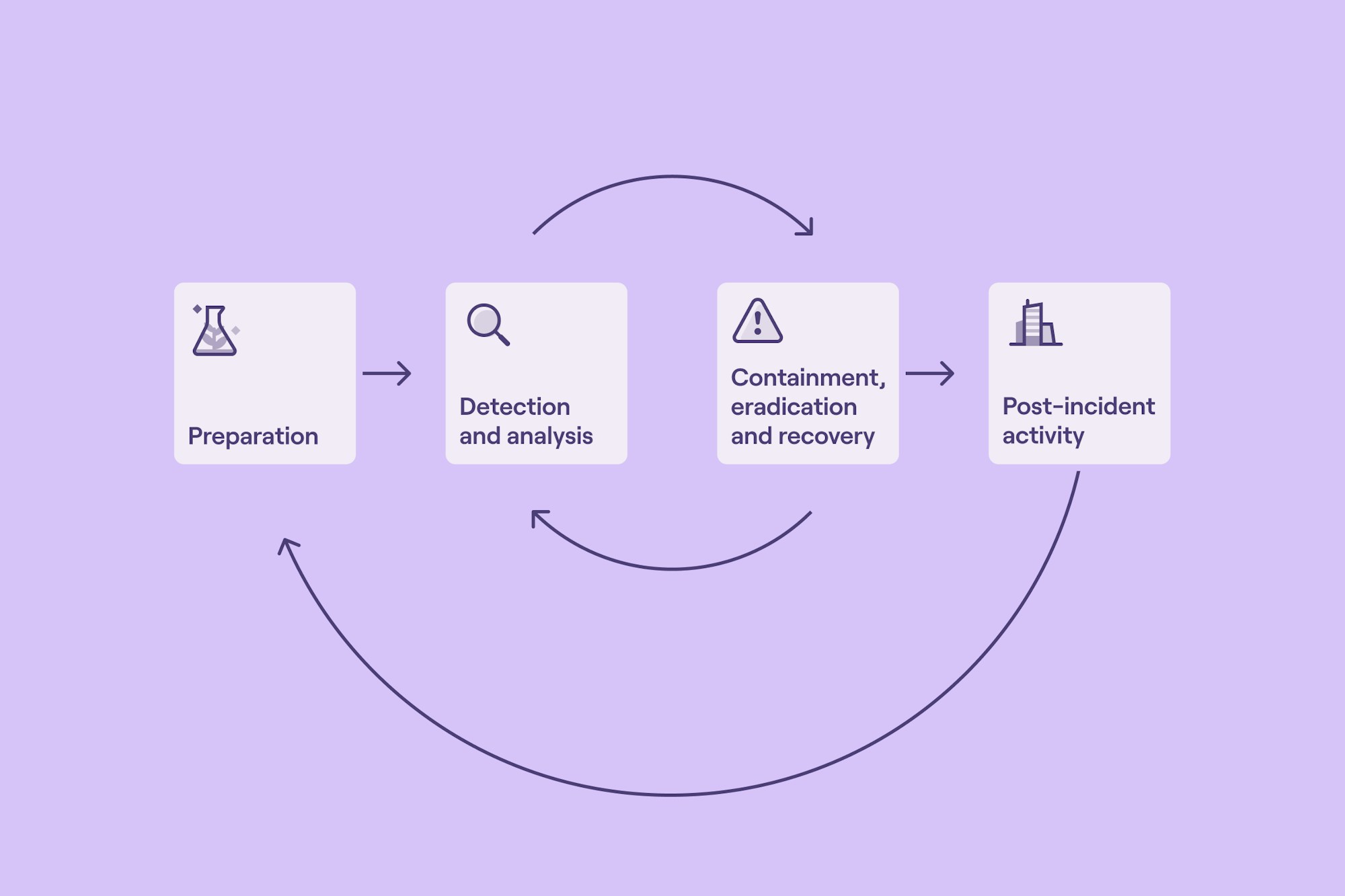
Preparation: CSIRTs often respond to an incident only to find that critical logs weren't captured or that ephemeral cloud resources no longer exist. Automation solves this by letting teams predefine the required tools and logs, then triggering EDR telemetry, container memory dumps, preloaded forensic images and SIEM log routing on demand. Teams also use Tines to spin up an always-available digital forensic environment, with AWS as the only infrastructure requirement.
Detection and analysis: Beyond anomaly detection, automation supports deeper analysis such as extracting and formatting log files or performing static analysis on a potentially unwanted program (PUP). Through Tines, an analyst can queue a memory dump and receive an email when it's complete, instead of waiting for a user to log on and running it manually.
Containment and eradication: Automation scales containment across large environments and time-sensitive events, executing complex actions simultaneously across multiple assets. Common examples include blocking IOCs, removing users from multiple systems, killing malicious processes across many hosts simultaneously, and rerouting network traffic.
Post-incident activity: Automation integrates with ticketing systems to capture and store logs, artifacts, and other contributing information without manual retrieval, freeing CSIRTs to focus on analysis and recommendations rather than data collection.
Incident response rarely fails on a single action. It fails on handoffs, missing context, and slow execution across disconnected systems.
Root cause analysis (RCA)
Incorporating automation into the RCA process lets participants focus on capturing their observations while automation handles data collection. Given specific event information, automation can map events to a causal account, asset, or process, then continue capturing and storing logs, network traces, memory images, and disk images as needed.


Gather & add correlated searches in Splunk Enterprise Security to Drata
Search the notable index to gather correlated searches that have triggered in Splunk Enterprise Security. Gather the results of the search and add them as evidence to the logging security controls within Drata.
Threat intelligence
Security automation allows organizations to operationalize threat intelligence feeds. Common use cases include:
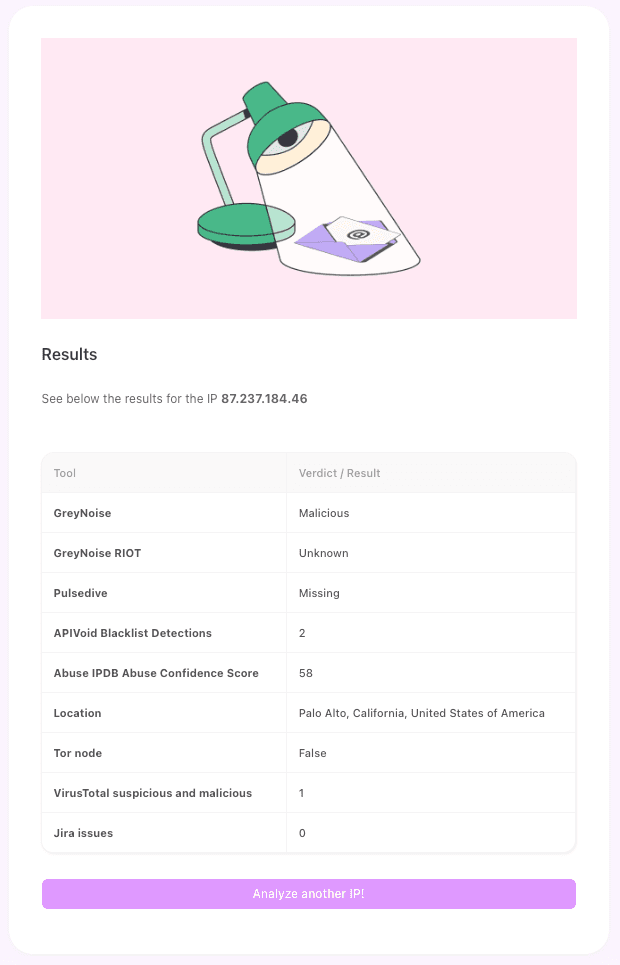
Analyzing a suspicious IP address across multiple reputation services simultaneously.
Confirming whether an alerted IOC is present in the network before alerting security teams (and if present, providing information about location, duration, and relevant logs)
Routing different types of qualified alerts to the right team. Product security alerts route to ProdSec or AppSec teams. IOC alerts route to a SOC or CSIRT depending on severity.


Analyze an IP in many services at once
Analyze an IP address across some of the most popular IP reputation and enrichment services, and consolidate results using the best data.
Tools
AbuseIPDB, APIVoid, GreyNoise, Jira Software, Pulsedive, VirusTotal
Threat hunting
Threat hunting is proactive and hypothesis-driven, offering several opportunities for automation integration.
Automation can prove or disprove a hypothesis by querying an organization's existing security stack (SIEM, EDR) and loading the required information into a workflow platform. Once the workflow is ready, the team runs it and reviews the results asynchronously. Automation also focuses threat hunting on specific network segments at specific times, letting threat hunters coordinate with other network activities.
And when a threat hunt identifies a valid threat, automation supports a smoother handoff to other participating teams such as a CSIRT. Texas A&M University System, where Cyber Operations saves 300+ hours per month and can bring a new customer online with full detection and response in under 24 hours, shows the same handoff-and-scale pattern.


Vulnerability management lifecycle
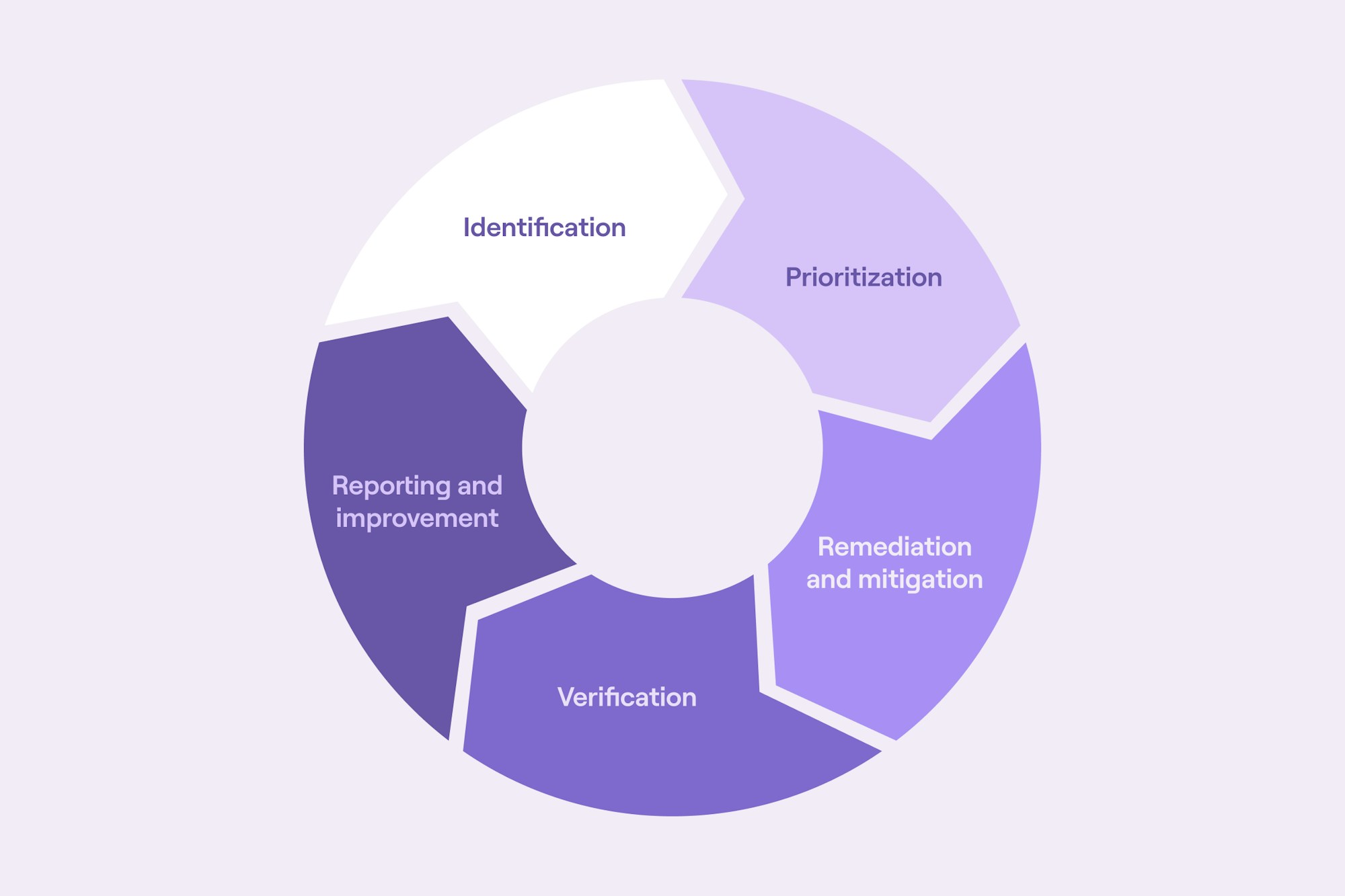
Security automation improves every stage of vulnerability management, from identification through verification.
Identification and prioritization
Using automation, the outputs from vulnerability scanning tools can be automatically assigned to the team responsible for managing the vulnerable asset. Once a vulnerability alert is qualified from a threat intelligence feed, it is automatically routed to the remediation team, with information about which library or codebase the vulnerability originates from, how long it has existed, and other relevant context.
For prioritization, a workflow platform can be preloaded with prioritization triggers and conditional branches. As vulnerabilities occur, the triggers apply the correct vulnerability rating and assign the work to the right team. Alternatively, automation handles the inputs and outputs of a prioritization engine, processing notification and ticket adjustments as the engine reprioritizes remediation work.
A US-based crowdfunding platform reduced unpatched vulnerabilities from 3,000 to 500 in under 45 days and reached 100% MFA adoption company-wide in weeks, replacing a planned tool purchase with Tines at zero additional spend.


Remediation, verification, and reporting
Automation assists with ongoing tracking of remediation work, including automated reminders for open tickets and prioritization updates. Once a vulnerability has been remediated, automation can confirm effectiveness by replicating the conditions of the initial report, such as rerunning a cloud scan or replaying the original script.
After verification, automation updates the ticket system with confirmed status, captures logs for both the initial report and remediation verification, and manages any mitigations implemented during the vulnerability period. Alert suppression rules turned on during remediation can be automatically removed, and disconnected assets can be reconnected.
Compliance automation
Compliance is one of the highest-impact automation targets. One-third of security leaders view compliance and reporting as a top-three challenge solvable with automation, in Automating GRC.
Automated compliance workflows continuously assess systems against regulatory standards (SOC 2, ISO 27001, HIPAA, PCI DSS, FedRAMP), alert teams to non-compliance issues, and collect evidence in real time rather than scrambling before an audit window.
Continuous controls monitoring (CCM) is increasingly replacing periodic point-in-time audits. AI agents designed for GRC workflows can answer policy and compliance questions in real time, verify evidence to support audit management, and eliminate manual searches for documentation across frameworks.
Identity and access management (IAM) automation
Automated security tools enforce identity and access management through zero-trust and least-privilege policies. They check for suspicious activity, trigger temporary suspensions, require follow-up verifications, or escalate issues to human analysts.
Vimeo saves 20+ hours per month on identity reconciliation and reclaimed 1,000+ hours clearing 2,000+ historical Jira vulnerability tickets through Tines. Their daily UKG-to-Okta reconciliation workflow catches identity mismatches within 24 hours, a process that previously surfaced issues only during quarterly audits.
A growing area in IAM automation is non-human identity (NHI) security. Service accounts, AI agents, automated pipelines, bots, and machine-to-machine integrations all hold credentials and permissions that traditional security tooling fails to monitor or govern.
NIST published NIST IR 8587 in December 2025, which addresses the token-based identity mechanisms underpinning automated NHI governance. As organizations deploy more AI agents and automated workflows, applying least privilege, credential rotation, and continuous monitoring to every non-human identity at machine scale becomes a distinct security automation requirement.
AI and machine learning in security automation
AI and machine learning have moved from theoretical enhancement to operational reality in security automation. The IBM breach report found that many of the organizations studied had deployed security AI and automation, with additional organizations using some form of generative AI security tool.
The operational model of threat detection is shifting from signature-matching and rule-based triggering to systems that reason about behavioral context, correlate signals across identity and cloud environments, and make autonomous triage decisions. Human-in-the-loop frameworks in AI-supported security processes have become a necessary requirement, and collaborative models anchored in security-by-design principles are shaping how teams apply AI in practice.
A significant gap remains between adoption and satisfaction. AI tools work when they're connected, governed, and integrated into workflows. Deployed as standalone point products, they underperform.
Agentic AI and the evolution of the AI SOC
Security team automation is moving from first-generation SOAR platforms, which automated discrete, predefined playbook steps, to agentic platforms designed to execute a complete decision loop. The SUDA loop captures that progression: See (ingest and correlate signals), Understand (add context), Decide (determine appropriate response), Act (execute remediation).
An agentic platform can ingest an EDR alert, add identity and cloud context, determine the alert represents a credential compromise, and automatically revoke active sessions. That process previously required multiple tools and human handoffs at each stage. Organizations need control of the remediation workflow to produce measurable security results.
The dual-use nature of agentic AI creates a new challenge. Every agentic AI deployment creates new non-human identities with access to critical systems, and the Model Context Protocol (MCP), which connects AI agents to enterprise data sources, introduces attack surfaces including prompt injection and exploitable LLM flaws. Standard access control and monitoring frameworks designed for human users must be rearchitected for machine-speed agents.
Challenges and limitations of security automation
Process maturity as a prerequisite
Automation amplifies whatever it touches, including broken processes. Some SOC teams say their security processes are too immature to automate, and many SOAR users found implementation more complex and time-consuming than they anticipated.
Automating an undefined or inconsistent process produces inconsistent results faster. Teams that invest in documenting and standardizing their workflows before automating them see better outcomes.
Skills gap and integration complexity
Some SOC teams lack the software programming skills needed for automation workflows. Integration across a heterogeneous tool stack adds another layer: connecting many security tools through APIs requires understanding each tool's data model, authentication method, and rate limits. Platforms with visual workflow builders, pre-built integrations, and no-code-to-full-code flexibility address the skills gap directly.
Human judgment cannot be fully replaced
Threat modeling, penetration testing, red/blue teaming, and strategic risk assessment all require creativity, adversarial thinking, and contextual understanding that automation can't replicate. The risk of over-reliance on automation is real: when teams trust automated outputs without verification, they miss edge cases, novel attack techniques, and context that doesn't fit predefined playbooks.
Governance gaps in AI-driven automation
The IBM/Ponemon Cost of a Data Breach Report 2025 found that organizations that experienced an AI-related security incident often lacked proper AI access controls and governance policies. Automation without governance doesn't reduce risk. It creates new risk categories while obscuring accountability.
Where security automation goes next
Security automation matters because the work around security has outgrown even strong teams' capacity. Manual enrichment, correlation, routing, verification, and documentation across too many disconnected systems create the operational burden. Teams that automate well reduce that work and create more space for judgment-intensive tasks such as investigations, threat modeling, and response planning.
Many teams are looking beyond rigid playbook engines. Intelligent workflow platforms give teams a way to combine governance, the full spectrum of execution, and broad integration on one surface. Teams use Tines in that model to build deterministic workflows for repeatable tasks, agentic workflows for ambiguous decisions, and human-led approvals where business context matters.
The same platform also extends beyond security. Intercom reduced build time from two months to two hours and consolidated 15 separate workflows into a single Tines Story, showing how the same workflow patterns apply across IT and security.
Security teams need better ways to connect their existing tools, govern AI safely, and eliminate undifferentiated work that causes burnout. Teams that do so move faster, respond more consistently, and remain more resilient as alert volume, AI adoption, and operational complexity continue to rise.
Frequently asked questions security automation
What is security automation?
Security automation is the use of technology to perform security tasks with minimal human intervention. Those tasks span data collection, event tracking, threat analysis, incident triage, and active threat response. Automated systems ingest alerts from security tools, triage incidents according to playbook priorities, add context to events, and execute remediation actions. Organizations with extensive automation deployment detect and contain breaches faster and save money per breach, in the IBM breach report.
What is the difference between SOAR, SIEM, and XDR?
SIEM aggregates and correlates log data to generate alerts and satisfy compliance requirements for log management. SOAR coordinates the response after an alert fires, orchestrating actions across multiple tools through API integrations and executing playbooks for repetitive tasks. XDR integrates detection and response natively across endpoints, networks, and cloud workloads within a single vendor's ecosystem. In practice, many organizations use automation capabilities embedded within SIEM, threat intelligence platforms, IT operations tools, or XDR rather than deploying standalone SOAR.
Will security automation replace SOC analysts?
Security automation handles the manual, repetitive work that consumes analysts' time, including enrichment lookups, false-positive triage, ticket routing, and data collection, while analysts focus on judgment, creativity, and strategic thinking. Threat modeling, penetration testing, adversarial simulation, and contextual risk assessment all require human intelligence. Freeing analysts from undifferentiated work lets them focus on higher-value investigation and response.
How do organizations get started with security automation?
Start with a high-volume, low-complexity workflow that the team currently handles manually, such as phishing triage or alert enrichment. Document the process, identify decision points, and choose a platform that integrates with existing tools. Measure the before-and-after impact (time per alert, alerts processed per analyst, mean time to respond) and expand from there. The strongest programs build on a platform that supports cross-team expansion, since the same workflow patterns that serve security teams also apply to IT, compliance, and identity management.