Phishing
Cut through the noise, break free from false positives
Discover ways to automate investigation, remediation, escalation, and communication around your phishing response process.

Featured stories


 Read forwarded phishing emails and attachmentsCommonly organizations ask their users to forward phishing emails as .eml attachments to a phishing inbox. This technique shows how to read an email, any attachments, and any attachments that are also .eml files.Tools: EmailRep


 Analyze potential SMS phishing attacks and raise incidents in JiraReceive screenshots of potential SMSishing attacks and extract URLs. These URLs are then analyzed using another Tines story before the report returns to the user. If the user responds to the attacker, an incident is raised on a true positive.Tools: OCRSpace, OpenAI, PagerDuty


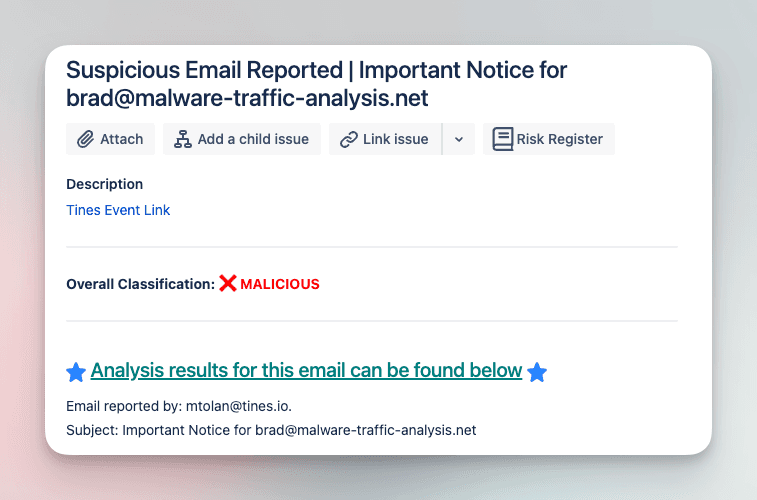
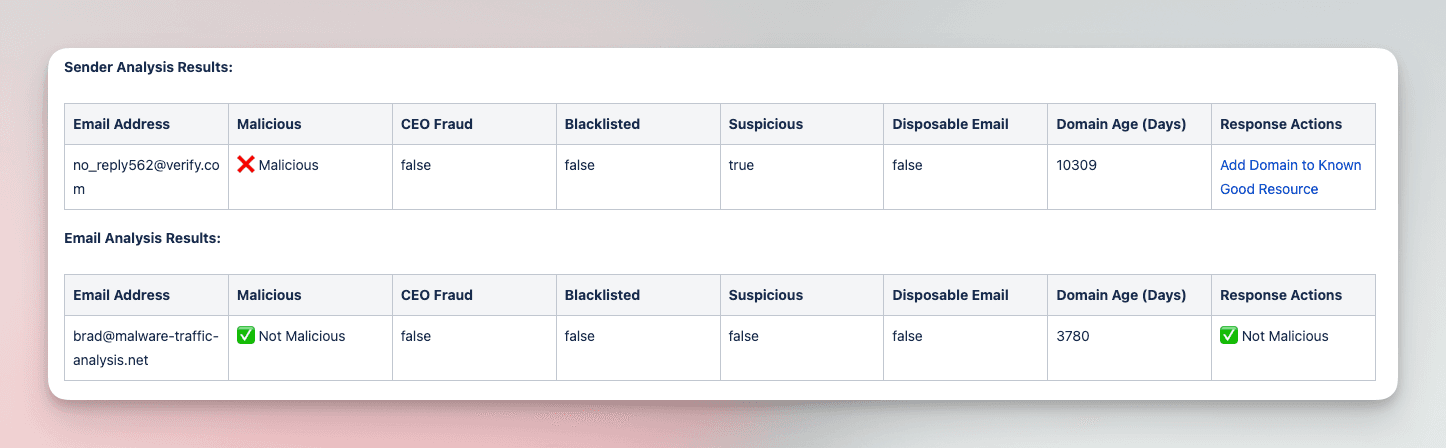
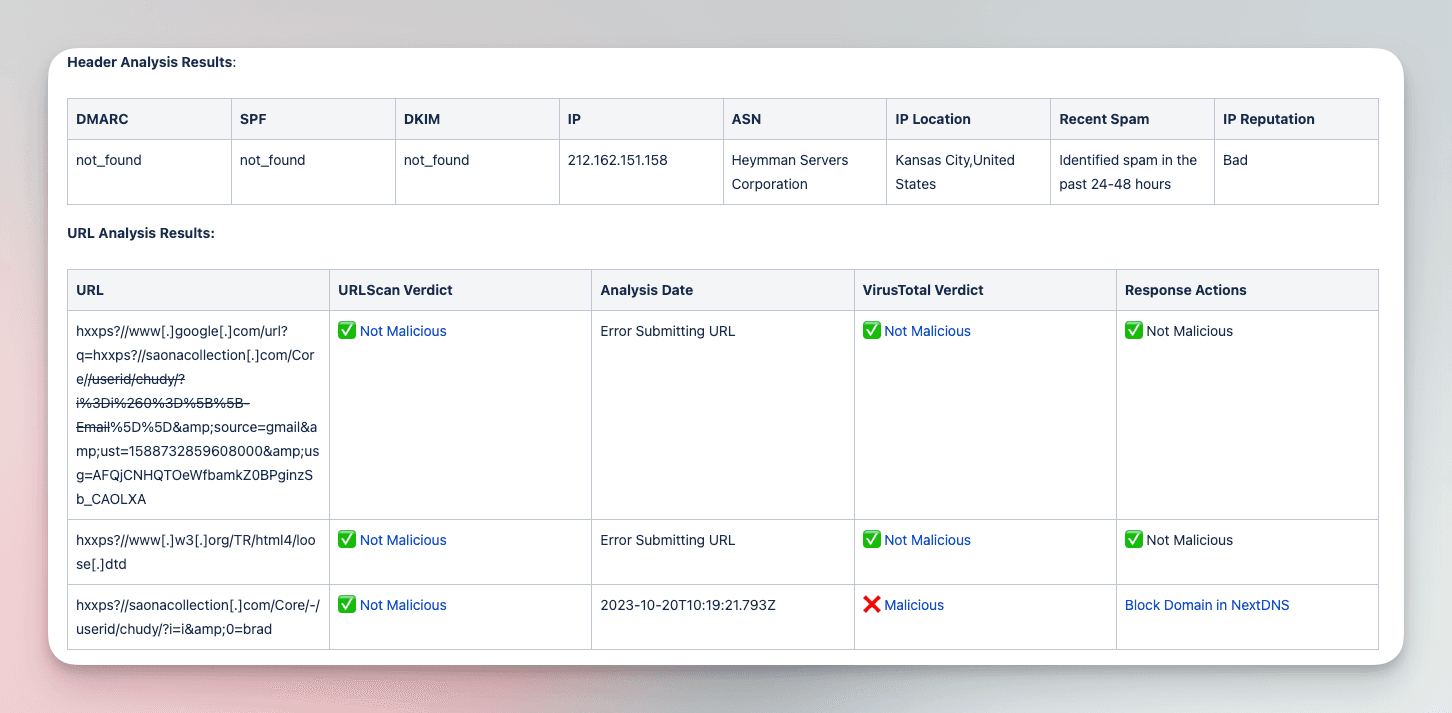
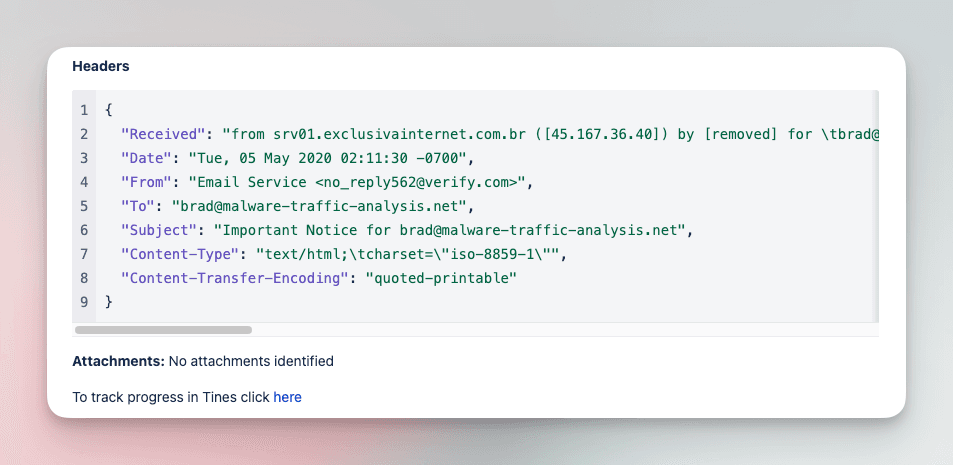
Analyze and triage suspicious emails with various tools
Submit suspicious emails and investigate with a comprehensive analysis of files, URLs, and headers. Add IOCs to various tool blocklists in order to limit impact of phishing campaigns.
Tools
CrowdStrike, EmailRep, Jira Software, NextDNS, URLScan.io, VirusTotal
How it works
Instantly import stories to your tenant where you can adapt them to meet your unique business requirements.
Learners welcome
Step through beginner to advanced topics as you explore our tailored courses on Tines Stories University


 Query an IP address in Team Cymru ScoutQuery Team Cymru Scout for detailed information about a specific IP address. Process the response by filtering client-server IPs and deliver the final analysis results back to either the originating HTTP request action or parent Story.Tools: Team Cymru Scout


 Add external IOCs to custom list in Infoblox ThreatDefenseThis Story will help you add IOCs from different sources to Infoblox Custom List.
The problem customers have is that they can get the data in JOSN or Text/CSV
So we built a story to help format these with Tines to make the process painless.Tools: Infoblox
Add external IOCs to custom list in Infoblox ThreatDefenseThis Story will help you add IOCs from different sources to Infoblox Custom List.
The problem customers have is that they can get the data in JOSN or Text/CSV
So we built a story to help format these with Tines to make the process painless.Tools: Infoblox Retrieve domain information with RiskIQ PassiveTotalGet information from RiskIQ PassiveTotal about a given domain. Retrieve information including subdomains, SSL certificates, OSINT data and WHOIS information.Tools: PassiveTotal
 Detect deepfakes with Reality Defender and triage in JiraAnalyze uploaded files for deepfakes using Reality Defender, enrich results with Twilio phone and EmailRep email intelligence, then create Jira tickets, Cases, and Slack alerts for suspicious submissions.Tools: EmailRep, Reality Defender, Slack, Twilio

 Analyze Terraform run errors using AIAutomatically analyze Terraform run errors using AI to provide actionable insights and recommendations.Tools: HashiCorp Terraform


 Correlate Microsoft Defender alerts in Tines cases and update with incident contextRetrieve Microsoft Graph security alerts and incidents, then create or update cases with detailed notes. Link related cases together and maintain incident records for comprehensive security tracking and investigation.Tools: Microsoft DefenderQuery an IP address in Team Cymru ScoutQuery Team Cymru Scout for detailed information about a specific IP address. Process the response by filtering client-server IPs and deliver the final analysis results back to either the originating HTTP request action or parent Story.Tools: Team Cymru Scout

 Triage alerts with agents using SOPs in ConfluenceStreamline security alert handling by automatically identifying and executing the appropriate Standard Operating Procedures. When an alert triggers, the first AI agent analyzes it and locates the relevant SOP in Confluence. The system then creates a case record and dispatches it to a second AI agent that performs all required remediation steps. All actions are documented in the case history, with automatic notifications sent to the on-call team via Slack.Tools: AbuseIPDB, Confluence, CrowdStrike, EmailRep, Okta, Slack, Tavily, Tines, URLScan.io, VirusTotalAnalyze, document and triage suspicious emails with Tines cases and recordsAnalyze suspicious emails by extracting and inspecting files, URLs, and headers. Leverage various security tools to assess potential threats and add identified Indicators of Compromise (IOCs) to blocklists, mitigating the impact of phishing campaigns. Document and track the entire process within dedicated Tines cases and records for comprehensive record-keeping and future reference.Tools: AlienVault OTX, Anomali ThreatStream, CrowdStrike, Hybrid Analysis, NextDNS, PassiveTotal, VirusTotal
 Initiate MISP investigation from a Tines caseInitiate a MISP investigation from a Tines case.
The MISP event link will be returned with the attributes created.Tools: MISP
Initiate MISP investigation from a Tines caseInitiate a MISP investigation from a Tines case.
The MISP event link will be returned with the attributes created.Tools: MISP
 Search Axonius for devices and enrich with VulnCheckSearch for assets in Axonius using various filters like hostname, IP address, ID, or owner's email. Once an asset is identified, retrieve its associated CPEs (Common Platform Enumerations) and related CVEs (Common Vulnerabilities and Exposures) from VulnCheck, and inform the requester.Tools: Axonius, VulnCheckAdd external IOCs to custom list in Infoblox ThreatDefenseThis Story will help you add IOCs from different sources to Infoblox Custom List.
The problem customers have is that they can get the data in JOSN or Text/CSV
So we built a story to help format these with Tines to make the process painless.Tools: Infoblox
Search Axonius for devices and enrich with VulnCheckSearch for assets in Axonius using various filters like hostname, IP address, ID, or owner's email. Once an asset is identified, retrieve its associated CPEs (Common Platform Enumerations) and related CVEs (Common Vulnerabilities and Exposures) from VulnCheck, and inform the requester.Tools: Axonius, VulnCheckAdd external IOCs to custom list in Infoblox ThreatDefenseThis Story will help you add IOCs from different sources to Infoblox Custom List.
The problem customers have is that they can get the data in JOSN or Text/CSV
So we built a story to help format these with Tines to make the process painless.Tools: InfobloxHow Upwork fosters learning through phishing response
“My favorite Story so far is one we built around phishing response. We created it to give the person who reported it feedback on what they reported, which enables my team, via the Story, to further educate the end-users on phishing vs. spam. This helps them to get smarter too.”


Submit your story
We’d love to hear your ideas or see what you’ve created.