Manage credentials
Credentials store sensitive information like API tokens and passwords. As a tenant owner, your role with credentials isn't always about using them in workflows (that's covered more in our Builder learning path series). While builders create and reference credentials in their workflows, you ensure they're organized properly, shared appropriately, and secured in accordance with your organization's policies.
Organize credentials with folders
As teams create more credentials, organization becomes critical. Folders help you group related credentials together, making them easier to find and manage.
Common folder structures include:
By service type (cloud services, communication tools, ticketing systems)
By environment (production, staging, development)
By department or business function
To manage folders, navigate to the Credentials page for a team and use the folder management options to create and organize credentials into logical groups.

The Credentials page in the team menu, highlighting the option to create a new credential folder.
🪄Tip
Credential access control
One of your key responsibilities is controlling who can access which credentials. By default, credentials are only accessible to the team that created them. However, you can configure access control to share credentials across teams.
Access control is configured via the Access tab of a credential:
Workbench access: Controls whether the credential can be used in Workbench. When enabled, affected tools (templates, products, and MCPs) are shown.
Team access: Controls where the credential can be used. Check Grant access to all teams on this tenant to make the credential available tenant-wide, or configure access per team using the dropdown.
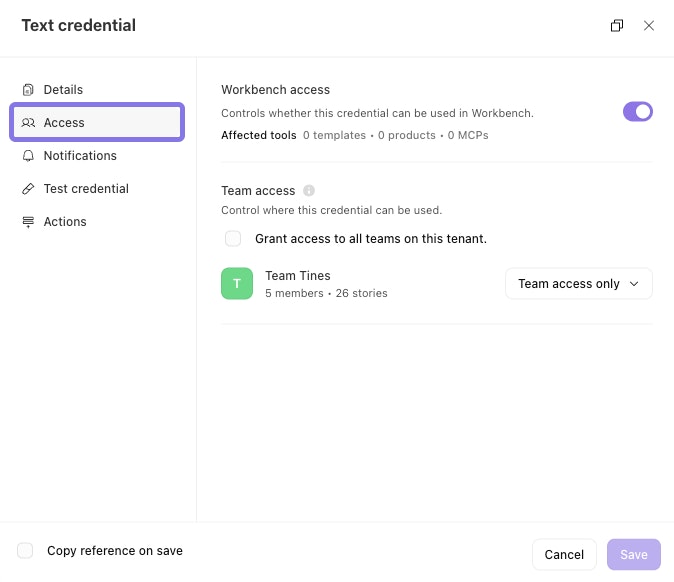
The Access tab of a credential, showing controls for where and how it can be used.
❗️Important
Manage resources
Resources store non-sensitive, reusable information that teams can reference across multiple workflows. As a tenant owner, you're responsible for organizing resources and controlling how they're shared, just like with credentials.
Common examples of resources include:
Configuration settings
Lookup tables and reference data
Lists of approved values (i.e., approved domains, email addresses)
Organize resources with folders
Like credentials, resources benefit from folder organization. As a tenant owner, you can establish folder structures that make sense for your organization:
By data type (configurations, templates, lookup tables)
By workflow purpose (onboarding, reporting, compliance)
By department or team function
Resource access control
Resources use the same team access model as credentials. By default, resources are only accessible to the team that created them. Check Grant access to all teams on this tenant to make the resource available tenant-wide, or configure access per team using the dropdown.
When a resource is shared across teams, any updates to that resource automatically apply to all workflows using it. This is powerful for maintaining consistency but requires careful change management.
Tips for credential and resource management
As a tenant owner, consider these practices for effective management:
Establish naming conventions. Create and enforce consistent naming standards across teams (for example,
ServiceName_CredentialType_Environment).Regular audits. Periodically review which credentials and resources are shared tenant-wide and whether that access is still appropriate.
Folder standards. Define standard folder structures that teams should use, making it easier to navigate credentials and resources across your tenant.
Change management. For widely-shared resources, establish a process for communicating changes to affected teams before updates are made.
Access reviews. Regularly review which teams have access to shared credentials and resources, especially after organizational changes.