There is no such thing as a perfect, one-size-fits-all tool in security operations. Organizations and teams are surrounded by a vast array of options, ranging from vulnerability prioritization to anomaly detection, all competing for their attention and integration needs. Good security operations teams want to move past tool selection and integration as quickly as possible, focusing on their primary job: protecting their organizations with minimal fuss and maximum effectiveness.
This practical guide to security operations center (SOC) tools is designed to help you achieve that objective. Using a series of practical examples and insights, it presents a structured approach to selecting security operations center tools that enables you to filter out the noise and focus on the requirements that matter. Each section includes tables and checklists to help guide your tool selection process.
Summary of key best practices related to security operations center tools
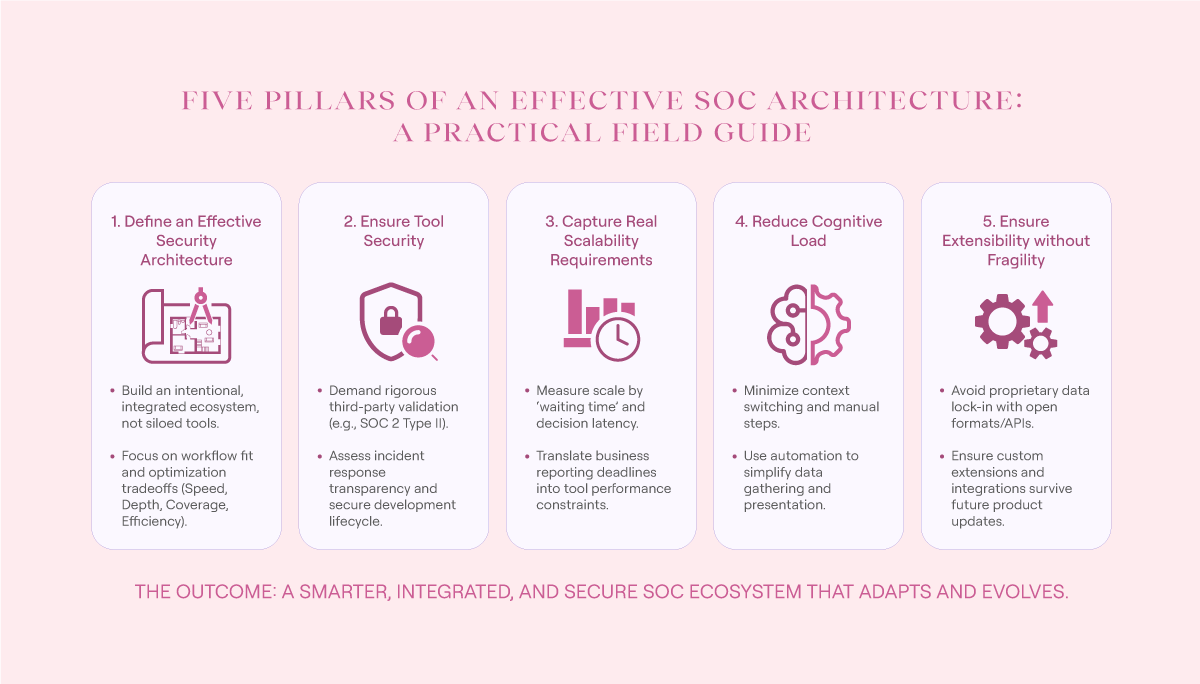
Security operations center tools overview (source)
Define an effective security architecture
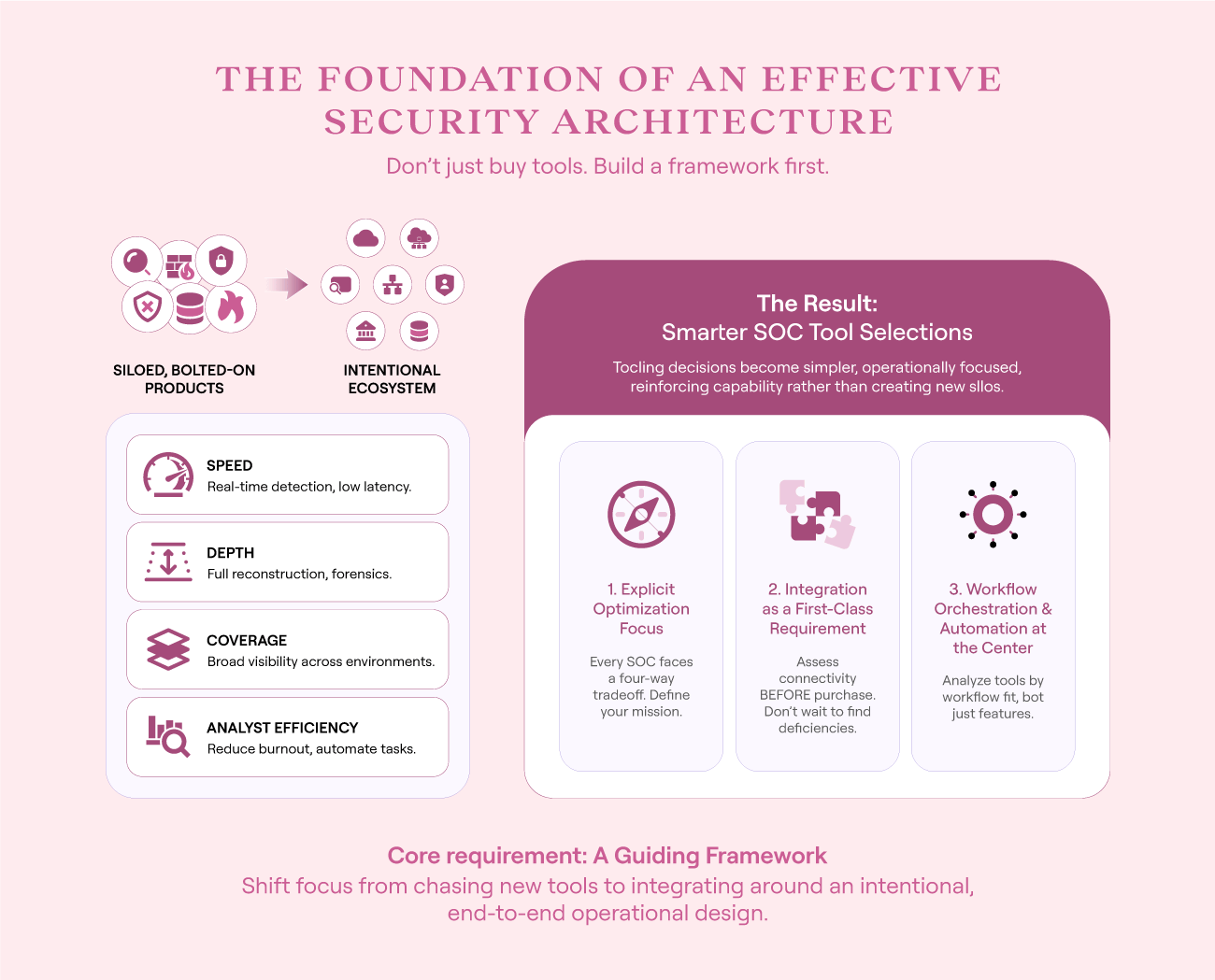
The very first thing you need to do has almost nothing to do with your security operations center tools and everything to do with the framework in which they operate. This is because the most effective security operations tools operate as part of a broader ecosystem, not as siloed, standalone products.
While this may sound abstract, defining an effective security ecosystem (or architecture) up front has enormous benefits. Instead of bolting on the newest “amazing” tool and hoping for the best, you focus on integrating individual tools around an intentional, end-to-end operational design. This improves the operational impact of your tools. In turn, tooling decisions are driven by a guiding set of principles and requirements; they become simpler and more operationally focused, so you avoid getting bogged down in feature lists and product demonstrations.
That said, while this probably sounds amazing, do not be deceived: There are a vast number of considerations that go into this kind of overarching security architecture, and many of these decisions will require significant input from engineering and project management stakeholders. It is unlikely that you will be the central decision-maker for all of these choices—you will need to operate as just one stakeholder among many.
Within this context, you need to focus on three key aspects of your security architecture: optimization, integration, and workflow orchestration and automation. If you can get these right, you’ll go a long way toward simplifying and improving your security operations center tool selections. The rest of this section shows you what this looks like, along with a series of tables that you can use to define your SOC tooling requirements.
Effective security architecture overview (source)
Explicitly define your optimization focus
Every SOC must balance a constant four-way tradeoff among speed, depth, coverage, and analyst efficiency. Consider a SOC that is heavily focused on intensive digital forensic investigations: The team will naturally gravitate toward tools with evidence capture and forensic analysis capabilities, often at the expense of speed. In contrast, a SOC focused on minimizing adversary dwell time will be willing to sacrifice depth as long as they can respond quickly.
Unfortunately, most SOCs never explicitly define their focus and the resulting tradeoffs; as a result, they find themselves at the mercy of whatever version of SOC optimization the current project team deems accurate. Often, this leads to confusing and nonsensical tool selections, which harm your capability rather than improving it. For instance, imagine if your SOC was deeply focused on forensic analysis but was provided with a network security tool that only captures NetFlow data. The tool selection would be completely at odds with your purpose—you would be unable to forensically analyze network traffic.
Once you and your SOC have clearly defined your SOC optimization focus, you create a system that naturally reinforces your SOC’s purpose, leading to far more effective security operations center tool selections.
If you’ve never done this exercise, use the table below to get started. In partnership with whatever group of stakeholders makes sense in your organization, work through the questions in the second column to draw out sensible examples and tool decision statements for your organization.
Treat integration as a first-class requirement
Your second step is to ensure that integration is a top requirement in your tool selection process. Doing this properly will mean that any tool you select can rapidly integrate into your SOC’s overall capability, rather than requiring you to identify deficiencies after you’ve already purchased the tool.
Although this may sound obvious, many SOCs struggle to do this well. Generally, that’s because they put integration considerations into the “we’re too busy to do this now” bucket rather than treating it as essential. The result is that integration requirements are not assessed upfront, and when they do attempt to integrate the tool, they find it lacking.
In contrast, a well-defined security architecture ensures that only tools with complete and effective integration options can be approved. This goes beyond simply checking claims on a vendor’s landing page and instead systematically compares each tool’s datasheet (or equivalent) against a well-defined set of integration criteria. This is often done in two stages, where the first stage is performed by operational SOC members who are assessing a tool’s operational viability, and the second (far more technical assessment) is done by project management and engineering teams.
An example of a first-pass assessment is provided below, which you can modify to suit your needs. Note how it has sufficient depth to eliminate clearly suboptimal tools while avoiding getting too deep into more engineering-focused requirements. Balancing this complexity saves both teams time and frustration as it allows operational teams to quickly rule out suboptimal tools, which in turn limits the number of tools a project management team needs to consider.
Put workflow orchestration and automation at the center
Organizations that emphasize workflow orchestration and automation have an entirely different approach to SOC tooling decisions. Instead of randomly choosing tools to address a perceived capability gap, they analyze each tool in the context of their overall workflow, which leads them to expand their tool analysis away from alert generation and instead ask questions like these:
Where does this tool sit in the investigation or response workflow?
What state does it create, consume, or modify?
Can it participate cleanly in automated activities?
Does it reduce analyst decision fatigue, or does it introduce another interpretation layer?
When this approach is combined with the efforts described in the previous two sections, it results in a highly efficient security operations center tool selection process. It forces you to identify tools that will work well in the context of your existing operational workflows rather than creating new silos of capability expertise. It also helps you to move away from heavily marketed capabilities and focus on the capabilities that you need.
To do this well, you need a dedicated, easy-to-use intelligent workflow platform. It needs to be something that you can confidently build your future operations around, and it needs to support complex, multi-state workflows and orchestrations. A brief list of the requirements is included in the table below.
Ensure tool security
SOC tools process some of the most sensitive information in your organization. In many cases, they contain secrets and information that go far beyond other information sources in your environment and represent absolute gold for your adversaries. As a result, you must ensure that they are the most secure tools in your environment.
No modern SOC has complete development control over its tooling; instead, they operate with a combination of first-party and third-party tools. As a result, a significant part of your tool security involves ensuring that your third-party tools are also secure.
The following subsections show you how to do this well.
Evaluate independent security certifications
Start by assessing your security vendor’s independent security certifications. This gives you a baseline understanding of their commitment to security and helps you filter out vendors who won’t be a match for you.
For instance, if a security vendor is processing your data, it should have SOC 2 Type II accreditation. If it doesn’t, you can immediately give that vendor a hard pass and continue looking for a more credible one.
Although this may sound simplistic, and certifications aren’t the be-all and end-all of security, they act like the initial buy-in price for security. They demonstrate that an organization has undergone a rigorous, independent assessment of its security practices to a defined standard. This allows you to dive deeper into their actual approach to security, as covered in subsequent subsections.
To understand which security certifications you need to assess, work with your business to collate a list that matches whatever regulatory environment you work in. Then simply make these part of your vendor assessment checklist.
Validate incident response and disclosure practices
Many cybersecurity professionals have felt the sheer, stomach-churning fear of finding out that one of their most trusted security tools has been compromised. Realizing that significant portions of your previous investigations and responses may have been compromised introduces a level of fear and confusion that can quickly cripple even the most experienced operators.
When this already tense situation is compounded by a security vendor falling apart under the pressure of an incomplete or ineffective incident response process, it can quickly become catastrophic. Silence, delays, or incorrect information releases can have drastic consequences, and in many ways, you are at the mercy of your security vendors. In essence, you are trusting them to know what they are doing in one of the highest-intensity environments in the modern workplace, with vast sums of money, and (at times) people’s lives at stake.
This is why it is critical that you assess how an organization responds when things go wrong. To do this, assess the three aspects and their associated requirements contained in the table below.
Assess a vendor’s secure development lifecycle
The uncomfortable reality for most organizations is that the vast majority of incidents are caused by insecure development practices rather than zero-day vulnerabilities and crazy complicated adversary attack scenarios. Your vendors are no different, and that’s why you need to clearly assess each one’s secure development lifecycle (SDLC).
For instance, imagine the impact of your endpoint detection and response (EDR) dashboard being accidentally exposed through an undocumented API. Without even trying, an adversary could map out your entire organization, including who owns what and the configuration of your systems. It would be one small error on the vendor’s behalf, but it would be gold for an adversary, leaving you vulnerable and exposed.
As with the other sections in this article, your goal is not to dive deep into the vendor’s engineering organization. Very few vendors will allow this to begin with, and your main role is to confirm that your vendor has a disciplined, security-conscious approach to their development practices. Put another way, you are not looking to log into their code repositories and confirm each of the points below, but rather to see that their documentation and past performance demonstrate that these things are in place. This significantly reduces the likelihood of a “dumb” mistake causing catastrophic damage.
To do this, assess the three areas and their associated requirements as described in the table below.
Capture real scalability requirements
On the surface, confirming a security operations center tools’ scalability and resilience seems like a no-brainer. Who wouldn’t want to ensure that a tool can actually stand up under the intense pressure of security operations?
Despite this, almost every SOC messes up this seemingly simple requirement. As a result, they end up with expensive placeholders that look amazing on paper but have little real-world usefulness. This is because SOCs do not experience scale in terms of typical engineering specifications, such as data quantity, events, or objects per second. Instead, their true experience of scale is waiting. Regardless of what action they are taking, minimizing the amount of time is their primary focus, as this reduces the risk to the organization.
The problem is that attempting to define your requirements in terms of “waiting time” is horrifying for the engineering and finance teams that support SOCs. Trying to define tool requirements where the inputs don’t scale according to the expected outputs is counterintuitive to almost every rule of feature definition, and the disconnect can typically only be solved with an infinitely scalable cost center account. Both of these options are pretty much non-starters for most organizations.
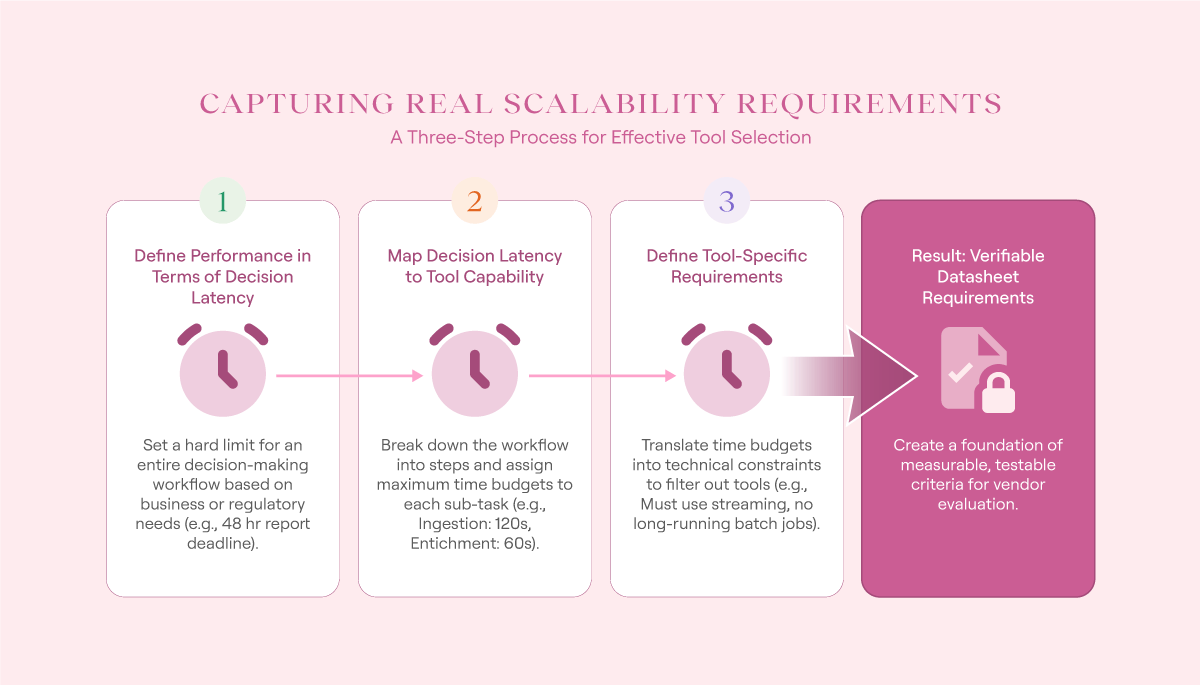
Nevertheless, this is something you absolutely must get right if you want to build an effective set of security operations center tools. To do so, you need to go through a three-stage process that converts your “decision latency” requirements into the more concrete requirements that engineering teams need to make their decisions. The subsections below show you how to do this for any SOC workflow, although for demonstration purposes, a common alert triage workflow is used.
Capturing real scalability requirements (source)
1. Define performance in terms of decision latency
Start by defining your overarching requirements in terms of the hard limits imposed by your decision-making environment. For instance, if you have a regulatory requirement to report an incident to federal authorities within 48 hours, then this is a hard limit on your decisions. Everything else, including database sizes, tooling limits, and executive buy-in, is secondary.
Put another way, you need to ensure that the maximum cumulative time any workflow involved in a decision-making process never breaches your hard limit. Regardless of the decision points you need to achieve the outcome, you must not breach the hard limit.
Once you know this, expand your decision-latency analysis to include all the subworkflows that lead to the decision being made, and assign a time value. This represents the maximum amount of time a given subworkflow has to achieve its purpose before it hands the results to the next one.
An example of what this looks like is in the table below. Note that in the real world, an alert triage workflow would involve far more steps, and you would also have far more than just one stage. However, the table below is sufficient for demonstration purposes, and you can easily expand it to match your own environment.
2. Map decision latency to tool capability
Next, you need to translate your decision latency requirements into concrete security operations center tool constraints. This converts your decision latency constraints into technical constraints.
To do this, expand the table above to include three new columns: example workflow action, required tool capabilities, and impacted tools. As you do this, note how each stage shapes your scalability requirements. For instance, using this example, given an expected ingestion and normalization requirement of 120 seconds for event logs, you can immediately reject any system that relies on long-running batch jobs or heavy manual interaction.
3. Define tool-specific requirements
Finally, now that you’ve defined your operational tool requirements, compile the requirements into tool-specific lists. These become a foundation that you can apply to any tool that you are looking for.
For example, using the table above, you could start drawing out your requirements for an EDR platform. If you have a mature SOC engineering team, you can supplement this information with specific numbers to tighten your requirements even further.
Reduce cognitive load
Cognitive load is one of the hidden aspects of security operations that can make or break your security operations center. If allowed to escalate too much, it forces constant context switching onto your operators, which in turn reduces their concentration and increases the chance of exhaustion-related errors. Managed properly, it creates a seamless operations environment that allows you to scale your security operations without scaling headcount.
Unfortunately, many SOCs equate this requirement with nice-looking tools that feel easy to use. While these aspects are important, focusing on them exclusively will cause you to miss the mark, achieving high levels of good-looking tools but still swamping your teams with operational overhead. Essentially, if a tool doesn’t actually reduce your analyst’s cognitive load, it is a waste of your time, no matter how good it looks.
To illustrate this concept, consider the workflow below. Its function is to answer the question every analyst asks when a threat intelligence (TI) alert is issued for a malicious IP address: Has this IP address been seen in this environment before?


As you’re analyzing this workflow, consider the steps that have been taken by this simple workflow:
A TI alert has been received.
A security event data platform has been accessed.
A search has been performed.
The results have been collated.
An analyst has been presented with the collated data.
Prior to this workflow orchestration, each step would have required an analyst’s attention. Put another way, this single orchestration reduces an analyst’s cognitive load from five steps to one. That represents a significant time saving and can easily be expanded to even more complex orchestrations.
This same principle applies to every security operations center tool you are considering. For example:
An EDR tool should surface the information an analyst needs to progress as simply as possible; it shouldn’t require multiple different screens to get information such as process trees and application hashes.
A SIEM system shouldn’t require you to use a complicated vendor-specific query language.
A workflow orchestration and automation platform shouldn’t require you to use a custom scripting language just to make it work.
Ensure extensibility without fragility
The final section in this article is about change and effective change management. There is no such thing as a static SOC capability: Adversaries are constantly adapting, there is always new technology, and, frankly, organizations themselves are consistently evolving. Your SOC may be amazing now, but if you can’t update it, extend it, and constantly improve it, you’ll quickly get left behind.
In this context, the final issue you need to assess in your security operations center tools is their ability to be modified and changed without becoming operationally risky. This should go beyond simple customization and include long-term survivability considerations such as upgrade cycles, technical debt minimization, and ongoing support. Put bluntly, it’s all about ensuring that you can upgrade your SOC over time without having to rebuild your entire tool stack.
Fortunately, much of the work required to ensure the long-term viability of your tools has already been done via this article. You’ve already investigated their development lifecycle and how they manage feature releases and deprecation. You’ve chosen a centralized workflow orchestration and automation platform that allows you to pass information between various platforms. You have a clear idea of your SOCs optimization focus and your decision latency requirements.
Now you need to land your security operations center tool requirements on two final points: minimizing proprietary data formats and ensuring extension survivability.
Minimize proprietary data formats
In the modern era of security operations, tool lock-in rarely happens contractually. More often than not, it happens because a given tool stores critical context such as alerts, investigations, cases, or enrichment logic in proprietary formats that are hard to parse, export, or reuse. Over time, this makes integration harder, limits extensibility, and can even lock you into substandard performance over time.
However, it is also important to acknowledge the role of intellectual property. A vendor that has invested large sums of money in developing a proprietary way to address a specific capability gap cannot afford to fully expose its inner workings. In some cases, this would reveal critical capabilities that an adversary could exploit.
To navigate these opposing priorities, you need to find a middle ground that ensures that you maintain ownership of your operational information while avoiding being irreversibly trapped within a single platform.
To do this, make sure that when you’re analyzing security operations center tools, you include the four aspects in the table below.
Ensure extension survivability
Finally, almost every tool in your SOC will need custom extensions, upgrades, or state management at some point. Adversaries and technology don’t stop changing, and neither should your tools. There will always be times when you have to address edge cases in your environment that aren’t natively covered by your tooling selection.
As a result, you need to ensure that any security operations tools you select allow you to safely and easily extend them, without breaking your extensions every time you download the latest update. In effect, you are seeking to answer a key question: Can the extensions you and your team are building today survive the normal evolution of the product tomorrow?
To do this, on top of the other requirements you’ve assessed so far, add the following.
Conclusion
In the modern SOC era, there is no such thing as a one-size-fits-all tool. Instead, every SOC mixes and matches a series of security operations center tools in order to achieve the capabilities they need. Unfortunately, while this sounds simple in theory, this is a painful, frustrating, and ultimately unsuccessful endeavour for many SOCs that leaves them with suboptimal tools. Instead of a well-designed, end-to-end process, they end up with a confusing array of non-integrated tools that soak up their time with proprietary formats and endless context switching.
However, there is a way to shift this trajectory, and in this article, you learned how. Starting with a clear understanding of your SOCs’ optimization focus and then working through practical considerations such as defining your real scalability requirements and reducing your analysts’ loads, you can develop a robust set of checks that will vastly improve your SOC tool selections. Even better, each section provided you with handy takeaways you can apply to your workplace immediately.
Armed with this knowledge, you are well placed to stop wasting time on security operations center tools that were never going to meet your needs, and instead, invest time in choosing the best-of-breed tools for your workplace.