As enterprise environments grow in complexity and attackers adopt increasingly stealthy techniques, manual threat hunting becomes unable to scale to meet the demands of modern cyber defense. Automated threat hunting addresses these challenges by applying structured logic, repeatable workflows, and machine-driven analysis to identify threats in real-time.
This article outlines key best practices for implementing automation in the hunting process. It is targeted towards cybersecurity professionals and focuses on strategies that are both operationally viable and technically sound.
Key best practices for automated threat hunting
Automated threat hunting: What is it?
Threat hunting is the process of proactively looking for signs of suspicious activity inside a network, ideally before the alarms go off or the damage is done. It involves forming hypotheses, analyzing telemetry, and looking for patterns that may indicate a compromise or emerging threat.
Automated threat hunting takes this a step further by using automated tools to carry out parts of the hunt at scale. It turns repeatable steps (e.g., running queries, collecting logs, or enriching data) into workflows that run automatically so that analysts can focus their attention on the most pressing issues.
Leverage workflow orchestration and automation
Automated threat hunting pipelines are most effective when built as formal workflows that combine automation and analyst oversight. These workflows reduce manual effort, enable repeatable execution, and improve consistency across investigations. Orchestration platforms (like SOAR systems) can help trigger hunts automatically and perform various tasks to improve the hunt’s efficiency.
However, while automation accelerates routine actions, human analysts should always remain in the loop at critical decision points. This balance helps reduce time to hunt while maintaining the contextual judgment that human expertise provides. Formal workflows also help improve downstream incident response integration by standardizing the format and structure of hunting outputs.
Consider a scenario where an organization deploys a SOAR platform to streamline threat hunting in response to newly received threat intelligence. When an external threat feed pushes a new IOC (such as a malicious hash or domain) into a SOAR system via an API integration or scheduled feed ingestion, it automatically triggers a predefined hunting workflow. This workflow performs tasks such as:
Querying endpoint logs
Enriching matches using commercial threat intelligence services
Tagging high-confidence hits for analyst review
Generating structured reports with evidence
Escalating findings to the SOC queue
These tasks effectively reduce analyst workloads while ensuring timely detection.
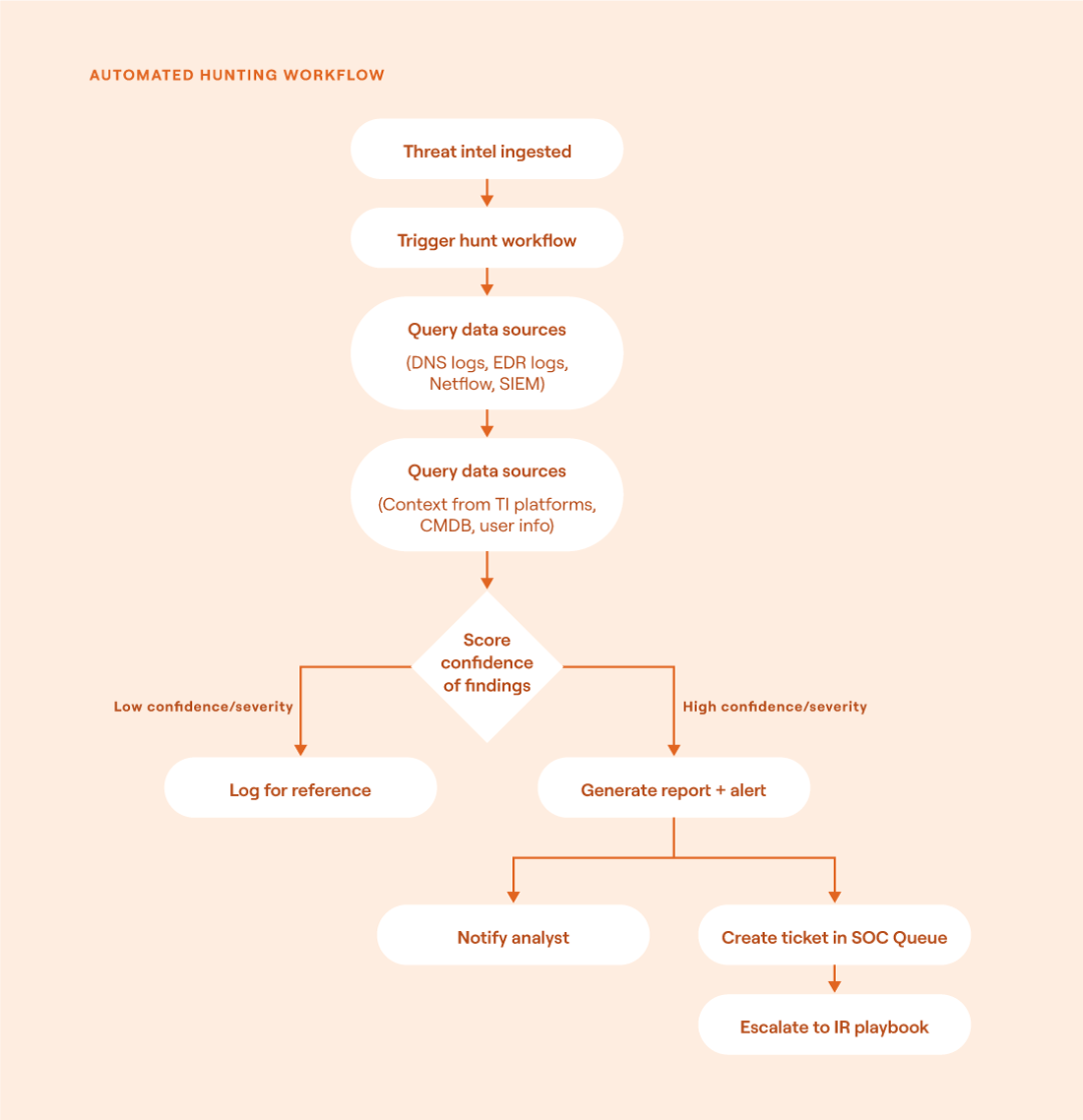
Flowchart showing an automated hunting workflow (source)
Integrate telemetry at ingestion
Reliable automated threat hunting depends on consistent and well-structured telemetry. Normalizing data at the ingestion point (rather than mid-stream or on demand) ensures that detection logic can operate uniformly across different tools/environments. Without this standardization, hunting workflows often break due to mismatched schemas, inconsistent field names, or incompatible formats.
Additionally, early normalization reduces processing overhead during hunts by embedding key contextual attributes up front. Instead of constantly performing lookups to resolve hostnames, asset types, user attributes, etc., the enriched data is already there. This allows queries to run faster and scale much more effectively, especially in environments with a high volume of data.
Many organizations adopt a structured schema to normalize incoming telemetry. Here are three widely used models:
The Elastic Common Schema (ECS) is designed for the Elastic Stack and provides a flexible, open schema that supports many security data sources. This model is ideal for teams already invested in Elastic SIEM or ElasticSearch pipelines. It’s relatively easy to adopt and integrates cleanly with Beats and Logstash.
The Open Cybersecurity Schema Framework (OCSF) is a vendor-neutral, open standard aiming for broad interoperability and backed by AWS, Splunk, IBM, etc. It provides rich event modeling and a modular design that supports both detection engineering and threat hunting at scale. This model is particularly valuable in heterogeneous environments with diverse tooling.
Choosing the right model depends on tooling, scale, and long-term integration plans. For teams using multiple platforms or building multi-cloud telemetry pipelines, OCSF provides a strong foundation for cross-platform consistency. For Elastic-heavy stacks, ECS offers simplicity.
Check out the Tines Normalize Alerts workflow for a real-world implementation of some of these concepts.


Codify hunting logic as parameterized queries
Formalizing threat hunting into reusable and parameter-driven queries allows security teams to maximize efficiency. Instead of relying on one-off scripts, analysts can define templates with input variables that adapt to different environments. This approach helps cut down on duplicate work and makes it much easier to adjust logic over time. Additionally, it supports version control. Storing queries in version control enables auditing, collaboration, and rollback if necessary. It also makes it easier to link each query to a MITRE ATT&CK technique to improve visibility and tracking throughout the hunt.
As an example, imagine that a security engineering team develops a hunt for potentially malicious PowerShell usage. Instead of hardcoding user and time ranges, the query is written as a reusable template:
DeviceProcessEvents
| where FileName == "powershell.exe"
| where AccountName in ("{{user}}")
| where Timestamp between ({{start_time}} .. {{end_time}})
| where CommandLine has_any ("Invoke-WebRequest", "IEX", "Base64")
The parameters {{user}}, {{start_time}}, and {{end_time}} allow the same logic to be applied across different hosts or timeframes. The team stores this query in Git, linked to ATT&CK technique T1059.001 (PowerShell). From there, it's deployed to multiple environments through a CI/CD pipeline that validates and publishes updated queries on a schedule.
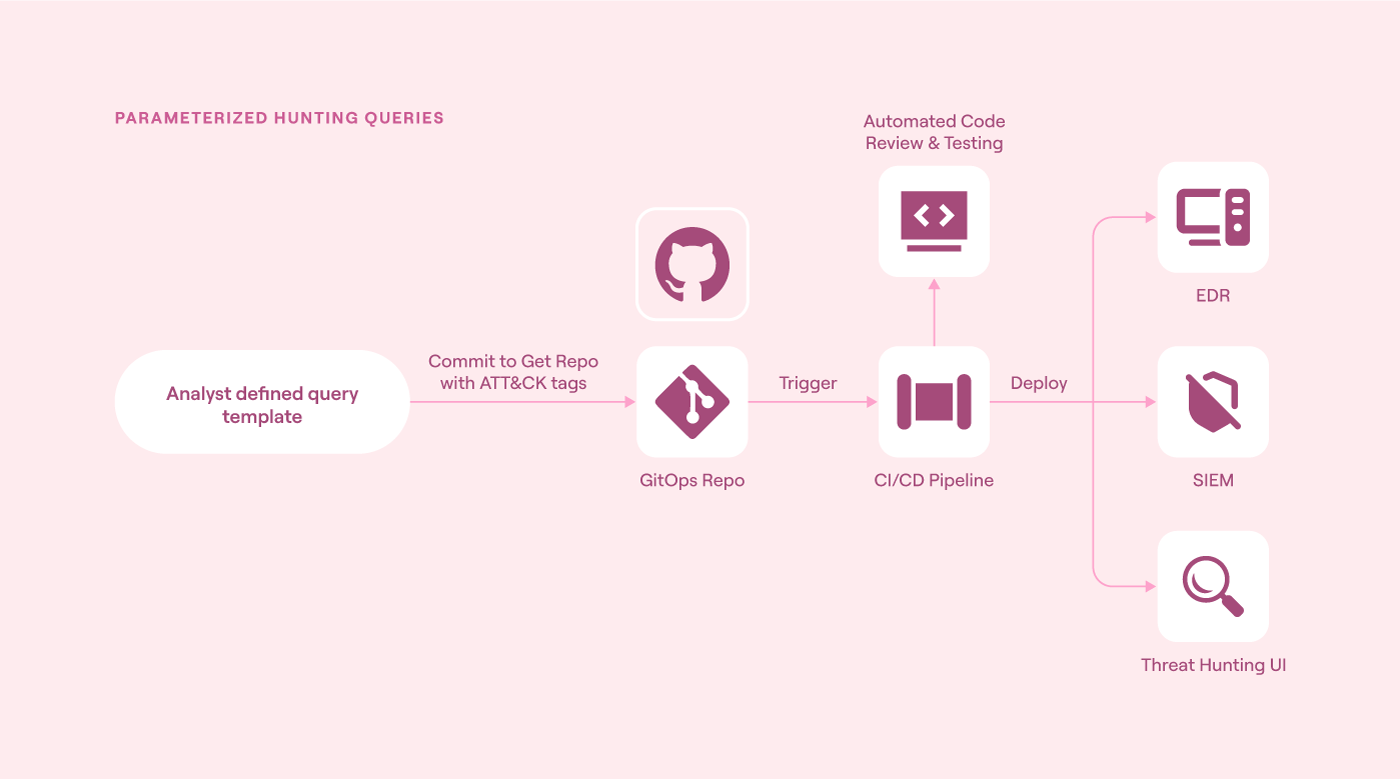
Deployment workflow for parameterized hunting queries (source)
Enrich and prioritize based on threat intel
Automated hunts become far more effective when they incorporate threat intelligence. Enriching telemetry with external context (e.g., known indicators, attacker tactics, or tool signatures) helps focus detection on real threats while reducing noise from benign activity. It also facilitates prioritization by linking events to active campaigns or high-risk adversaries.
Enrichment gives an organization’s systems the extra context they need to flag suspicious activity more accurately. Whether it’s recognizing known infrastructure, spotting behavioral patterns, or checking reputation scores, this added layer helps separate the actual threats from background noise. It also ensures that a team’s detection logic stays as up-to-date as possible as new threats emerge.
Note: Check out this practical enrichment implementation using Tines and VirusTotal.


It’s important to note that not all threat intel is created equal. The type of feed used can dramatically increase the speed and confidence of automated hunting workflows.
Choosing the right mix of threat intelligence feeds is critical to building effective automated threat hunting workflows. Open-source feeds provide broad visibility, while curated and commercial sources offer depth and context for higher-confidence decisions. Internal intelligence ensures that detections are grounded in what matters most to an organization’s specific environment.
Operationalize hunting outputs
For automated threat hunting to have real impact, its outputs need to flow directly into operational security workflows. Unfortunately, hunts often generate valuable insights that are never acted upon because they aren’t properly integrated with systems to handle follow-on tasks. If hunt results are buried in reports, their value quickly diminishes.
To avoid this situation, outputs should trigger meaningful follow-up actions. These actions might include opening a SOC queue ticket, tagging SIEM artifacts, or kicking off an incident response pipeline. Automating handoffs makes sure that high-confidence detections don’t get lost and that analysts can focus their time where it really matters.
The dataflow could look something like the diagram below.
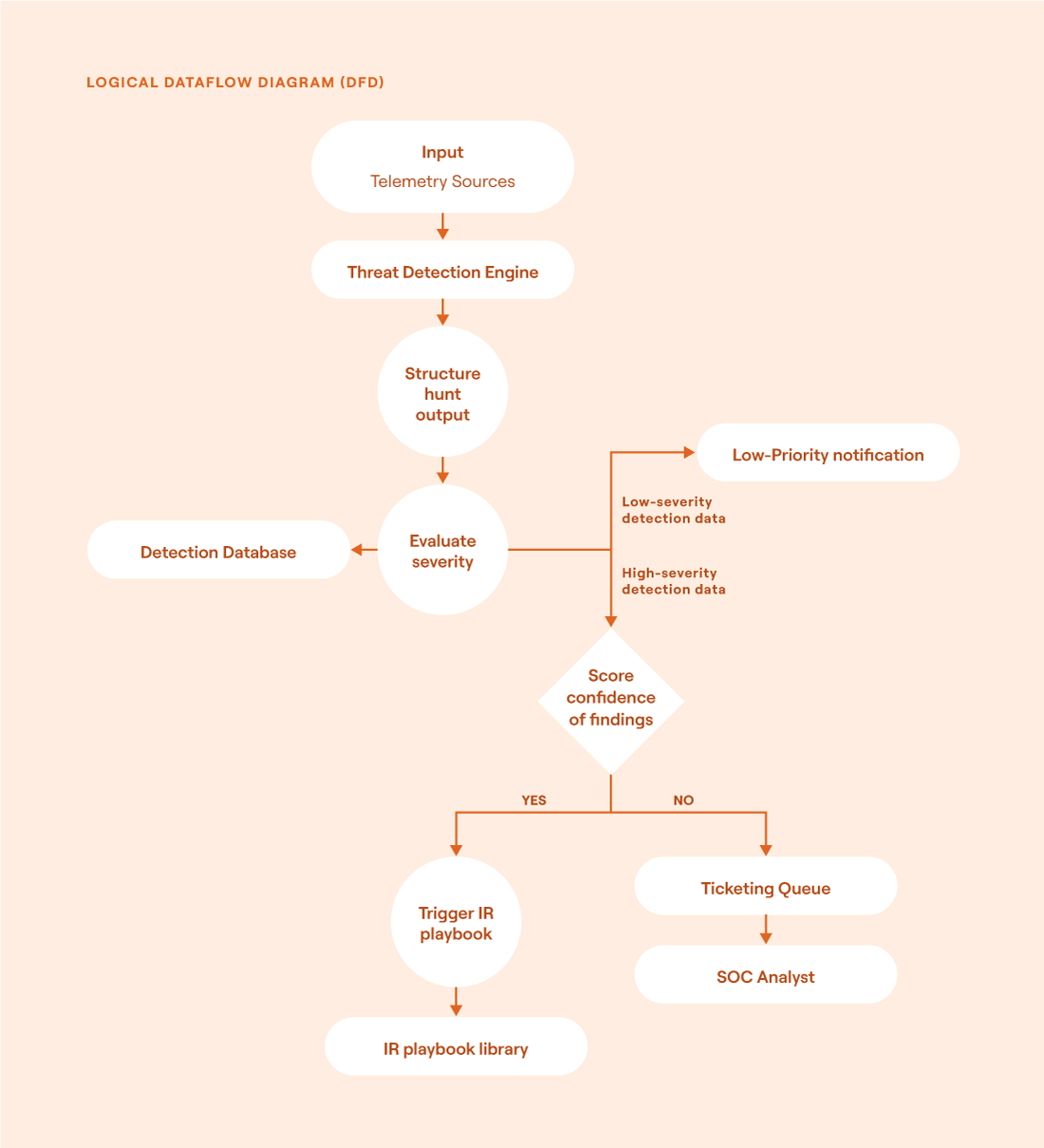
Logical dataflow diagram (DFD) for operationalizing hunt outputs (source)
The flow of information is as follows:
Telemetry sources provide the raw data that feeds into the detection engine.
The threat detection engine matches incoming data against predefined hunt logics or behavioral signatures to identify potential threats.
When a match is found, the system structures the output into a standardized format. During this step, the data is also enriched by tagging it with metadata, attaching relevant context, and preparing it for downstream consumption.
The detection is scored for severity and confidence based on the system's internal logic, threat intel, and other contextual factors (i.e., asset value, anomaly strength).
All detections are stored in a central detection database to ensure that they’re retained for future analysis.
If a detection is deemed low-severity, it generates a passive notification for analyst awareness but does not require immediate action.
For high-severity detections, the system evaluates the confidence level of the findings and checks that confidence score against a predefined threshold for automation (e.g., ≥ 95%).
If it meets the 95% confidence threshold, the detection automatically triggers an incident response workflow. This playbook might include tasks such as host isolation, further enrichment, containment, etc.
If the confidence is lower or the action requires human input, the detection is routed to a ticketing queue where a SOC analyst can investigate and escalate if necessary.
Tag outcomes and feedback in a structured way
The goal is always to improve, for which automated threat hunting systems need structured feedback. When analysts review hunting results, their conclusions should be captured in a way that automation can understand. Without that feedback loop, detection logic can remain static and will become less effective in adapting to new behaviors.
Structured tagging makes hunt evaluations reproducible and supports automated tuning. It also builds analyst trust by showing that their input shapes future hunts. Over time, this data becomes extremely important for fine-tuning security systems.
Let’s look at an example of feedback tagging for suspicious authentication activity. After completing a hunt focused on failed login attempts, an analyst tags each event with one of four outcomes: true_positive, false_positive, needs_review, or confirmed_evasion.
{
  "detection_id": "85723",
  "rule": "Suspicious Auth",
  "outcome": "true_positive",
  "analyst": "jsmith",
  "timestamp": "2025-06-27T10:14Z",
  "notes": "User confirmed brute force"
}
These tags are stored alongside the original detection metadata in a structured format (i.e., JSON or CSV).
| Detection ID | Outcome Tag    | Analyst  | Timestamp            | Confidence |
|--------------|----------------|----------|----------------------|------------|
| 85723        | true_positive  | jsmith   | 2025-06-27 10:14 UTC | 95%        |
| 85724        | false_positive | msanchez | 2025-06-27 10:21 UTC | 50%        |
| 85725        | needs_review   | -        | -                    | 68%        |
Next, a tuning script reviews this feedback to adjust detection thresholds and prioritize which hunt logic needs revision or reinforcement. Using this model is ideal for DevSecOps and feedback-driven environments.
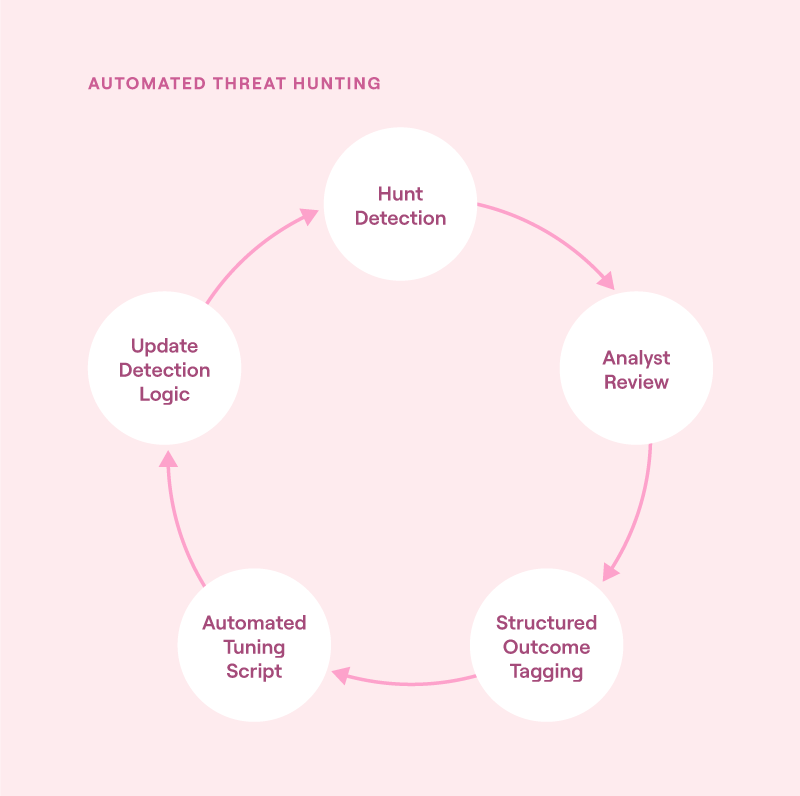
Feedback loop for automated threat hunting: analyst tagging feeds into detection tuning, creating a continuous cycle of refinement and improved accuracy (source)
Final thoughts
Automated threat hunting is a natural next step for defending today’s fast-moving and highly complex environments. Teams can spot threats faster and more reliably by turning expert ideas into repeatable logic, combining data with threat intel, and connecting results directly to security operations. But automation alone is never enough. The best security strategies still involve analysts to collect feedback and improve over time. As threats grow more advanced, organizations’ cyber defense strategies need to keep up. As such, automated threat hunting is no longer just a “nice-to-have” but instead a core part of modern cybersecurity.
Here are some key takeaways:
Start with repeatable workflows: Use automation to reduce manual overhead and improve consistency.
Normalize data early: Structured telemetry enables cross-platform integration and scalable security efforts.
Formalize hunt logic: Parameterized queries make detections reusable, tunable, and version-controlled.
Enrich with threat intel: Context helps prioritize threats and focus attention where it really matters.
Operationalize outputs: Route results to downstream systems to ensure that significant detections are acted on appropriately.
Close the loop: Structured feedback from analysts enables continuous tuning and improves detection quality over time.