

Federal cybersecurity just got a meaningful reset.
On May 22, 2026, the Office of Management and Budget issued M-26-14, quietly retiring the familiar-but-frustrating M-21-31 and replacing it with something more purposeful: a risk-based, outcome-driven logging framework built around two clear priorities; federal logging and visibility
If M-21-31 said "collect everything," M-26-14 says "understand and act."
That's a shift security practitioners have been asking for. And the good news for federal agencies staring down a tight compliance clock: a lot of the work to get there is already done.
What changed and why it matters
M-21-31 established valuable logging baselines across the federal enterprise. But it also created operational pain — escalating storage costs, unmanageable data volumes, and alert fatigue that made it harder to detect actual threats.
M-26-14 addresses that directly. It replaces rigid data collection mandates with a flexible framework focused on actionable intelligence, organized around two objectives every SOC team values:
Continuous Event Monitoring (CEM)
Real-time monitoring, anomaly detection, and rapid response. Logs must be actively searchable for a minimum of six months.
Threat Hunting, Investigation, Response, and Forensics (THIRF)
The ability to reconstruct what happened after a known or suspected compromise — centralized logs, attack pattern mapping, forensic records. Logs must be retrievable for 12 months from multiple sources.
Both objectives apply to every information system an agency owns or operates, including IoT devices and operational technology. And both come with a compliance clock tied to CISA's upcoming Logging Reference Architecture (LRA):
The memo measures maturity across five elements: inventory visibility, collection coverage, collection operations, data retention, and log management. Overall maturity is determined by the lowest watermark across all five. Every element must move together.
Execution is a workflow problem that Tines solves
Understanding what M-26-14 requires is the easy part. Doing it continuously, at scale, across dozens of systems, with limited staff is exactly where intelligent workflows change the equation.
Tines was built by security practitioners who needed a way to stop doing the same thing twice and start spending time on the decisions that actually matter. The platform combines AI, automation, and integration with human oversight — without requiring specialized developers to build or maintain workflows.
The core principle is simple: if a tool has an API, Tines can orchestrate it. That means no rip-and-replace. No forced dependency on a single vendor ecosystem. Agencies meet M-26-14 using their current infrastructure in a way that is connected, orchestrated, and acts on data automatically.
One feature worth calling out specifically for federal teams: cURL to Tines. Paste any cURL command — from your SIEM's REST API, your threat intelligence feed, your ticketing system — and Tines converts it into a ready-to-use workflow action in seconds. Your existing tool stack and your existing credentials are connected immediately.
A complete CEM and THIRF workflow built from stories that already exist
The steps below illustrate how a full M-26-14 compliance can be facilitated with Tines, from initial alert ingestion through documentation and maturity reporting. Every stage maps directly to existing stories in the Tines library.
Here's what each stage looks like in practice.
Stage 1 — Alert ingestion: connecting your SIEM
M-26-14 requires that logs be accessible to the SOC and support real-time anomaly detection. Tines connects to any SIEM via API — on a schedule, via webhook, or both — and immediately begins acting on what it receives.


Manage Logz.io SIEM Alerts: Queries Logz.io on a 15-minute schedule, retrieves alerts from the past 15 minutes, and creates a Jira ticket for each event with full context. The same pattern works for any SIEM with a REST API.
Also available in the library:
Gather correlated Splunk searches and add to Anvilogic use cases
Investigate and enrich suspicious Office 365 login Elastic alerts
The API connection: Each of these stories uses an HTTP Request action built from the SIEM's REST API — a scheduled POST to Splunk's Search API, or a query to the Elastic Detection Engine API. Import the cURL command, add your credentials as a stored secret, and the connection is live.
Stage 2 — AI triage: cutting through the noise
CEM is about more than ingesting logs. It's about identifying what actually requires attention before it reaches an analyst queue. Leveraging the Tines AI agent action, agents read incoming alerts, locate the relevant agency SOP, and classify each event — automatically.


Triage alerts with agents using SOPs in Confluence
Streamline security alert handling by automatically identifying and executing the appropriate Standard Operating Procedures. When an alert triggers, the first AI agent analyzes it and locates the relevant SOP in Confluence. The system then creates a case record and dispatches it to a second AI agent that performs all required remediation steps. All actions are documented in the case history, with automatic notifications sent to the on-call team via Slack.
Tools
AbuseIPDB, Confluence, CrowdStrike, EmailRep, Okta, Slack, Tavily, Tines, URLScan.io, VirusTotal
Triage alerts with agents using SOPs in Confluence: When an alert triggers, the first AI agent analyzes it and finds the relevant SOP stored in Confluence or SharePoint. A second agent executes the required remediation steps. A Tines Case is opened with a complete audit trail. The on-call team is notified via Slack. All of this happens automatically, before a human ever needs to look at a screen.
Also available in the library:
Human-in-the-loop, by design: Every triage story can be extended with a Tines prompt action — a structured question sent to an analyst via Slack or email before any high-stakes action executes. The analyst's decision, and the reasoning behind it, is recorded in the Case history with a timestamp. That record becomes your compliance audit trail.
Stage 3 — Log enrichment: context that changes decisions
Before routing an alert to the CEM or THIRF path, your Tines workflow enriches it by running parallel API calls to multiple threat intelligence services simultaneously to determine whether the event involves a known IOC, a compromised asset, or a benign anomaly.


Analyze an IP in many services at once
Analyze an IP address across some of the most popular IP reputation and enrichment services, and consolidate results using the best data.
Tools
AbuseIPDB, APIVoid, GreyNoise, Jira Software, Pulsedive, VirusTotal
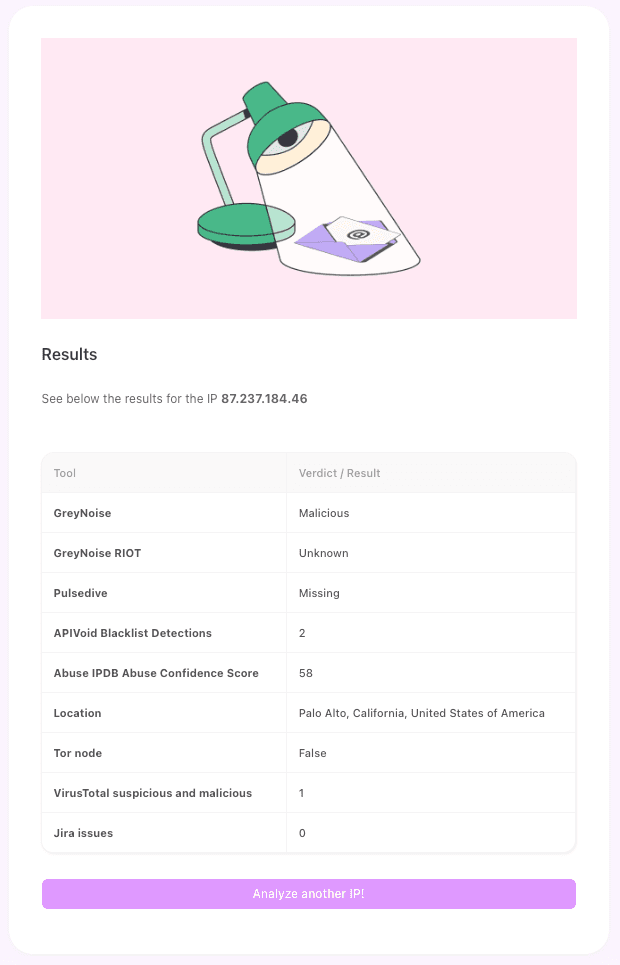
Analyze an IP in many services at once: Submits an IP address to AbuseIPDB, VirusTotal, GreyNoise, and PulseDive simultaneously — not sequentially — and consolidates the best available intelligence into a single enriched output. This is how raw SIEM data becomes actionable context.
Also available in the library:
The API connection: Enrichment calls are simple HTTP GETs and POSTs. AbuseIPDB: GET /api/v2/check?ipAddress=<ip>. VirusTotal: GET /api/v3/ip_addresses/<ip>. The parallel execution pattern Tines uses — running all enrichment calls simultaneously rather than one at a time — significantly reduces total triage time and keeps SOC queues moving.
Stage 4 — Timestamp and retention validation: automated compliance checks
M-26-14 sets specific baseline requirements: NTP-synchronized timestamps, logs searchable for six months, logs retrievable for 12 months. In Tines, your workflow checks these automatically and creates remediation tickets when gaps are found. This ensures compliance issues are caught and addressed before they become audit findings.


Gather & add correlated searches in Splunk Enterprise Security to Drata: Queries the Splunk notable index, gathers correlated search results, and adds them as evidence directly to logging security controls in Drata..
Also available in the library:
Stage 5a — CEM response: act fast, document everything
When an alert is classified as a CEM anomaly, the Tines workflow opens a Case, notifies the SOC, and — before any high-stakes action is taken — puts the decision in front of a human analyst. The analyst's response is recorded. Every escalation path is documented.
Triage alerts with agents using SOPs in Confluence
Streamline security alert handling by automatically identifying and executing the appropriate Standard Operating Procedures. When an alert triggers, the first AI agent analyzes it and locates the relevant SOP in Confluence. The system then creates a case record and dispatches it to a second AI agent that performs all required remediation steps. All actions are documented in the case history, with automatic notifications sent to the on-call team via Slack.
Tools
AbuseIPDB, Confluence, CrowdStrike, EmailRep, Okta, Slack, Tavily, Tines, URLScan.io, VirusTotal
The CEM path in Tines handles:
Case creation: Full event context captured in a Tines Case, timestamped and attributed
SOC notification: On-call team alerted via Slack, Microsoft Teams, or email
Human-in-the-loop escalation prompt: "Escalate to CISA?" — the analyst decides; the decision is recorded
API-driven transmission: If escalated, the Tines workflow sends the log bundle to CISA in the agreed format via API
Also available in the library:
Stage 5b — THIRF investigation: reconstruct, map, and report
When a known or suspected compromise is identified, M-26-14 requires agencies to centralize logs from multiple sources, map attack patterns, generate forensic records, and report structured findings to CISA or the FBI. In Tines, you manage all of it end to end.
[Embed: Replay Data with Cribl into Elastic Security and isolate hosts — show webhook trigger, Case creation, IP enrichment, Elasticsearch query for related hits, human decision prompt, host isolation]
Replay Data with Cribl into Elastic Security and isolate hosts using Elastic Agent: Receives a webhook from Elastic, creates a SIEM case, enriches the IP with location and threat intelligence, queries Elasticsearch for related events across the environment (log centralization in action), and presents the analyst with an isolation decision. If confirmed, the host is isolated via Elastic Agent. Every step is documented.
Also available in the library:
Stage 6 — Documentation and maturity reporting: the audit trail that writes itself
Every action your Tines workflow takes is logged with timestamp, actor, and outcome. Cases maintain a living record of every incident, decision, and remediation step. Maturity model evidence is generated automatically and ready to export for CISO logging plan submissions.

This matters specifically for M-26-14's Agency Logging Plan requirement. The memo requires agencies to document "the operational steps required to deploy and maintain effective CEM and THIRF objectives." Your Tines workflow generates that documentation automatically from the storyboard itself.
The outcome? Workflows mapped to the evolving requirements for federal environments
A few things matter specifically for government agencies that make Tines’ intelligent workflow platform different from a general automation platform:
Self-hosted deployment. Tines self-hosted keeps all data within the agency's own infrastructure. Nothing transits an external network. AI model interactions stay within the agency stack — private by design.
Human-in-the-loop controls. High-stakes actions — transmitting data to CISA or the FBI, isolating a host, escalating an incident — require analyst approval before execution. Governance is part of everything you build.
Scale across agencies without rebuilding. Story templates built once by a central team — CISA, a shared services provider, or a system integrator — can be shared across agency tenants. Each agency customizes for its own tool stack without starting from scratch. The same core workflow logic, deployed consistently everywhere.
No specialized developers required. SOC analysts build, update, and maintain workflows using an intuitive drag-and-drop storyboard — or by describing what they need in plain language and letting Tines generate the workflow automatically. Every member of the team can read and understand what a workflow does and how to manage it. When requirements change, analysts update the story — not developers.
The compliance clock is running
CISA has until mid-August 2026 to publish the Logging Reference Architecture. Once it does, agencies have 90 days to submit their logging plans and 120 days to reach Level 1 maturity across all five elements.
The window to prepare is now. And with these workflows readily available, the starting line is closer than it might seem.
Agencies that act before the LRA lands will be positioned to submit compliant logging plans and reach the first maturity levels well within the 120-day deadline — without rebuilding their infrastructure, hiring specialist developers, or waiting months for a legacy SOAR to be deployed.
Explore the Tines library and start adapting these stories for your agency: tines.com/library
See it in action: Streamlining security, operations, and compliance: Automation strategies for federal agencies — webinar with ThunderCat Technology and GovExec
Read the federal platform overview: Tines self-hosted — Intelligent workflow platform for federal operations