
New hires shouldn't spend their first week waiting on IT. But in most organizations, that's exactly what happens: a Slack account that takes three days to provision, a GitHub invite that falls through the cracks, a hiring manager who has no idea whether security has approved VPN access yet. The result is a frustrating first impression for the employee and a pile of repetitive, error-prone manual work for IT.
This article walks through how to build IT onboarding automation using a provisioning agent built in Tines 3B. We'll cover the problem, the exact prompt used to build it, and a step-by-step breakdown of how the agent connects your HRIS (Workday, BambooHR), identity and access management tools, provisioning APIs (Google Workspace, GitHub, Salesforce, VPN), and collaboration platforms like Slack to automate onboarding end to end.
Why IT onboarding gets delayed
Ask any IT or People Ops team what onboarding looks like today, and you'll hear a familiar story. A new hire is added to the HRIS. Then a scramble begins across half a dozen disconnected systems to get that person ready for day one.
What practitioners are trying to accomplish
The goal is simple on paper: have every account, permission, and piece of hardware ready before a new hire's start date, with the right stakeholders informed and nothing falling through the cracks. In practice, this means coordinating identity provisioning, hardware logistics, SaaS access requests, and internal communications - often for dozens of new hires a month, each with role-specific requirements.
Why this is hard today
Provisioning typically requires someone to manually match a new hire's role to a checklist of accounts and approvals, then chase down IT, Security, and the hiring manager - each working from separate task lists with no shared source of truth. The friction shows up everywhere: tool sprawl across email, Slack, GitHub, Salesforce, VPN, and directory systems; handoffs that live in easy-to-miss Slack DMs or emails; and no shared visibility into status, so bottlenecks go unnoticed until the new hire shows up without access on day one.
What better looks like
Speed can't come at the expense of control - privileged access like VPN or Salesforce still needs an approval gate and a clear owner, with every action logged to support audits and frameworks like SOC 2 or ISO 27001. A better process pulls new hire data from the HRIS automatically, provisions what it safely can via API, routes anything requiring judgment to the right human with a deadline, escalates when things stall, and gives IT, Security, and hiring managers one shared, auditable view of status.
An IT onboarding agent that provisions, delegates, and escalates
This is exactly the workflow built in the Tines 3B example gallery: an onboarding agent that streamlines IT onboarding for provisioning accounts for new hires before they start.
Tools and systems involved
The workflow connects categories of tools that will be familiar to any IT or People Ops practitioner:
HRIS platforms (Workday, BambooHR) as the system of record and trigger source
Identity and access management / provisioning APIs for email and Google Workspace, GitHub, Salesforce, and VPN
Collaboration tools like Slack for task assignment, nudges, and welcome messages
Directory tools for org chart and reporting-line data
Email for formal notifications and summaries
Together, these represent the core stack behind most automated provisioning tools used for IT onboarding today - HRIS as source of truth, identity providers and SaaS APIs for provisioning, and messaging platforms for human-in-the-loop coordination.
Inside the workflow: from HRIS trigger to day-one welcome
In this video, Danielle walks through how the workflow and app were built from a prompt in Tines 3B and how she uses it in her day-to-day role to streamline new hire onboarding.
1. How it works
The workflow is triggered the moment a new hire record is created in the HRIS. From there:
The agent reads role, team, manager, and start date from the HRIS record.
It cross-references that role/department against a standard onboarding checklist to determine which accounts and permissions are needed.
For each account that needs provisioning, tickets are created and routed to the appropriate owner (IT, Security, or the hiring manager, for example) with a due date set before day one.
Each day, the agent checks completion status. Tasks overdue by more than 24 hours trigger a friendly Slack nudge to the owner; after 48 hours, the task escalates to that owner's manager.
On day one, the new hire receives a welcome message containing links to their provisioned accounts, an org chart summary pulled from the directory tool, and a "who to ask about what" cheat sheet generated from their role and team context.
2. What it connects
HRIS data, identity/SaaS provisioning APIs (Google Workspace, GitHub, Salesforce, VPN), Slack, email, and a company directory tool are all connected within a single workflow - eliminating the need to manually bridge these systems yourself.
3. What it automates
Reading new hire context and matching it to a role-based onboarding checklist
Task creation, assignment, and routing for anything requiring approval
Daily status monitoring and escalation, replacing manual follow-up
Day-one welcome communication, org chart lookup, and cheat-sheet generation
4. How control is maintained
Access that requires judgment - not just API availability - is routed to a human owner rather than auto-approved. Escalation paths ensure stalled approvals don't go unnoticed, and every provisioning action and approval decision is logged, creating the audit trail needed for internal review or compliance frameworks like SOC 2 and ISO 27001. IT, Security, and the hiring manager all see the same shared progress view, removing the silos that let tasks slip through.
5. The outcome
By combining auto-provisioning, task delegation, and proactive monitoring, the workflow reduces time-to-productivity for new hires, cuts the manual coordination load on IT and People teams, and replaces ad hoc, inconsistent access approvals with a governed, auditable process - all from a single prompt-built workflow spanning five+ systems.
A centralized app for onboarding
A centralized app gives IT, Security, and hiring managers a single place to manage onboarding instead of piecing status together across inboxes and Slack threads. From this app, stakeholders can see exactly where each new hire stands - which accounts are provisioned, which approvals are pending, and who owns the next step along with a clear, visual breakdown of upcoming tasks and deadlines. Rather than relying on scattered tickets or ad hoc messages, everyone works from the same live view, which makes it immediately obvious where a request is stuck and who needs to act. This shared visibility doesn't just speed up resolution - it reinforces accountability, since every action and approval is tied to an owner and tracked in one place, ready to support audits down the line.
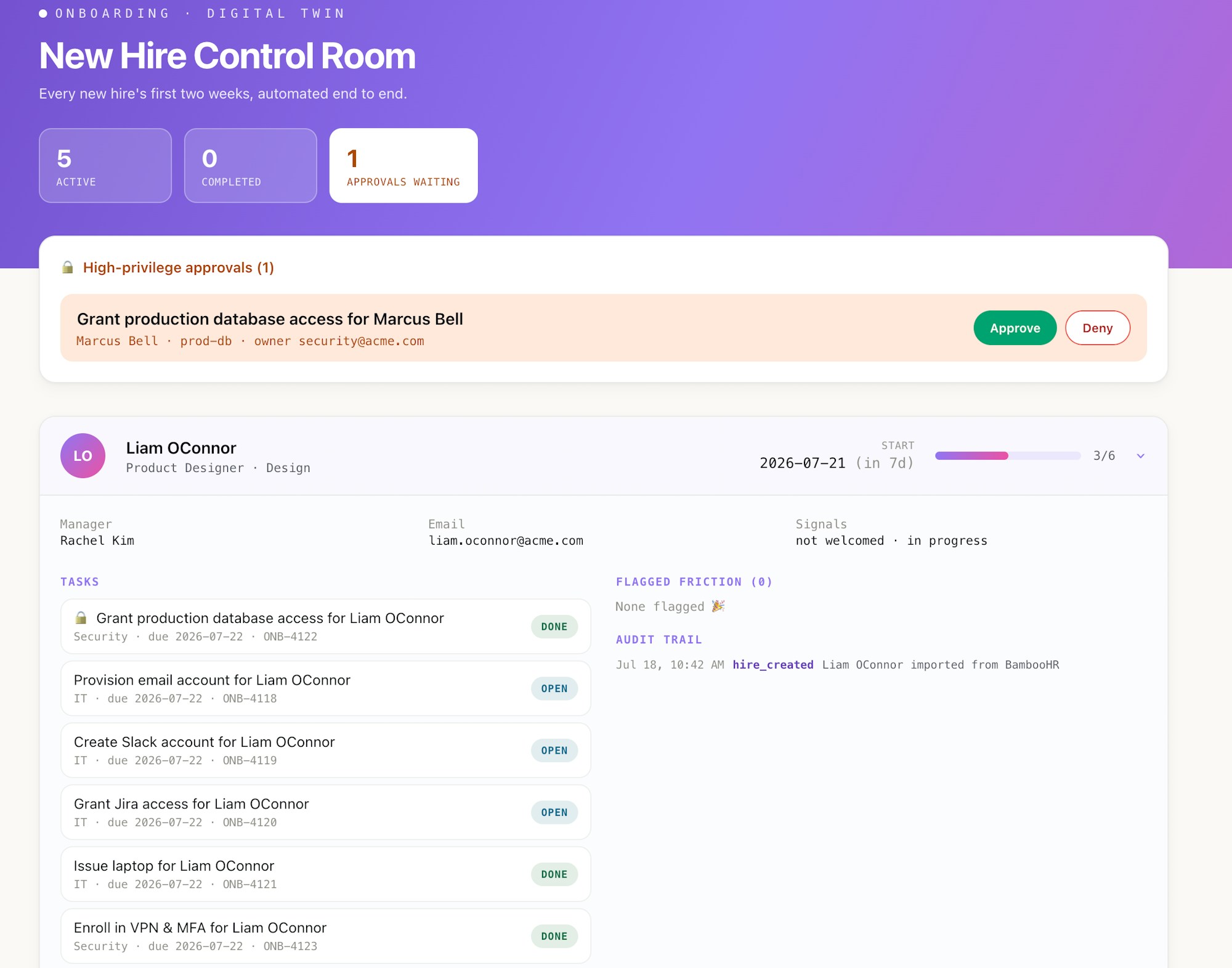
The Payoff: Faster Onboarding, Less Manual Work, Full Audit Trail
What's notable here isn't just the outcome - it's how easy it is to customize built. Import a working, multi-step onboarding agent then use natural language to easily connect your tools, make improvements, and add new capabilities, until the workflow is perfectly tailored to your needs. As your HRIS fields change, a new SaaS tool gets added to the stack, or your escalation policy shifts, the workflow can be adapted the same way: by describing the change, not rebuilding from scratch.
Beyond the initial build, 3B supports ongoing maintenance through features like auto-tune to refine workflow logic over time, auto-fix to catch and resolve issues before they cause failed provisioning runs, and built-in monitoring so IT always has visibility into what's running and what isn't.
Onboarding is just one piece of the identity lifecycle. Teams that build this workflow often go on to build related automations - like access reviews, offboarding agents, or ticket triage for IT requests - using the same prompt-to-workflow approach.
If your onboarding process still relies on manual checklists and Slack reminders, you can import a complete version of this agent into a free Tines 3B Explore account and start customizing today!