
Many teams have a version of the same story. An analyst is copying indicators of compromise (IOCs) between five browser tabs at 2 AM. An IT manager is waiting two months for a developer to build one onboarding workflow. Or a Python script that triaged alerts perfectly until its author left, and nobody could read the code.
The workflow builder category has shifted twice in the past decade. First is when drag-and-drop canvases moved building from developers to analysts and operators, and now, as AI lets anyone describe a workflow in plain English and get a working draft in seconds.
The instinct most teams follow when evaluating workflow builders (pick the one with the prettiest canvas or the longest connector list) misses the factors that matter in production. These include governance, security controls, the ability to mix deterministic and AI-driven steps, and the platform's ability to scale beyond one team.
This article breaks down what a modern workflow builder is, how visual canvases and AI each shifted what's possible, what separates enterprise-grade builders from basic ones, and where the category is heading.
What is a workflow builder?
A workflow builder is a platform for visually designing and executing multi-step automated processes. It combines triggers, conditional logic, pre-built integrations, data operations, and AI agent steps to run operational or business processes with minimal manual intervention.
In practice, a modern workflow builder looks like a visual canvas. You drag actions onto a board, connect them with logic paths, and set triggers, such as a webhook firing from CrowdStrike or a form submission.
From there, you deploy the result to production. Security teams, in particular, rely on workflow automation to handle high-volume processes like alert triage, enrichment, and incident response, while IT teams use it to streamline employee onboarding, access provisioning, and ticket routing.
Industry analysts have grouped these capabilities into categories such as Business Orchestration and Automation Technologies (BOAT). These frameworks highlight defining traits such as enterprise connectivity, business process orchestration, and low-code development. They also point to agentic automation, document processing, and platform operations.
The distinctions from adjacent categories matter for procurement:
Form builders: Capture data input. A submitted form might trigger a workflow, but the form builder stops at collection while the workflow builder manages everything that happens after.
Business Process Management (BPM) modelers: Broader in scope. A workflow engine is a component within BPM, not a replacement for it.
Robotic Process Automation (RPA) recorders: Operate at the UI screen layer, recording and replaying clicks and keystrokes. They break when processes change because they're bound to interface elements.
Workflow builders: Operate at the API and integration layer, connecting systems through APIs designed for programmatic access.
The workflow builder sits between the data-collection layer (forms) and the enterprise-governance layer (BPM), handling the execution logic that connects systems, applies conditions, invokes AI, and routes work to humans when judgment is required.
How visual canvases reshaped who can build workflows


Visual canvases changed the economics of workflow building. Before canvases, automation meant developer tickets. After canvases, analysts and operators could build their own.
Early workflow automation lived in shell scripts and cron jobs. A Python script that triaged phishing alerts sat on one engineer's laptop; if that engineer left, the automation became technical debt. Cron had no built-in retries, no error surface, and no way for a non-developer to inspect what was running.
When Security Orchestration, Automation, and Response (SOAR) platforms introduced visual playbook editors in the late 2010s, conditional branches that had been buried in if/elif/else blocks became visible nodes on a canvas.
First-generation SOAR canvases still required deep scripting knowledge, but by 2020, low-code and no-code canvases reduced that dependency. Analysts became accidental programmers, building production automation without writing code.
Scripts were solo artifacts: one author, one maintainer, zero shared visibility. Visual canvases made collaboration a structural property. Platforms introduced shared canvases where analysts could collaborate in real time and run security actions together. When all stakeholders can see the same canvas, the workflow reflects operational reality rather than a single engineer's mental model.
The canvas also made new logic constructs accessible to non-developers. Conditional branches let analysts route high-severity alerts to one path and low-severity alerts to another.
Parallel paths let enrichment calls to VirusTotal, IPAM, and a threat intelligence feed run simultaneously. Reusable sub-workflows meant teams could build a standard "isolate host" block once and call it from 50 different playbooks. Each of these constructs existed in code, but the canvas made them accessible to the people closest to the operational problem.
How AI is reshaping what builders can do
Visual canvases changed who could build. AI is changing both how workflows get built and what they can do once they run. Three shifts are happening simultaneously.
1. Natural-language workflow creation
Describing what you want in plain English and getting a working workflow back is now available on a growing share of workflow platforms. The person closest to the problem can now be the person who builds the workflow.
An IT manager who knows the onboarding process inside out doesn't need to translate requirements into a ticket for an engineer; they can describe the process and refine the resulting outcome.
2. AI agents act as native workflow steps
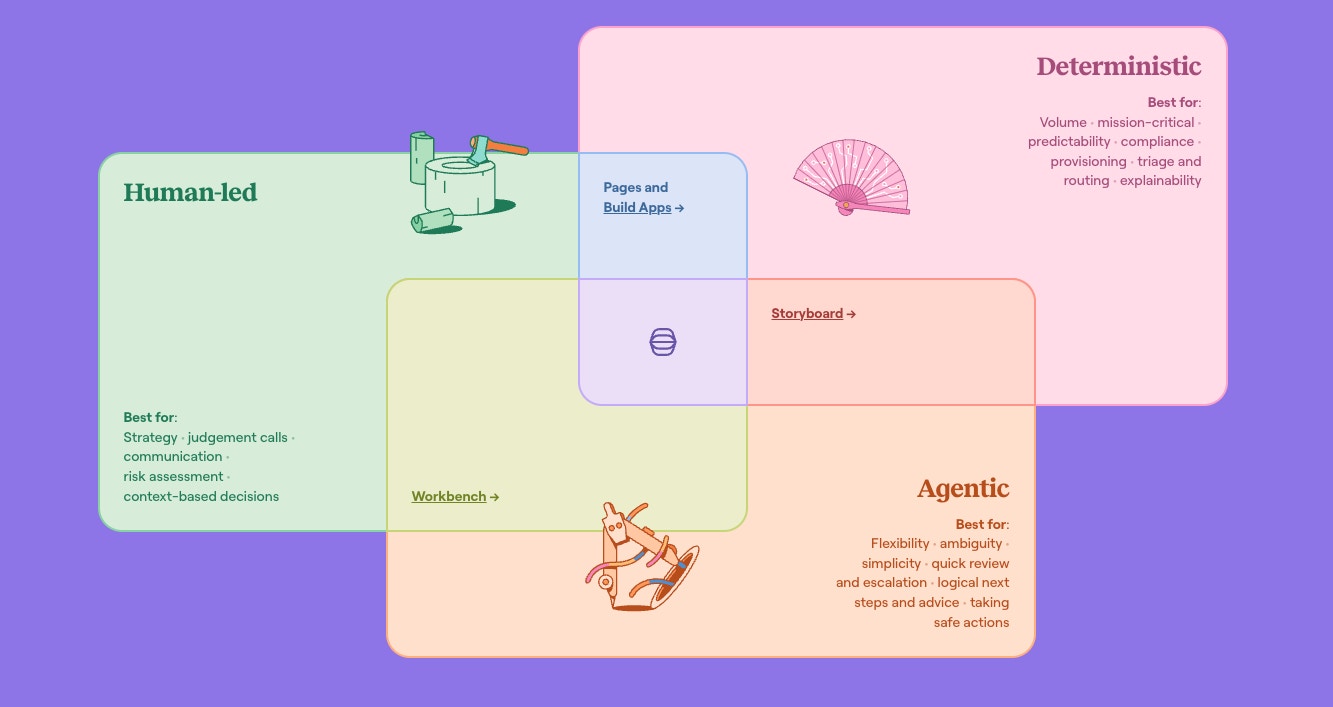
The architectural shift is to embed AI reasoning directly within workflows as discrete steps that sit alongside deterministic actions. This pattern is often described as separating probabilistic LLM-based cognition from deterministic workflow execution.
AI agents interpret unstructured data (email bodies, ticket descriptions, log entries) while deterministic actions handle the predictable execution (creating tickets, provisioning accounts, sending notifications). Human-in-the-loop escalation triggers when confidence thresholds aren't met.
Guardrails are built into the architecture, not layered on after the fact. Instruction-level controls constrain AI output formats. Platform-level governance enforces data protection and compliance.
Confidence thresholds route low-certainty results to human reviewers. Tines saw 302% growth in customer LLM usage in FY2026, and that adoption is concentrated on platforms where AI runs as a native workflow step rather than a separate chatbot. This is the shift that defines an intelligent workflow platform: AI agents, deterministic steps, and human approvals all running on the same governed surface.
3. AI acts as a debugging and improvement partner
AI doesn't stop contributing after the build. It can support debugging existing workflows with real-time feedback, surfacing required credentials and parameters that need human attention.
The AI can explain what a workflow does (critical when the original builder has left the team), flag error patterns, and suggest where new AI steps could replace manual enrichment.
What separates an enterprise workflow builder from a basic one
Enterprise workflow builders stand apart from basic ones in a few critical ways, and governance and security controls are usually where evaluations are won or lost. Forrester research commissioned by Tines reinforces this from another angle: 88% say that without orchestration, AI stays fragmented. With that context in mind, here are the five capabilities that define an enterprise-grade builder:
Governance built into the canvas: No-code and low-code tools can create "rogue" automations that increase security and compliance exposure at scale. Regulators are pushing in the same direction, with frameworks like the EU AI Act requiring high-risk AI systems to support automatic event recording. Enterprise builders meet this bar by making every action attributable, every change tracked, and every AI invocation logged as part of the platform architecture.
Security-grade controls from day one: Role-based access control (RBAC), secrets management, change control, and test-live credential separation aren't features in an enterprise builder; they're the foundation. Platforms built for enterprise use are expected to incorporate these controls into the core product architecture.
All four building modes on a single surface: Enterprise environments contain different builders with distinct skill sets. SOC analysts need drag-and-drop. Security engineers need full code access for custom logic. Operations builders need low-code formulas to extend logic without writing full scripts. IT managers need natural-language generation to prototype fast. Platforms locked to a single mode either recreate the developer bottleneck (code-only) or cap what experienced builders can do (no-code only).
Full-spectrum execution in one workflow: Deterministic steps handle predictable, auditable work. Agentic AI steps through ambiguity within guardrails. Human-in-the-loop steps place people at decision points requiring judgment. Most real-world processes need all three. Triaging a CrowdStrike alert, enriching it with VirusTotal data, scoring it with an AI agent, and routing low-confidence results to a Slack approval channel requires all three execution types within a single flow.
Vendor-agnostic integration depth: The number of connectors matters less than whether those integrations can handle real production requirements like bidirectional sync, field-level mapping, error handling, and bulk operations. Enterprise builders connect to anything with an API, including internal tools, security platforms, and identity providers, without ecosystem lock-in.
Platforms that meet all five criteria aren't basic workflow builders anymore. They're intelligent workflow platforms.
From workflow builder to intelligent workflow platform
Workflow builders have evolved from developer tools into the orchestration layer where deterministic automation, AI agents, and human judgment operate together under unified governance. As AI shifts from experimentation to enterprise-wide orchestration, platforms built with governance and full-spectrum execution from the start are best positioned to lead.
Tines reflects this shift through its intelligent workflow platform. In Storyboard, teams build stories (Tines' term for workflows) using all four modes: natural language via Story Copilot, no-code, low-code, and full Python.
Stories run deterministic, agentic, and human-in-the-loop steps on one governed surface, with every action logged, every AI invocation auditable, and every credential managed centrally.
Jamf's security team lived this shift firsthand. Before Tines, they built workflows as Python web apps. Each one took about a week, and only Python-experienced engineers could touch the code. After moving to Storyboard, build time dropped 95% (from a week to one to two hours), and 20+ new builders joined the team, a 4x increase.
"I checked out Tines and just started building really awesome things really fast," says Andrew Katz, Senior Information Security Engineer at Jamf. "I was impressed by how fast it was to drag and drop actions and configure them. It was significantly faster than writing the same thing in Python."
Born in security, where audit trails are non-negotiable, the platform now extends into IT operations, RevOps, and beyond. Request a demo to see Tines in action.
Frequently asked questions on workflow builders
What does a workflow builder do that a form builder or RPA recorder doesn't?
A workflow builder executes multi-step logic across systems, applying conditional branches, AI reasoning steps, and human approval gates to data flowing between tools such as CrowdStrike, Okta, Slack, and ServiceNow. A form builder captures input but doesn't orchestrate what happens next.
An RPA recorder replays UI-level clicks and breaks when interfaces change. Workflow builders operate at the API layer, connecting systems through stable programmatic interfaces rather than brittle screen-level interactions.
Can non-technical users really build production workflows?
Yes, when the builder supports natural-language generation and visual configuration alongside code. Story Copilot and similar AI assistants let non-technical builders describe a workflow in a sentence and get a working draft they can refine. The canvas provides visual feedback on logic paths, error states, and data flow.
The same platform also supports low-code formulas and full-code actions, so experienced engineers can extend what non-technical builders start without switching tools.
How does AI fit inside a workflow builder without becoming a black box?
AI steps run as configured actions with defined inputs, structured outputs, guardrails, and audit logs. In a governed agentic architecture, the team's Agents and AI Actions operate within the controls the team sets at build time.
When the AI acts, the platform logs what data went in, what decision was made, and what action was taken. Low-confidence results are routed to human reviewers rather than executed automatically. The AI operates within the same governance framework as every deterministic action on the canvas.
What should teams look for when evaluating an enterprise workflow builder?
Governance built into the architecture (audit trails, RBAC, change control), not bolted on as a configuration option. Multi-mode building (natural language, no-code, low-code, full-code) on one surface.
The full spectrum of execution: deterministic, agentic, and human-in-the-loop in any combination. Vendor-agnostic integration that connects to anything with an API. And proven cross-team scale, because a platform that only serves one department will get replaced by one that serves the organization.