
When a security alert fires, your analyst opens your security information and event management (SIEM) platform, copies an IP address, pastes it into a threat intelligence platform, checks the asset inventory, cross-references the identity provider, and messages the on-call lead on Slack.
Meaning your analyst needs to wade through five tools, taking at least ten minutes before any actual response begins.
This pattern shows up in many business processes across security, IT, HR, finance, and revenue operations. Organizations often automate individual tasks but still leave humans as the integration layer, copying data between systems and holding processes together with memory and messages.
The integration layer is where the cost shows up. Time leaks into context-switching, errors compound from stale data, and headcount has to grow with tool count just to keep processes running. What teams need isn't another point automation solution. It's something that carries the whole process end-to-end.
Business process automation (BPA) is what takes people out of that integration layer. It orchestrates entire sequences of work across multiple systems and teams with minimal manual intervention. And the category built to run BPA at scale is the intelligent workflow platform, one governed surface that combines deterministic steps, agentic AI, and human-led decisions.
What is business process automation?
Business process automation (BPA) runs an entire sequence of work across multiple systems and teams, from the trigger that kicks it off to the final record update, with minimal manual intervention.
A BPA workflow combines rule-based steps, AI decisions, and human approvals into one executable process that reads from and writes to every tool it touches. The defining scope is end-to-end: BPA doesn't automate a task inside one system; it carries the work across all of them.
Real processes rarely live inside one tool. Onboarding a new hire touches the HR system, the identity provider, Slack, email, and whatever provisions the laptop. Responding to a security alert pulls from the SIEM, threat intelligence, asset inventory, and identity.
BPA runs sequences like these end-to-end, including the handoffs between systems and the points where a person needs to weigh in.
BPA vs. task automation vs. RPA vs. BPM
BPA gets lumped in with every other category that touches workflows. Each one solves a different slice of the problem, and BPA is the layer that ties them together.
Task automation: handles a single discrete step, like sending a notification when a form is submitted. BPA covers the full sequence around that step, spanning intake, validation, routing, approval, notification, and record update.
Robotic process automation (RPA): mimics a human clicking through a UI. Best suited for legacy systems where API connections are impossible or too costly. BPA connects systems natively through APIs instead.
Business process management (BPM): a discipline, not a technology. Covers the methods used to discover, model, analyze, and improve how work gets done. BPM may or may not include automation.
AI agents: reason through ambiguity, make decisions, and adapt to changing conditions. But an agent alone doesn't know when to fire, what to do with its output, or when a human should step in instead.
BPA is the orchestration layer that ties all of these together. It determines when rules run, when AI acts, and when humans decide.
How BPA actually works under the hood
Understanding the mechanics behind BPA helps teams design better workflows and troubleshoot failures faster. Each workflow combines triggers, logic, human checkpoints, and system connections into a coherent process.
1. Triggers, logic, and state management
Workflows start when something triggers them. Common triggers include webhooks from an external system, scheduled events, and manual runs from a human who kicks off a process on demand. Each trigger carries a payload, which the workflow uses as input for the steps that follow.
Multi-step workflows also need a process engine that holds state across steps, not a stateless rules engine that fires once and forgets. State is what lets step 7 know what happened in step 2, what lets a workflow pause for human approval and resume where it left off, and what makes retries and error handling possible. Without state, every failure means starting over from scratch.
2. Human-in-the-loop steps
A workflow pauses, notifies a human through Slack, email, or a built-in approval surface, and waits for their input before continuing. The response could be a yes or no on an approval, a correction to an AI output, or a call on an edge case that the rules didn't anticipate. Once the human responds, the workflow picks up and runs to completion.
Some decisions shouldn't be automated at all. Large financial approvals, access grants to sensitive systems, and terminations need a named human on the record. Others can't be automated reliably yet. For example, judgment calls where context and accountability matter more than speed still need a person in the loop.
BPA carries every step up to the decision, hands the human clean context, and picks the process back up the moment they act.
3. AI within workflows
AI earns its place in a workflow when the work involves summarizing data, recommending next steps, classifying inputs, or generating hypotheses from unstructured information.
In practice, an AI step reads context from earlier steps, calls a model, and returns output that the rest of the workflow uses as input. A summary can feed into a ticket. A classification can route the process down one branch or another. A recommendation can populate a human reviewer's screen.
AI should not make final approvals, compliance sign-offs, or decisions that require accountability and reproducibility. The question isn't "Can AI do this?" but "Should AI do this?" The answer shifts by process, by risk, and by whether the output can be audited after the fact.
4. Integrations and the orchestration layer
The platform sits on top of the tech stack, not beside it. It connects to existing systems through APIs, reads and writes data across those connections, and doesn't replace the underlying tools. The SIEM stays the SIEM. The HR system stays the HR system. BPA is the layer that moves work between them.
Through BPA, a team can wire any system with an API into the same workflow, which is what turns individual automations into company-wide processes. A lead enrichment workflow and an onboarding workflow can share the same underlying connection to an identity provider.
That's the difference between dozens of point integrations maintained in isolation, and one orchestration layer every process runs through.
Why BPA matters more in 2026
BPA matters more now because the number of tools teams juggle has outpaced their ability to connect those tools manually. The Tines Voice of Security 2026 report captures the scale of the problem: 92% of security professionals say an intelligent workflow platform would be extremely or very valuable, and 73% expect their tech stack to grow further.
Tool sprawl, AI coordination gaps, and operational cost pressure are the three forces driving that demand.
The tool sprawl problem
Tool sprawl is the first forcing function. The same Voice of Security report found that 47% of teams running 75 to 99 tools report frequent burnout, and the 2025 Tines and AWS-sponsored IDC research found that 60% of security teams have fewer than 10 people, while 54.8% manage 20 to 49 tools.
Small teams operating enterprise-scale stacks can't hold those connections together manually, and point-to-point automation breaks down as the stack grows.
A familiar pattern appears across teams: security runs legacy security orchestration, automation, and response (SOAR) tools, IT stitches together scripts and lightweight automation tools, and RevOps has disconnected recipes. Nothing ties them together.
The AI coordination gap
AI adoption is near universal, but impact is not. McKinsey reports that 88% of organizations use AI in at least one business function while only 39% see enterprise-level impact. The gap is caused by the lack of an orchestration layer underneath.
Additionally, a Tines-commissioned Forrester study found that 88% of IT and security decision-makers say AI stays fragmented without orchestration. BPA is the scaffolding that turns an AI pilot into a process the business actually runs on. Without it, every AI output becomes another ticket for a human to route.
Operational cost pressure
Operational cost pressure is the third force. Budgets aren't growing at the pace of demand, and the cost per process keeps climbing. Headcount freezes, tool consolidation mandates, and leadership asking for more output from the same team all push in the same direction.
The math breaks when a team absorbs more scope each year without adding people, and most of the existing team's hours go to manual routing between systems instead of the decisions only they can make.
BPA is how teams claw that time back without adding bodies. Cycle times drop, errors fall, audit trails build themselves, and humans shift from routing work to handling the exceptions that actually need them.
What BPA looks like across teams
BPA isn't a back-office initiative. The most impactful workflows cross team boundaries. Each example below describes a multi-step process, not just a task.
1. Security
Incident response triage is the typical SecOps workflow for BPA. Alerts auto-enrich with asset owner information, user role, correlation with previous alerts, and threat intelligence before an engineer opens the queue.
Low-confidence results pause for human review within the ticket itself, so the engineer can isolate a machine or lock an account without switching tools. The before-state is familiar: an analyst moves between multiple tools to collect basic context.
At Brex, alerts had been funneled into Slack without enough context or prioritization. Through Tines, the intelligent workflow platform, the team built workflows that enriched, correlated, and routed every alert into a case. Up to 90% of weekly alerts are now analyzed and suppressed automatically.
Snowflake's security team reports a similar pattern at scale: 91.4% reduction in manual alert correlation, with roughly 10 hours saved per day across the team.
2. IT operations
IT teams run a constant stream of cross-system processes: ticket routing, access provisioning, device lifecycle, and software license assignment. Each one follows the same shape.
A request comes in, context gets pulled from multiple tools, a decision is made, and actions are pushed into downstream systems. Manual execution of that pattern is where IT time goes.
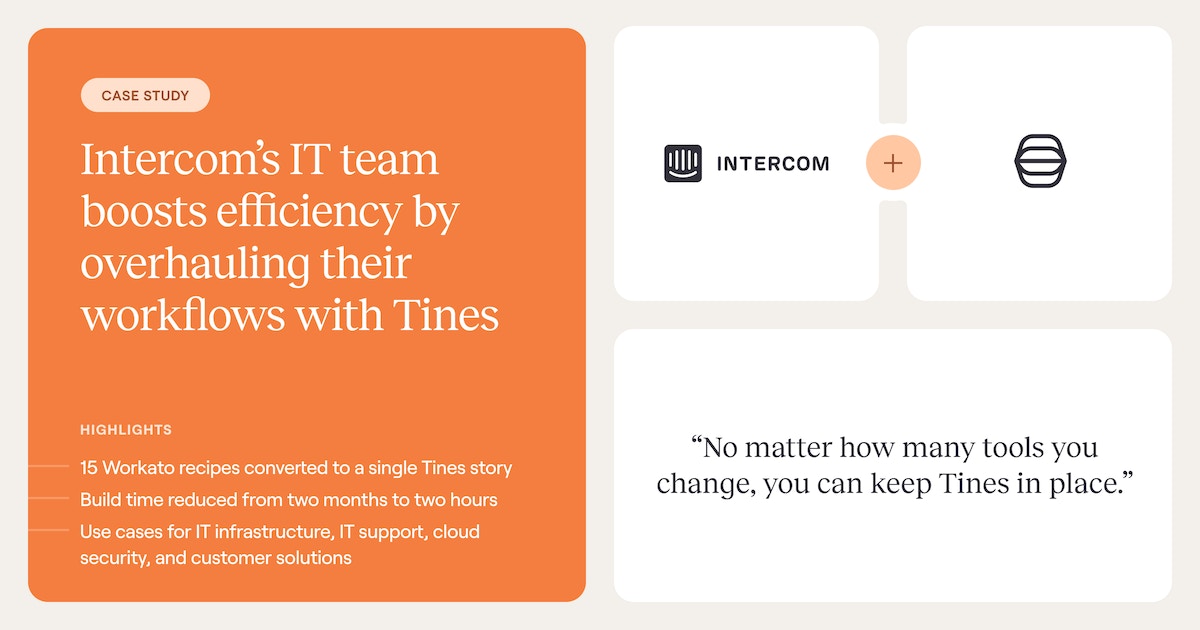
At Intercom, the IT team had been spending months building workflows in Workato. After moving to Tines, build time dropped from two months to two hours, and they consolidated 15 separate workflows into a single story. Employee onboarding that used to require 5 a.m. manual logins now runs automatically.
3. HR and people operations
Employee onboarding often spans multiple systems in a single workflow. A new-hire record in the HR system triggers account creation in the identity provider, provisions role-appropriate applications, and sends notifications across Slack and email.
Offboarding runs the inverse pattern, revoking access and reclaiming licenses as the record closes.
4. Finance
Purchase order (PO) approval workflows often combine human approval for amounts above a threshold with automated processing below it. The workflow pulls vendor data, applies policy rules, routes to the right approver based on amount and department, and writes the approval back into the ERP.
5. RevOps and sales
Lead routing is the canonical RevOps workflow for BPA. A new lead hits the CRM, triggers an enrichment call for firmographic and intent signals, runs through scoring logic, and lands in the right rep's queue with context already attached.
The same trigger-enrich-decide-act pattern scales across renewal workflows, deal desk approvals, and quote generation. Any process where data from multiple systems has to converge before a human acts.
How to identify which processes to automate first
Not every manual process is a good automation candidate. Automation amplifies whatever pattern it runs on, so automating a broken process produces broken output faster. These five steps help teams pick the right starting point:
1. Map the current process
Document what actually happens, not what the process doc says happens. Walk through the steps with the people doing the work. Note every tool they open, every handoff, every decision, and every place the process stalls.
The map reveals where time is spent and where data lives, both of which shape the automation that comes next.
2. Look for the operational signals
The best automation candidates share a few hard signals:
High transaction volume with identical execution steps each time
Repeated handoffs between people at the same predictable points
Rework loops that happen at consistent steps
SLA (service-level agreement) breaches concentrated in specific stages
The underlying pattern is predictable decision logic combined with high operational cost from running the process manually. A task that feels annoying isn't the signal, but a task that burns hours a week and follows the same path every time is.
3. Decide between full automation and orchestration
Processes with clear decision logic and low exception rates are candidates for full automation. Processes that include judgment calls, require different handling based on context, involve multiple teams, or carry compliance requirements need orchestration with human gates.
The question to ask at each step is whether the action should execute immediately once triggered, or surface information for a person to review first.
4. Fix the process before automating it
Automation should amplify a mature process, not hide a broken one. If the process has unclear ownership, inconsistent inputs, or rework driven by upstream problems, address those first. A clean, well-understood manual process is the prerequisite for a reliable automated one.
5. Start small and run in parallel
Pick one bounded process that's painful, visible, and measurable. Build the automated version and run it alongside the manual process for a few cycles. Compare outputs and fix edge cases. Once the automation matches or beats the manual result consistently, cut over and move on to the next candidate.
Making BPA work across the full spectrum
Business process automation is the orchestration layer that connects systems, embeds human judgment where it matters, and lets AI handle the ambiguity that rules can't cover. It operates at the process level, not the task level, and requires deterministic, agentic, and human-led workflows working together on one surface.
Most organizations have the pieces. They have the SIEM, the identity provider, the IT service management platform, and the CRM. What they lack is the connective tissue that makes those tools work as a coherent process.
Through Tines, the intelligent workflow platform teams reach for when BPA needs to run across every system in the stack, teams maintain governance that satisfies compliance requirements from day one, connect to any tool with an API, and build all three workflow types in a single secure environment.
Whether the starting point is security alert triage, IT onboarding, or finance approval chains, the same platform and the same workflow patterns carry across teams. That's why 75% of active Tines customers now span more than one department.
Ready to see what BPA looks like in practice? Sign up for the Tines Community Edition for free, or book a demo to talk to a product expert.
Frequently asked questions about business process automation
What's the difference between BPA and RPA?
RPA operates at the task layer, replicating human UI interactions with a screen. BPA operates at the process layer, orchestrating multiple steps, systems, decision points, and human handoffs across an end-to-end workflow.
The relationship is complementary. When a BPA orchestration layer needs to interact with software that has no API, an RPA bot steps in for that specific touchpoint.
What processes should not be automated?
Processes that are broken or poorly understood should be fixed first, then automated. Automation amplifies existing inefficiencies when the process hasn't been analyzed and improved.
High-stakes decisions with frequent exceptions, processes where the exception path is more common than the standard path, and compliance processes requiring named human attestation are poor candidates for full automation.
How do you choose between building custom automation and using a workflow platform?
Custom scripts work for isolated, single-system tasks where a team already has engineering capacity to build and maintain them. An intelligent workflow platform becomes the better choice when processes span multiple systems, require human approval gates, need audit trails, or when the team building automations includes non-developers.
The decision usually tips toward a platform once maintenance costs for custom scripts exceed the time saved.