Manage credentials
Credentials store sensitive information like API tokens and passwords. As a tenant owner, your role with credentials isn't always about using them in workflows (that's covered more in our Builder learning path series). While builders create and reference credentials in their workflows, you ensure they're organized properly, shared appropriately, and secured in accordance with your organization's policies.
Organize credentials with folders
As teams create more credentials, organization becomes critical. Folders help you group related credentials together, making them easier to find and manage.
Common folder structures include:
By service type (cloud services, communication tools, ticketing systems)
By environment (production, staging, development)
By department or business function
To manage folders, navigate to the Credentials page for a team and use the folder management options to create and organize credentials into logical groups.

UI location to create a new team credential folder.
🪄Tip
Credential access control
One of your key responsibilities is controlling who can access which credentials. By default, credentials are only accessible to the team that created them. However, you can configure access control to share credentials across teams.
Access control options include:
Current team only: Only members of this team can use this credential.
All teams: All teams in the tenant can use this credential.
Selected teams: Choose specific teams that can access this credential.
Current team's members' personal teams: Members can use this credential in their personal teams (if they have story run permissions).
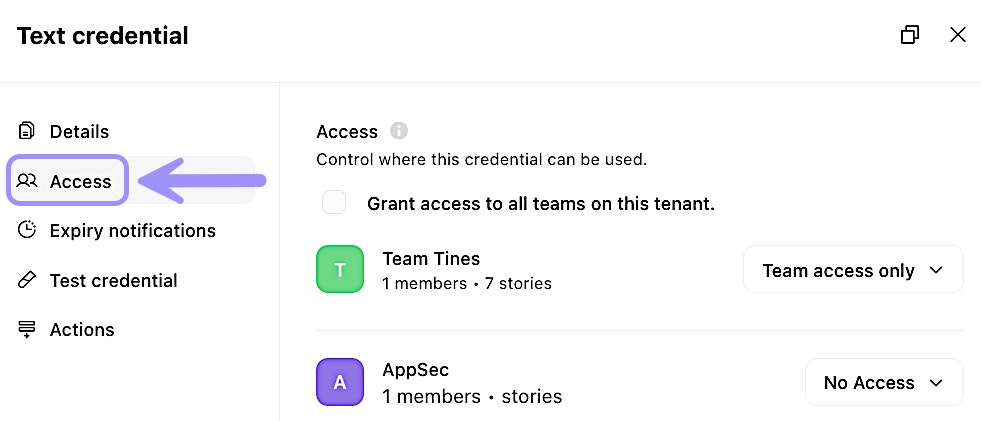
Access menu of a credential.
❗️Important
Manage resources
Resources store non-sensitive, reusable information that teams can reference across multiple workflows. As a tenant owner, you're responsible for organizing resources and controlling how they're shared, just like with credentials.
Common examples of resources include:
Configuration settings
Lookup tables and reference data
Lists of approved values (i.e., approved domains, email addresses)
Organize resources with folders
Like credentials, resources benefit from folder organization. As a tenant owner, you can establish folder structures that make sense for your organization:
By data type (configurations, templates, lookup tables)
By workflow purpose (onboarding, reporting, compliance)
By department or team function
Resource access control
Resources use the same access control model as credentials. You can configure whether a resource is available to:
The current team only
All teams across the tenant
Selected specific teams
Current team members' personal teams
When a resource is shared across teams, any updates to that resource automatically apply to all workflows using it. This is powerful for maintaining consistency but requires careful change management.
Tips for credential and resource management
As a tenant owner, consider these practices for effective management:
Establish naming conventions: Create and enforce consistent naming standards across teams (for example,
ServiceName_CredentialType_Environment).Regular audits: Periodically review which credentials and resources are shared tenant-wide and whether that access is still appropriate.
Folder standards: Define standard folder structures that teams should use, making it easier to navigate credentials and resources across your tenant.
Change management: For widely-shared resources, establish a process for communicating changes to affected teams before updates are made.
Access reviews: Regularly review which teams have access to shared credentials and resources, especially after organizational changes.