
What is intelligent workflow automation?
Automation works well until a step needs judgment, like an alert that needs context or an exception that doesn't match any rule. Those judgment steps are where the chain breaks, and where teams lose the capacity automation was supposed to give back.
Intelligent workflow automation closes that gap. It orchestrates business processes across deterministic automation, AI for triage and decisions, and human-in-the-loop checkpoints in one workflow, so the ambiguous, judgment-driven steps don't break the chain.
The point isn't more automation. It's the right execution mode for each step in a process, with auditability and human control where they matter. The rest of this article covers the benefits teams measure, the workflows that lend themselves to this approach, and how to ship the first one.
Intelligent workflow automation: what it is and how it works
Intelligent workflow automation is an orchestrated process that combines deterministic steps, AI-assisted decisions, and human approvals to handle work that scripts alone can't complete.
Deterministic automation handles the muckwork: enriching IOCs, checking blocklists and creating tickets. These steps follow fixed rules, produce identical outputs for identical inputs, and generate clean audit trails.
AI components handle what deterministic logic can't, like interpreting an ambiguous email header, scoring whether a login anomaly is a genuine compromise versus a VPN misconfiguration, or classifying an exception that doesn't match any existing rule.
Human-in-the-loop checkpoints preserve judgment where it matters most: approving an account lockout, authorizing a firewall rule change, or reviewing an AI triage decision below a confidence threshold.
No single approach covers the full spectrum of real operational work. Scripts break on ambiguity, AI without guardrails introduces unacceptable risk, and human review of every action doesn't scale. Intelligent workflow automation is the architectural response to teams adopting AI without eliminating the judgment-heavy work around it.
Benefits of intelligent workflow automation
The primary outcomes are governance and capacity recovery: AI deployed inside auditable workflows, hours freed, and teams redirected to higher-value work. That matters operationally because repetitive triage and exception handling are exactly the kind of work that compounds overload.
AI deployed safely at scale: Teams run AI inside governed workflows where every action is logged, every decision is auditable, and humans approve what matters. AI runs on the same surface as deterministic steps and human checkpoints, with no separate governance system to maintain.
Less undifferentiated work: Teams recover analyst and operator time by eliminating the repetitive enrichment, routing, and status-update steps that don't require human judgment. The pattern repeats across teams: 75% of Tines customers expand from one department into multiple, often starting in security and reaching IT, HR, and ops within the first year.
Lower exception escape rate: AI-assisted triage catches ambiguous cases that rule-based filters miss, reducing the volume of exceptions that escape initial processing and require manual recovery downstream.
Faster cycle times: Intelligent workflows cut the time from event to action by combining automated detection, AI triage, and routed approvals into one chain. Handoffs shrink, and queueing delays disappear, which makes SLAs easier to hit because reviewers only see the cases that actually need judgment.
The compounding effect is what makes the category different from any single component. AI alone produces faster decisions but creates governance debt. Deterministic automation alone is auditable but breaks on ambiguity. Human review alone scales linearly with workload.
Putting all three on one platform is what produces both speed and control.
Examples of intelligent workflow automation
Three patterns show what these benefits look like in practice. Each one combines deterministic steps, AI judgment, and human review in a single workflow, and each one comes from a Tines customer.
1. Phishing alert triage and response
Before: A legacy SOAR playbook extracted IOCs and ran them against a blocklist. Anything that didn't match a known-bad signature landed in the queue for manual investigation. The queue was perpetually full.
After: Deterministic actions handle extraction and enrichment. An AI agent classifies submissions using contextual reasoning and generates verdict explanations so security engineers can evaluate the AI's reasoning rather than investigating from scratch. The workflow keeps human review for escalated cases.
Brex, for example, reports up to 90% of weekly alerts analyzed and suppressed through this type of workflow.
2. Employee onboarding across IT, HR, and security
Before: HR managed hiring in one system. IT handled provisioning in another. Identity creation happened through a third. Each system ran its own automation independently, creating fragmented automation, duplicated logic, and limited visibility across the workflow.
After: Deterministic steps handle sequential provisioning: account creation, role-based access assignment, laptop configuration, training enrollment. The AI layer handles interpretive complexity, like checking onboarding checklists against both role and region to account for policy differences that would otherwise require hundreds of scripted rules. Teams insert human approval gates specifically for elevated permissions.
Intercom consolidated 15 Workato recipes into a single Tines story, dropped employee lifecycle build time from two months to two hours, and replaced their entire Slackbot-based access request system. Across the Tines customer base, 75% of customers use the platform across multiple teams, with security-to-IT expansion the most common pattern.
3. Vulnerability management at scale
Before: Scanners produced lists. Tickets piled up. Critical patches missed deadlines because no system tied detection to action, and security teams spent more time chasing owners than fixing vulnerabilities.
After: Deterministic data aggregation pulls scanner outputs into a single intake. AI triages by exploitability, asset criticality, and remediation complexity, routing high-confidence patches to ticketing automatically and flagging ambiguous findings for human review.
BCM One cut its vulnerability count by 55% in four months, dropping from 1.1 million to 504,000 vulnerabilities, while running 50,000 daily Tines events across the platform.
How to get started with intelligent workflow automation
The first step isn't buying a platform. It's finding the right workflow.
Signals that intelligence is needed
Three signals show where intelligence is needed. First, look for runbooks that include steps like "use judgment" or "determine severity based on context." Those judgment steps are exactly where AI fits and where traditional automation stops short. Second, look for tickets that bounce between teams because no single system has the full context to resolve them. Cross-team handoffs with manual context transfer are high-value targets.
Third, look for decisions where a model could help, but trust is lacking. That trust gap is the precise location for a human-in-the-loop checkpoint.
Three steps to a first intelligent workflow
Once a workflow looks promising, the build pattern is the same regardless of domain. Three steps make the difference between a script that automates one piece and a workflow that handles the whole process.
Start with one runbook-driven workflow: Choose a process that runs frequently, has clear decision points, and low-consequence outcomes if it misfires. Phishing email triage, access request processing, and alert enrichment are common starting points.
Add AI for the ambiguous step: The single step where security engineers apply judgment gets an AI component in a proposal role. The AI classifies, scores, or summarizes; the engineer confirms or overrides.
Add a human checkpoint for the consequential step: Any irreversible or policy-sensitive action should route through a human gate with full decision context, including enrichment data, AI reasoning, recommended action, and override capability.
The goal isn't end-to-end automation on day one. It's to prove the architecture works on one workflow, then expand the pattern.
What to avoid
Teams that stall tend to make the same handful of choices. They go fully agentic on day one, and the first hallucination becomes a production incident from which trust never recovers. They pick a workflow no one will measure, so no one can answer "did it help?" when budget season arrives, and the second workflow never gets funded.
They skip shadow mode and ship straight to production, missing the edge cases that only show up in real traffic. The most reliable pattern is the opposite: one workflow with a measurable outcome, deterministic-first with AI in a proposal role, run in shadow mode against the manual process, and flipped to production only once the delta is clear.
Shipping intelligent workflow automation
The shift is from automating tasks to orchestrating processes. Teams that get it right stop asking "what can we automate?" and start asking "what's the right execution mode for each step?" A typical workflow has predictable steps that belong to deterministic automation, ambiguous steps that benefit from AI, and consequential steps that need a human. The work is matching them up, governing the result, and shipping it.
Tines is the intelligent workflow platform where that match happens. Teams build Stories (Tines' term for workflows) that combine deterministic, agentic, and human-led steps on a single governed surface, with no developer dependency, no pre-built connector requirements, and no SIEM lock-in.
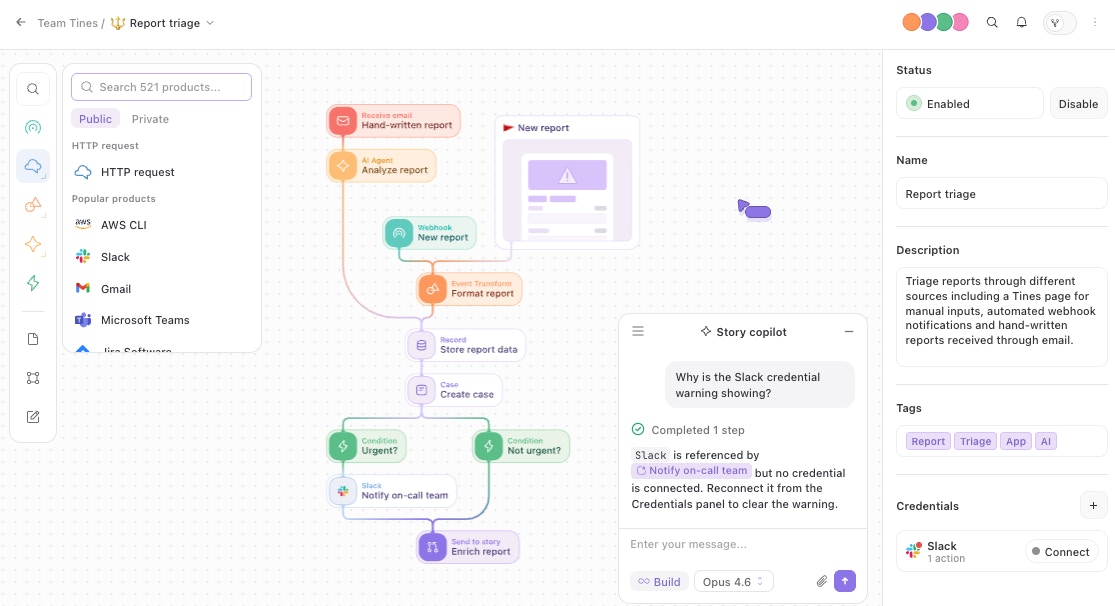
All AI features run on Tines' own infrastructure, stateless, private, geo-bound, tenant-scoped, with no training on customer data.
The first intelligent workflow is the hardest. After that, the pattern transfers: same architecture, same governance, same execution modes, applied to different work. The Tines Storyboard is where stories get built, the Library has templates for common starting workflows, and the Community Edition is free forever with AI and unlimited integrations included.
Book a Tines demo to see deterministic, agentic, and human-led steps running together on one platform.
Frequently asked questions about intelligent workflow automation
What workflows make the best starting point for intelligent workflow automation?
Look for runbooks with high volume, clear decision points, and outcomes that aren't catastrophic if a step misfires. Phishing email triage, access request processing, alert enrichment, and onboarding routines tend to be the strongest first candidates.
How do teams measure the success of intelligent workflow automation?
Most teams track three things: time saved per workflow, exception escape rate (the percentage of cases that need manual recovery downstream), and cycle time from event detected to action taken.
Tines customers commonly report savings in the hundreds of hours per month from a single workflow, with GitLab reducing pager noise by 80% and Snowflake saving roughly 10 hours per day on alert correlation.
What does an intelligent workflow platform offer that stitched-together tools don't?
Teams often stitch together Zapier for triggers, Python scripts for logic, a SOAR for security playbooks, and standalone AI tools for experimentation. Each covers one piece, but nothing ties them securely together or provides a unified audit trail.
An intelligent workflow platform consolidates automation, AI, integration, human-in-the-loop capability, and governance into one environment, which is how teams produce results like reclaimed analyst hours and consistent decision quality across workflows.