Views are saved configurations that preserve your filter settings, column arrangements, and display preferences for a specific record type. Instead of recreating the same filters and layout every time you need a particular perspective on your data, you can save it as a view and switch to it instantly.
Common use cases for views include:
Open high-priority requests: A view filtered to show only high priority requests from the past seven days.
Monthly compliance report: A view filtered to the current month with specific columns arranged for export.
Team-specific data: A view filtered to show only records relevant to a particular team or workflow.
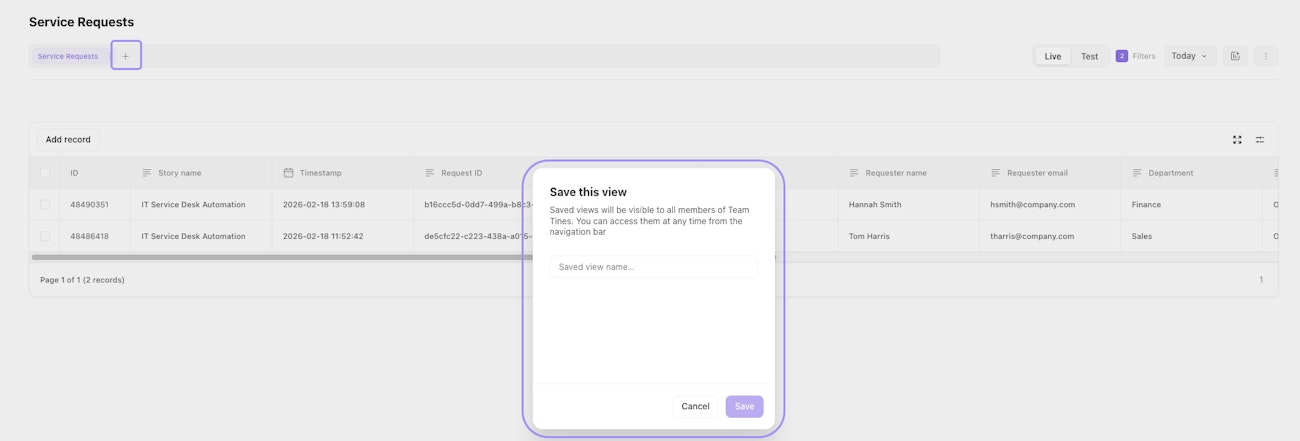
The record view save dialog showing the name field and the new view button next to the record type name.
To save a view:
Set up your filters and column arrangements.
Click the + next to your record type name at the top of the table. The initial view, shown with the record type name, includes all records for this record type.
Name your view and save it.