Recovery codes are your safety net. They provide a way to access your Tines account if your SSO configuration breaks, your identity provider goes down, or you lose access to your email.
Why recovery codes matter
Imagine this: you've just configured SSO for your tenant, but you made a small mistake in the configuration. Without recovery codes, you'd be locked out of your own tenant, and you would need to reach out to Tines Support to get back in.
Recovery codes prevent this scenario. Each code is a one-time password that lets you bypass normal authentication and sign directly into Tines.
🪄Tip
Generate recovery codes
Only tenant owners can generate recovery codes, and they only work for active users. To generate codes:
Ensure User recovery codes is enabled in the Authentication settings.
Navigate to the Users page.
Find your user profile.
Within your user profile, navigate to the Account recovery section.
Via the Recovery codes setting, click Generate codes.
Copy all to clipboard or Download all to save your codes locally.
✋ Try this: Generate recovery codes
❗️Important
Once you've generated recovery codes for your user, you will see a key icon (🔑) next to your name in the Users tab. If you hover over the icon, it will show how many working recovery codes remain.
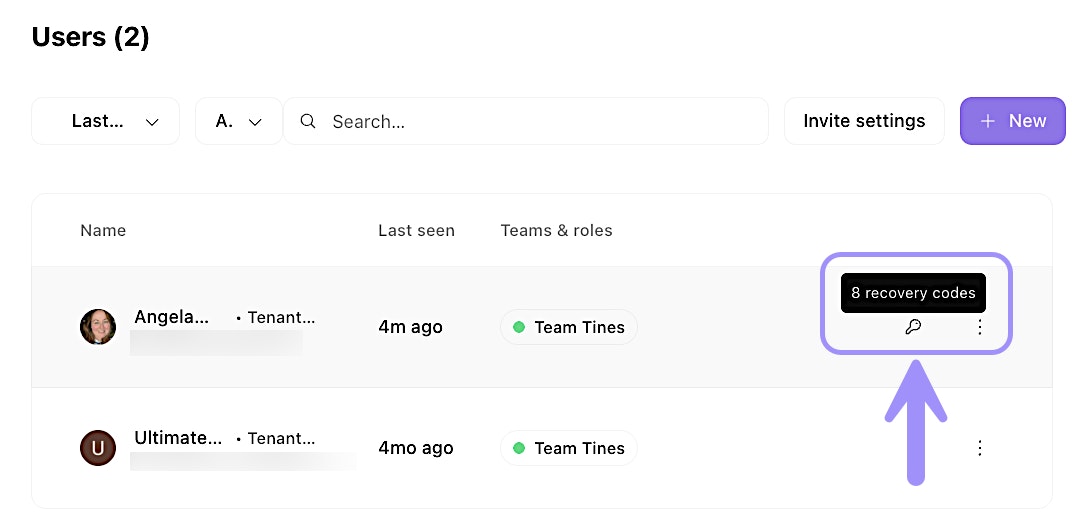
UI location of the at-a-glance view of remaining recovery codes for a user.
Use recovery codes
If you need to use a recovery code, visit https://your-tenant-domain/login/recovery. Enter one of your saved codes and click Continue. If the code is valid, you'll be signed in immediately.
Each code works only once. After you use it, that specific code is invalidated. The remaining codes will continue to work.
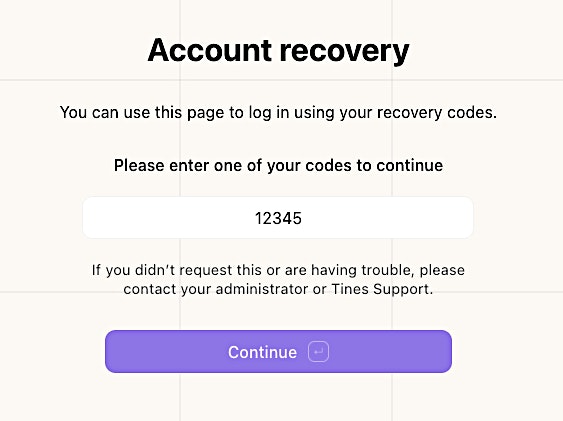
Account recovery page view with a mock recovery code example.