Tines Pages let you build interactive experiences for people inside and outside your tenant. Sometimes you want to restrict who can access these pages based on their identity provider group membership. SSO-group-based page access makes this possible.
Enable SSO group-based page access
To enable this feature:
Navigate to the tenant Settings via the team menu.
Go to the Authentication tab.
Turn on SSO-group-based page access.
Once enabled, enter the group attribute name in the SSO-group-based page access field. This name should match the attribute in your identity provider (IdP) that contains group information. You'll find this attribute in your IdP's SAML assertion. Check your IdP documentation to confirm the exact attribute name.
Click the Lock to save changes button to apply your configuration.
❗️Important
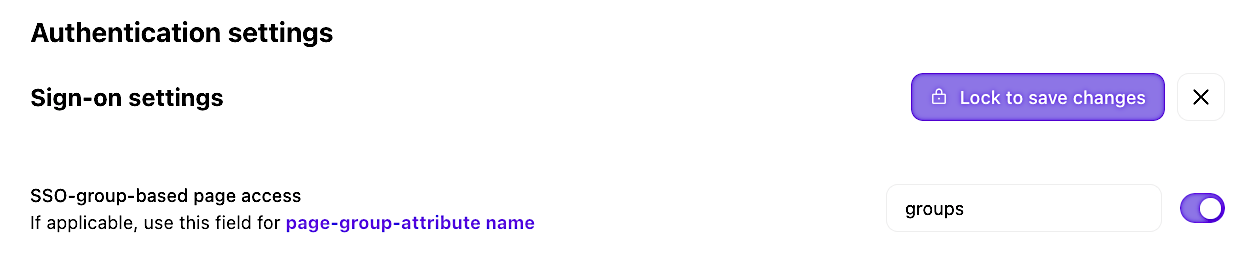
UI location to enable and configure SSO-group-based page access.
Configure page restrictions
Once tenant-wide SSO-group-based page access is enabled, you can configure individual pages to require specific group membership. When you edit a page on the storyboard, you'll see options to specify which identity provider groups can access it in its properties panel.
Users who aren't members of the required groups will see an access denied message when they try to view the page.
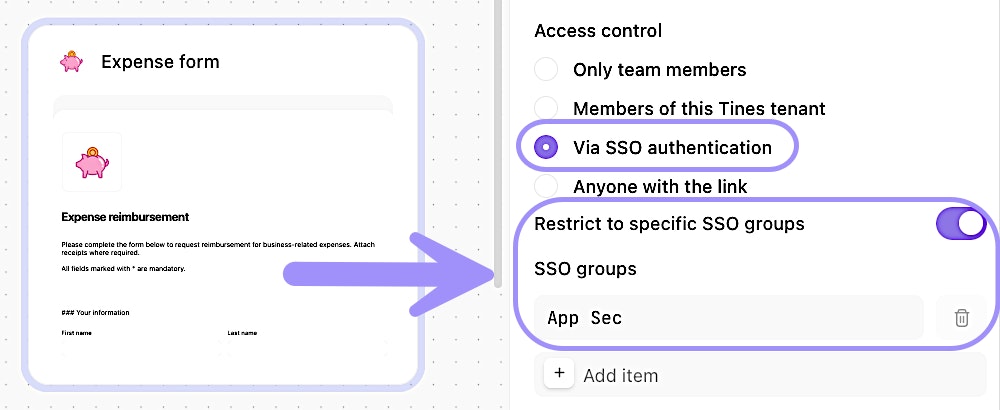
UI location to apply specific group access to a page.