So far, we've focused on building MCP servers in Tines to expose your workflows to external AI applications. But Tines also works in the opposite direction: you can connect to external MCP servers from within Tines using the AI Agent action as an MCP client.
Why use Tines as an MCP client?
You’ll want to connect to MCP servers from Tines when:
You have existing MCP servers in other systems. Maybe your team already has MCP servers in other platforms, or you're using third-party MCP servers that provide useful capabilities.
You want to combine external tools with Tines workflows. Your AI Agent action can use tools from external MCP servers alongside your Tines templates, Send-to-Story tools, and custom tools, all in the same workflow.
You're building complex AI agents that need diverse capabilities. By connecting to multiple MCP servers, you can give your AI agents access to a wide range of tools without building everything in Tines.
For example, imagine you're building an AI agent to help with customer support. You might:
Connect to an MCP server that provides access to your knowledge base.
Connect to another MCP server that handles payment processing.
Use Tines Send-to-Story tools to create tickets and send notifications.
All within a single AI Agent action.
Configure MCP servers in the AI Agent action
Connecting to an MCP server from Tines is straightforward. In your AI Agent action configuration, you can add MCP servers as tools:
Click on your AI Agent action within the storyboard to open its properties panel
Within the properties panel, scroll down and click the + Add tool button.
Under Tines Tools, select MCP.
Select an existing MCP server connection or click the New MCP connection button to set one up.
Configure the connection details:
MCP server name: The name of the MCP server.
MCP server URL: The address of the MCP server.
Advanced options:
Credentials (optional): The credential that will be used in the
Authorizationheader. This will override the automatic authentication detection.Transport type: Streamable HTTP (default) or HTTP
Headers (optional): Additional headers to be sent with the request.
Click Connect to save and connect your MCP server to the AI Agent action.
Once connected, any tools exposed by that MCP server automatically appear in your AI Agent action alongside your existing tools. Your agent can then invoke these MCP tools just like any other attached tool.
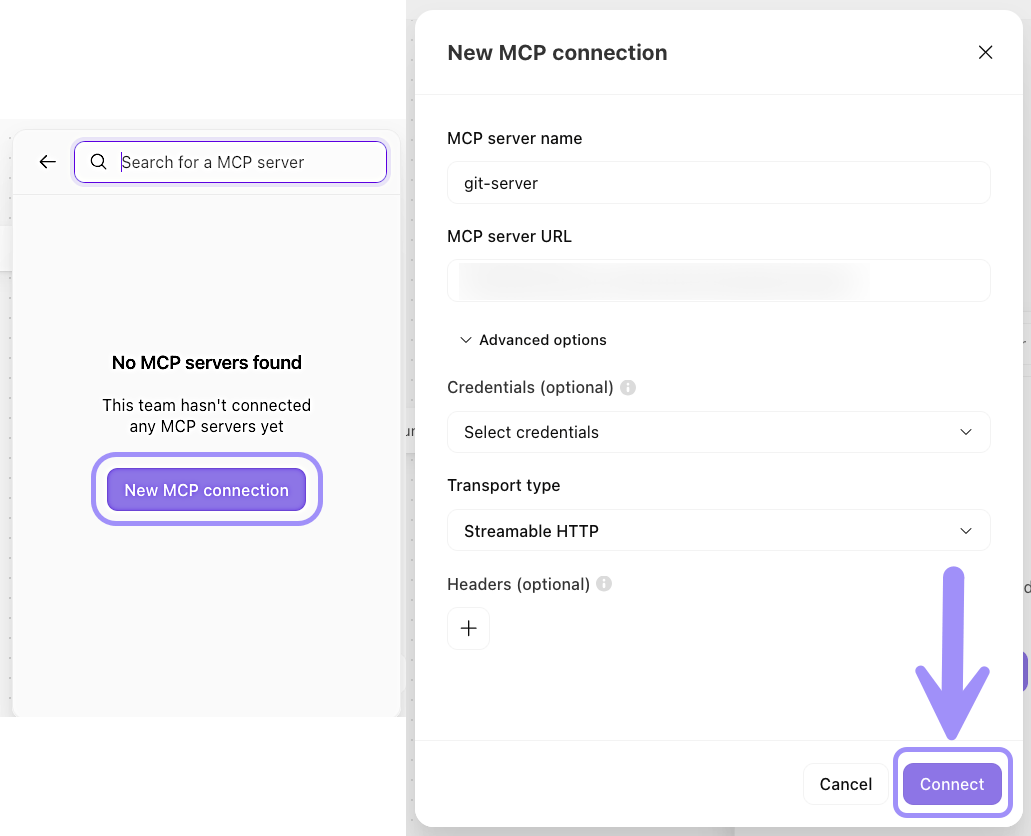
UI location to configure an MCP server for the AI Agent action.
Combine MCP servers and clients
Here's where things get powerful: you can use Tines as both an MCP server and an MCP client in the same workflow.
For example, your IT team wants to use Claude Desktop as their AI assistant to help with common support tasks. At the same time, you want your Tines workflows to leverage external tools that are already available via MCP servers.
Here’s how you might set this up:
Build an MCP server in Tines (Tines as server): Create an MCP server that connects your workflows as tools like password resets, laptop provisioning, service status checks, and ticket creation. Then, connect it to Claude Desktop so your IT team can trigger these workflows using natural language.
Use Tines as an MCP client (Tines as client): Create an AI Agent action that connects to external MCP servers for your IT documentation knowledge base, hardware asset management system, and vendor warranty lookup service.
Combine them in a workflow: Build a story where an AI Agent action processes support requests using both external tools (knowledge base, asset inventory, warranty info) and internal Tines workflows (password resets, provisioning, ticket creation), while your IT staff can simultaneously use Claude Desktop to manually trigger any of these workflows when needed.
The result: you've created a bidirectional AI ecosystem:
Outbound (Tines as server): Your IT team uses Claude Desktop to control Tines workflows.
Inbound (Tines as client): Your Tines AI agents use external MCP servers to access knowledge bases and asset data.
Combined: Automated support requests get handled by AI agents that leverage both internal and external capabilities.