
About Hawx Smart Pest Control
Hawx Smart Pest Control is a business with a large field technician workforce. The IT team supports onboarding and device readiness for technicians while managing identity and access across the software the business relies on. Their technicians primarily use iPhones in the field and need to ensure their devices are secure at all times.
Executive summary
Hawx adopted Tines to improve onboarding, simplify complex identity workflows, and gain greater control over device management. We spoke with Jordan Tanner, Systems Integrations Manager, and Loren Farr, IT Manager, who lead onboarding and systems integration across IT. Before Tines, the team relied on Okta Workflows and external scripts running in Google Cloud Run, which added complexity and introduced multiple points of failure when handling edge cases and custom data.
After moving to Tines, Hawx reduced workflow spend by 50% while gaining the flexibility to run custom scripts directly within their workflows. The team now uses Tines alongside Fleet, their mobile device management platform, to orchestrate device rollouts, keep identity and directory data in sync, and support more than 800 iOS devices used by field technicians. As Loren shared, Tines makes it easier to identify issues, handle edge cases, and keep critical onboarding processes moving forward.
The challenge
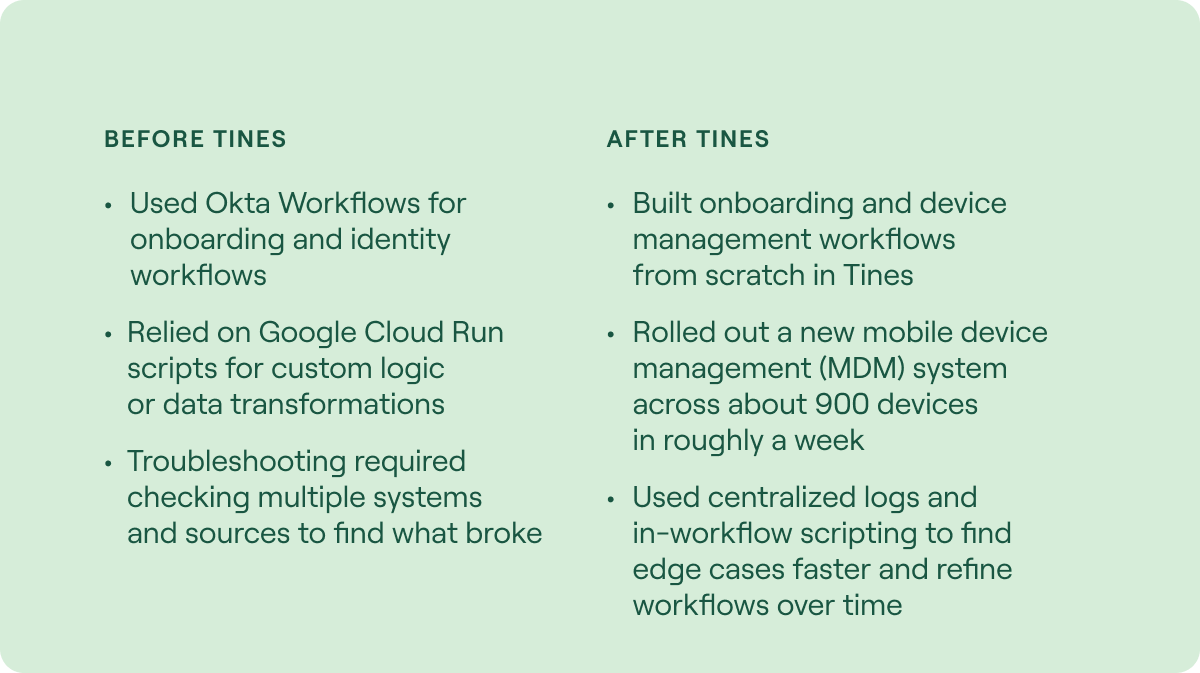
Before Tines, Hawx relied on Okta Workflows for onboarding and identity-related workflows. While it worked, it was hard to maintain when they needed custom logic and scripting for the edge cases that show up in their data. Their team often had to call out from Okta Workflows into Google Cloud Run scripts to transform or write JSON and to pull data from other endpoints, then pass that data back into Okta. That approach added multiple steps and more potential points of failure.
When issues arose, troubleshooting meant manually jumping between multiple systems to determine what went wrong. Because field technicians depend on mobile devices and cannot have downtime, onboarding and device setup must be reliable, repeatable, and easy to manage.
Why Tines
Hawx chose Tines because it gave them the flexibility they were missing when it came to their custom data, especially the ability to run scripts directly within workflows. This was a priority because their workflows needed to handle niche and one-off edge cases, and their data often required unique formatting. Tines also made it easier to troubleshoot issues, with one place to review logs, see what broke, and fix the workflow without stitching together evidence across multiple systems.
“With Tines, everything is transparent. We can see the logs, understand the issue, fix the edge cases, and keep things moving.” - Loren Farr, IT Manager at Hawx Smart Pest Control
They also appreciated that Tines was more affordable than their previous solution, making it possible to achieve everything they had been doing and more while reducing IT spend by 50%. They quickly adapted to Tines’ workflow model and found that having fewer core building blocks actually simplified their approach. Instead of searching for a specific tool for each task, they could use the same core actions and write the logic they needed directly within them.
The Impact
Since adopting Tines and Fleet, Hawx has built durable workflows that support device readiness and identity accuracy. While their environment continues to evolve, several clear improvements are already visible.
Faster mobile device rollouts with less disruption
The team built a Fleet mobile device management (MDM) workflow in about two to three weeks while learning both Fleet and Tines. With that foundation, they completed a smooth rollout of a new MDM across about 900 devices in roughly a week.
Because the rollout was coordinated through Tines, devices were provisioned with the appropriate applications and configurations from the start, minimizing downtime for field technicians. Instead of extended cutovers or manual reconfiguration, Hawx transitioned nearly its entire mobile fleet with minimal disruption to day to day operations. For a business that depends on technicians being productive in the field, keeping devices ready and reliable directly supports revenue generating work.
More control over device and identity data
Hawx uses Tines with Fleet and Okta to keep device and user records aligned. They use naming conventions for devices in Fleet, listen for device changes in Okta, and use Tines to query device details and update user profile fields so that Okta and the Google directory reflect current technician phone information.
This orchestration reduces manual updates and prevents mismatches between systems. IT can see which device belongs to which technician, ensure phone numbers are accurate in identity systems, and remove outdated devices when replacements are issued. The result is tighter control over access, fewer help desk escalations tied to device changes, and greater confidence that identity and device records reflect reality in the field.
Friction-free building and troubleshooting with less operational overhead
Hawx appreciates the ease of building in Tines. When troubleshooting workflows in Tines, they can quickly identify the issue, review logs in one place, and add logic to handle it. In their previous setup, troubleshooting required checking multiple systems and upstream data sources, which took more time and effort.
At first I was looking for a specific tool for every task. With Tines, you use a small set of core actions and write the logic you need. It’s a much smoother way to build.
Loren Farr, IT Manager at Hawx Smart Pest Control
Top workflows
Fleet, Okta, and directory sync for field technicians
Hawx uses Tines as the orchestration layer between Fleet and Okta to help keep technician device records and identity profiles current. When a device is onboarded into Fleet, they install required applications. They also listen in Okta for a new device being added as an authenticator. From there, they clear old devices that match their naming convention, pull the device serial number, query Verizon for the associated phone number, and update the user’s Okta work phone field. That update syncs to the Google directory so the directory stays current with technician phone numbers.
We use Tines as the orchestration layer between Fleet and Okta. When a device is onboarded, Tines installs the right applications, updates identity records, clears out old devices, and keeps everything in sync.
Jordan Tanner, Systems Integration Manager at Hawx Smart Pest Control
Device configuration and application delivery through Fleet
Hawx uses Tines to push custom applications and configuration payloads to iOS devices. They described using scripts to handle different types of payloads and to send what the device needs through Fleet. They also read Okta profiles to determine which department a technician is in, then use that information to ensure the correct set of applications is installed. Without Tines, they said this would require manual assignment and manual application installs after the end user reported missing apps.
Employee onboarding workflow using Paylocity and Okta
Hawx uses a webhook from Paylocity to pull employee updates into an onboarding workflow. The workflow determines whether Okta data needs to change, then updates Okta and other software systems as needed. They also needed a place to store temporary data for later reference, and they use Google Sheets to store and look up information, such as group assignment needs based on job title.
Tines support
When it comes to support they receive from Tines, the Hawx team called out the dedicated Slack channel as the most valuable part of their support experience. When they get stuck or are not sure what to do next, they can post in Slack and get quick help from real people. They also appreciated follow up support to confirm issues were resolved and that workflows were working as expected. For a team building and refining complex workflows, that access to fast guidance has been a major plus.
What’s next
The Hawx team’s near-term focus is finishing and refining their onboarding workflows in Tines so they can reduce manual oversight and handle more edge cases with confidence. With onboarding workflows taking shape and offboarding next in line, they see Tines as a long-term foundation for automation across IT and security. As their core workflows stabilize, they plan to expand usage into additional processes and continue refining how devices and identities are managed across the business.