What are case templates?
Case templates are pre-built structures for cases that include pre-defined fields, notes, and metadata. These templates allow you to quickly create new cases without starting from scratch, which is especially useful for workflows your team handles repeatedly.
Example: Phishing incident template
Imagine your security team handles dozens of phishing reports each week. Instead of manually creating each case from scratch, you could build a phishing incident template that includes:
Reporter name and email (text field)
Reported date (timestamp field)
Suspicious email subject (text field)
Sender address (text field)
Initial triage status (dropdown: Low/Medium/High risk)
Pre-filled notes with your team's standard investigation checklist
Now, when a new phishing report comes in, your team can create a case from this template in seconds, ensuring nothing gets missed and every incident is documented consistently.
Why case templates matter
Consistency: Ensure similar cases are handled the same way across the team.
Time-saving: Avoid creating new cases from scratch each time.
Training support: Templates provide a baseline for new team members to follow.
Where to find case templates
You can explore all your available templates by clicking the Manage templates button within the list view:
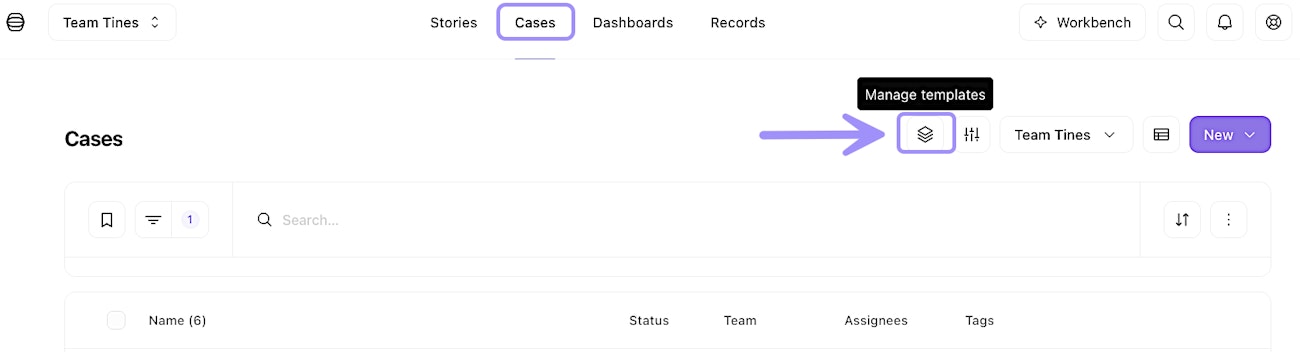
UI location of the case templates feature within the list view.
This is where your team can create new templates, review existing ones, and view the contents of each template. Think of it as your team’s library of ready-to-go case blueprints that you can draw from whenever a new task comes in.