What are case groups?
Case groups are organizational units that categorize cases, for example, by department, workflow, or purpose. Groups help control visibility, making it easier to manage large volumes of cases efficiently.
Why case groups matter
Keep cases organized and easily accessible.
Control who can see and act on specific cases.
Support filtering and reporting for workflows.
How organizations use case groups
Case groups typically reflect your organization's structure or workflow types. For example:
By department: Security Operations, IT Support, Compliance, Customer Success
By workflow type: phishing incidents, access requests, vendor reviews, customer escalations
By region or business unit: EMEA Operations, North America Sales, APAC Support
Groups ensure that cases are visible to the right teams while maintaining appropriate access controls. For example, your Security Operations group might handle all security incidents, while your IT Support group manages access requests. Each group can have different members, permissions, and workflows without overlap or confusion.
Where to find case groups
Case groups are managed via the Groups button within the list view:
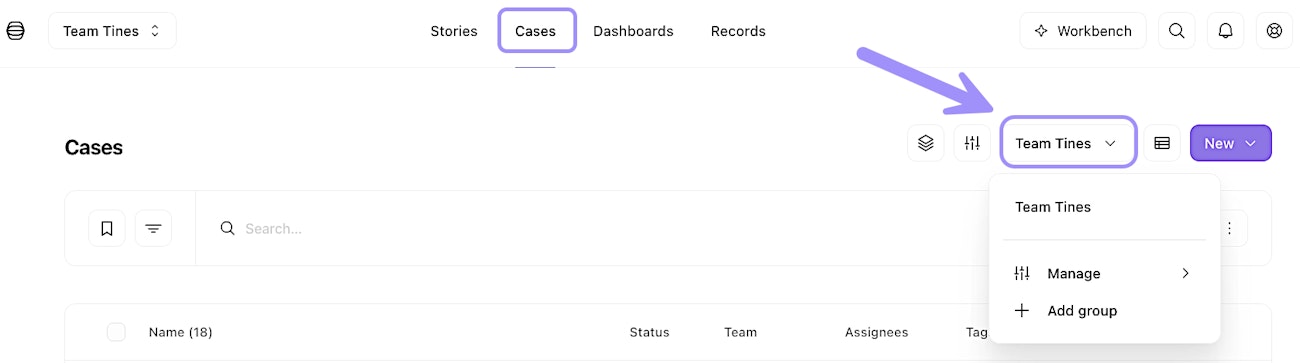
UI location of the case groups feature in the list view.
Here, you can see (depending on your permissions):
All the case groups of which you're a member.
Check who has access to each case group.
Understand what cases belong to the relevant case group.