Available settings
Tenant owners can configure change control to be enabled by default for all new stories within specific teams or across the entire tenant. This is particularly useful for teams managing high-risk or compliance-sensitive workflows. Only team admins or users with the custom permission change control: manage can toggle change control off once it's enabled.
To configure these change control settings, navigate to the team menu → Settings → Configurations → Change control:
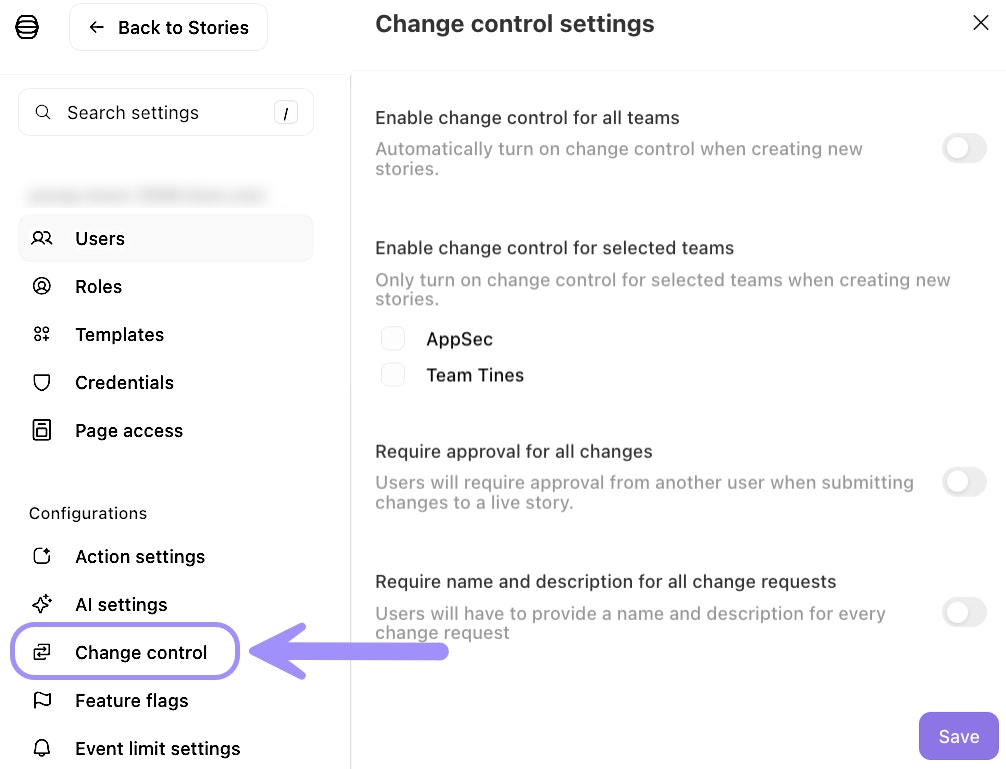
UI location to enable change control at a team or tenant-wide level.
Enable change control for all teams: Automatically turns on change control when any story is created throughout the tenant. This is the most restrictive option and is best for highly regulated environments where all workflows require oversight.
Enable change control for selected teams: Automatically turns on change control for stories created within specific teams. This allows you to apply stricter governance to teams handling sensitive workflows while giving other teams more flexibility.
Require approval for all changes: Enforces separation of duties by requiring the approver to be a different user than the requester. This is essential for compliance requirements that mandate separation of duties. Team admins can bypass this in emergencies, but a notification is sent to the change control webhook. Note that users with custom permissions "change control: manage" or "change control: review" cannot bypass this requirement.
Require name and description for all change requests: Prevents change requests from being submitted without both a name and description. This ensures proper documentation and context for every change.