The customize output setting in actions allows you to modify the event data that an action produces. Instead of storing the full, raw output from an action, you can transform, filter, or restructure the data before it's saved as event data. This feature is available for all action types in Tines and can help you build cleaner, more efficient workflows.
Why use customize output?
Think of customize output as a way to shape your data right at the source. Rather than adding extra actions to format or filter information, you can handle data transformation directly within the action that generates it. This approach keeps your stories truly streamlined. Here are a few practical reasons to use customize output:
Simplify your stories: Reduce the number of actions needed by transforming data in one step instead of two.
Speed up processing: Strip out unnecessary response data so downstream actions only work with what they need.
Improve readability: Format complex payloads into clean, structured data that's easier for you and your team to work with.
How to enable customize output
You can find the customize output option in any action's properties panel via + Options:
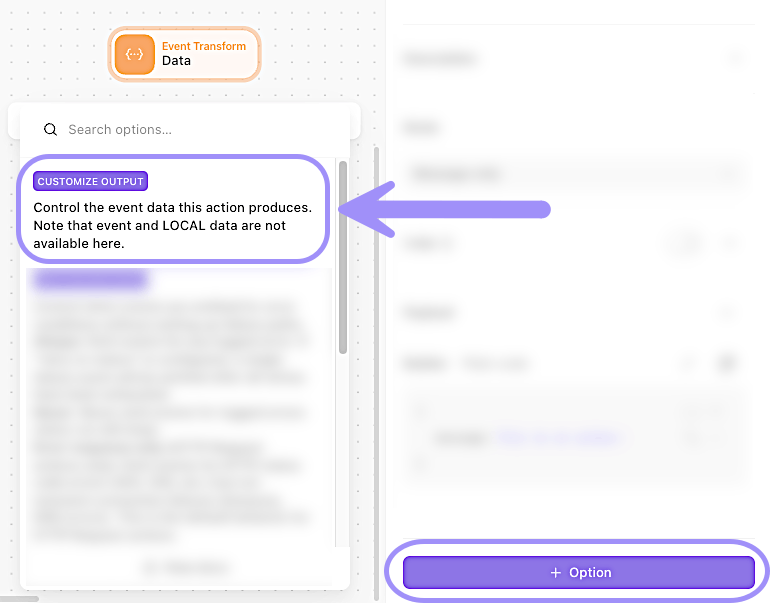
UI location to add the customize output setting to an action's configuration.
Write your customize output expression
When you enable customize output, you're working with the action's raw OUTPUT value. This is the complete, unmodified data that the action produces. Your formula expression should return the exact structure you want to store as the action's event data.
The result of your expression becomes the action's event data for all future runs. This means any downstream actions that reference this action will see your customized output, not the original raw data.