Set up input data
The Input field in automatic mode tells the action what data to work with. This is typically a reference to upstream event data passed down from a previous action in your story.
You can reference any data available in your story at that point. The AI will use this input structure to understand what it's working with when generating code. If your input is a complex nested object, the AI can see that structure and write code accordingly.
🪄Tip
Write guidance
The Guidance field is where you describe what you want the transformation to do. This is your instruction to the AI, written in natural language.
Be conversational but specific. You might write something like "Extract the username and email from each user object in the array" or "Calculate the total count of high-severity alerts and return it as a number." The AI is quite good at understanding intent, but clarity helps. If you're working with specific field names, use them. If you want a particular output format, describe it.
🪄Tip
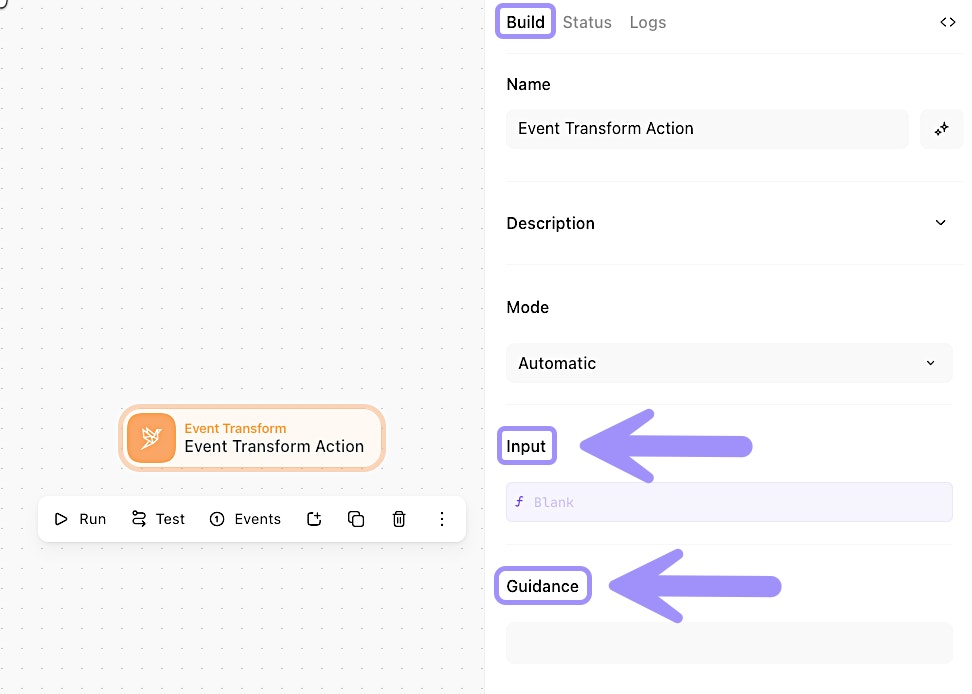
UI location of the Input and Guidance settings of an automatic mode Event Transform action.