The storyboard is where your workflow comes to life. It’s the visual workspace where you build, connect, and organize components, like actions and tools, that make up your story.
Key storyboard areas
There are three main panels when viewing the storyboard:
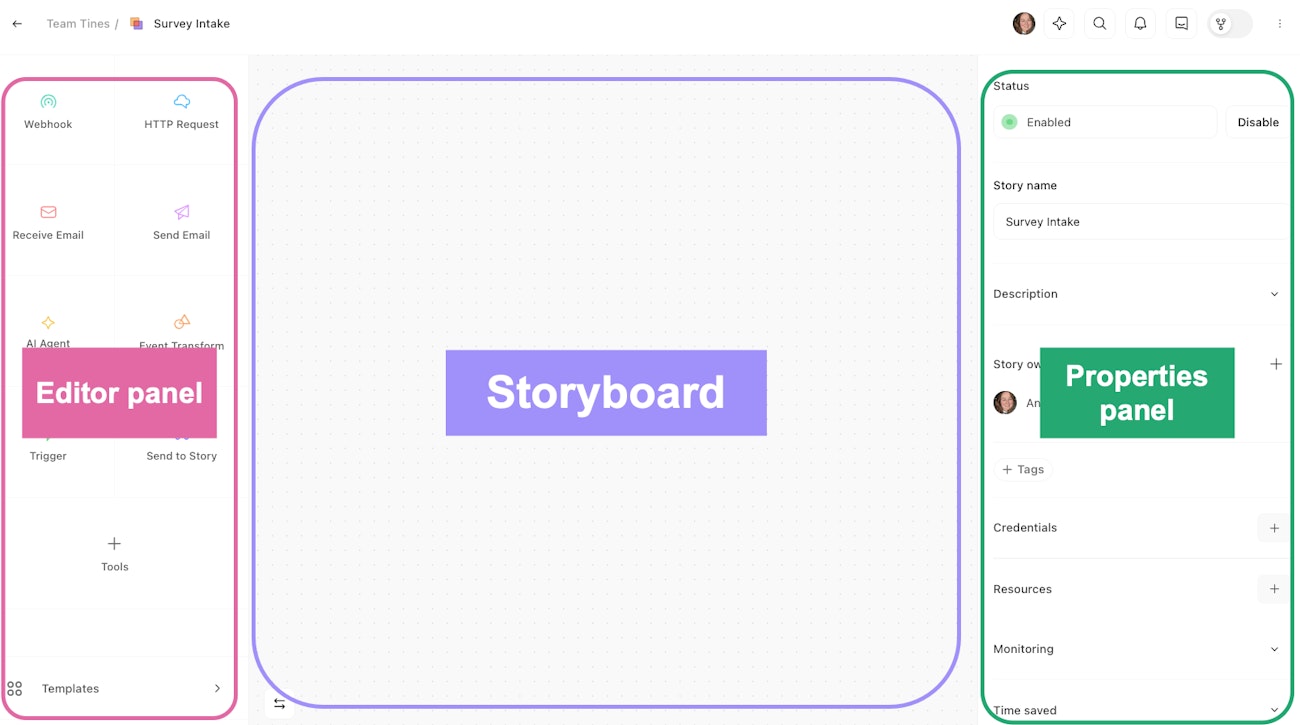
Visual of the key storyboard areas.
Editor panel: On the left-hand side of the storyboard, the Editor panel includes our eight actions, tools, and templates.
Storyboard: At the center stage, the storyboard is where you can drag-and-drop actions and tools, connect them together, and really bring your story to life.
Properties panel: On the right-hand side of the storyboard, the Properties panel includes configurable settings for the element of the storyboard you have selected. For example, if you click on an action on your storyboard, the Properties panel will display configuration settings for that action. If you ever need to view the story-level configuration, click on the white space of your storyboard.