Access the tenant health page
The Tenant health page gives a single view of what's happening across your entire Tines environment. It's designed to help you spot issues early and take action before they impact your users.
To access the Tenant health page, click on the team menu and select Tenant health.
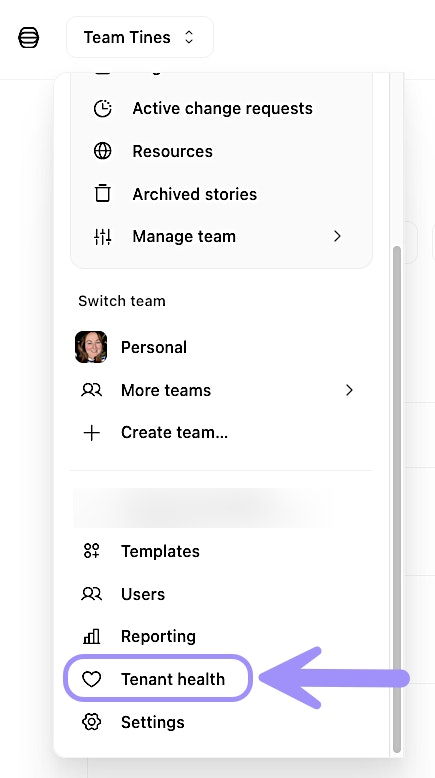
UI location of the Tenant health page.
Understand tenant health metrics
The Tenant health page displays several key metrics that help you assess the overall performance of your tenant:
Pending action runs: The number of actions waiting to be processed. A sustained high number of pending action runs may indicate that stories are generating more work than your tenant can process quickly.
Daily event usage: The percentage of today's event usage.
Live activity: Story performance metrics showing which stories are generating the most runs, which actions are hitting errors, and where bottlenecks might exist.
✋ Try this: Navigate the Tenant health page
Interpret performance data
When you review tenant health data, look for patterns rather than isolated spikes. Occasional increases in pending action runs or queue latency are normal, especially during business hours or after scheduled events.
However, sustained high metrics over time may indicate that you need to optimize your stories or upgrade your tenant resources. Common optimization strategies include reducing unnecessary action runs, batching events more efficiently, or adjusting story logic to minimize redundant work.
Clear pending action runs
In some situations, you may need to clear pending action runs. This should only be done if you're certain the pending runs are unnecessary and don't need to be processed.
For example, you might clear pending runs if a testing script accidentally generated thousands of unnecessary events, or if a third-party integration sent duplicate data that doesn't require processing.
To clear pending action runs, navigate to the relevant story → three-dot menu → Live activity. In the pop-up window, search and select the action(s) you want to clear, and click Delete selected pending runs.
❗️Important
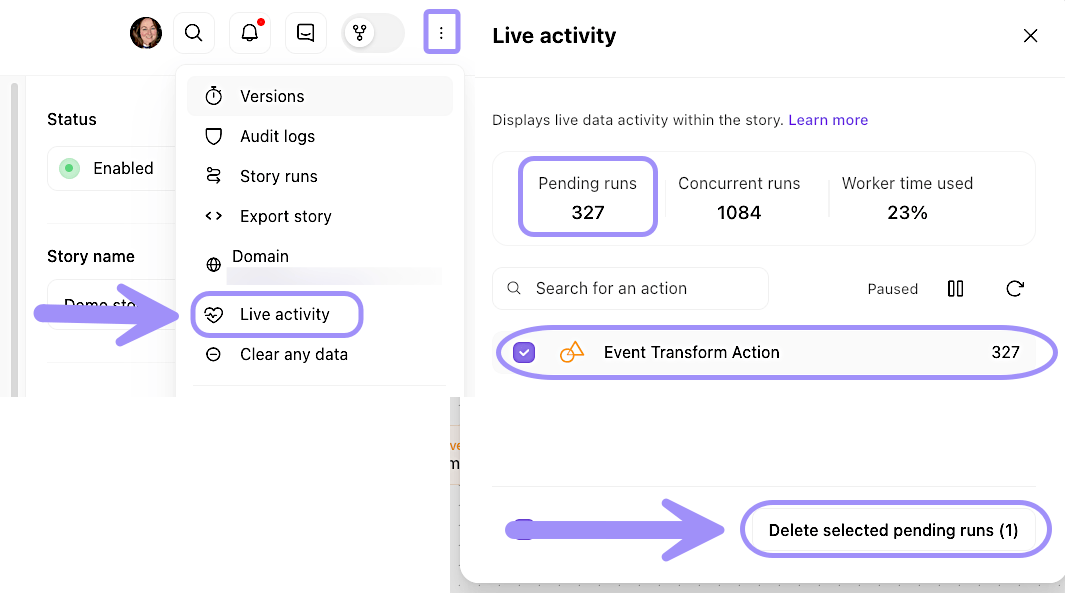
UI location to clear out pending action runs within a story.