Tines provides a native pagination feature that simplifies the process of retrieving all pages from a paginated API. Instead of manually building loops with multiple actions, you can enable pagination directly within an HTTP request action.
The PAGINATE variable gives you access to pagination-specific data during the pagination run, allowing you to build dynamic requests that automatically advance through pages until all data is retrieved.
How the PAGINATE key works
When you enable pagination on an HTTP request action, Tines automatically handles the looping logic for you. The action will make repeated requests until a specified condition (has_more) evaluates to false. Between each request, you can reference data from the previous response using the PAGINATE.previous_response variable.
PAGINATE.index: The current iteration number, starting at 0 and incrementing by 1 after each request.PAGINATE.previous_response: The full response from the previous page, includingbody,headers, andstatus.
These variables allow you to dynamically adjust your request parameters based on the API's pagination structure.
Enable pagination
To enable the pagination and start utilizing the PAGINATE key, navigate to your HTTP request action's properties panel → Build tab → + Option → Pagination:
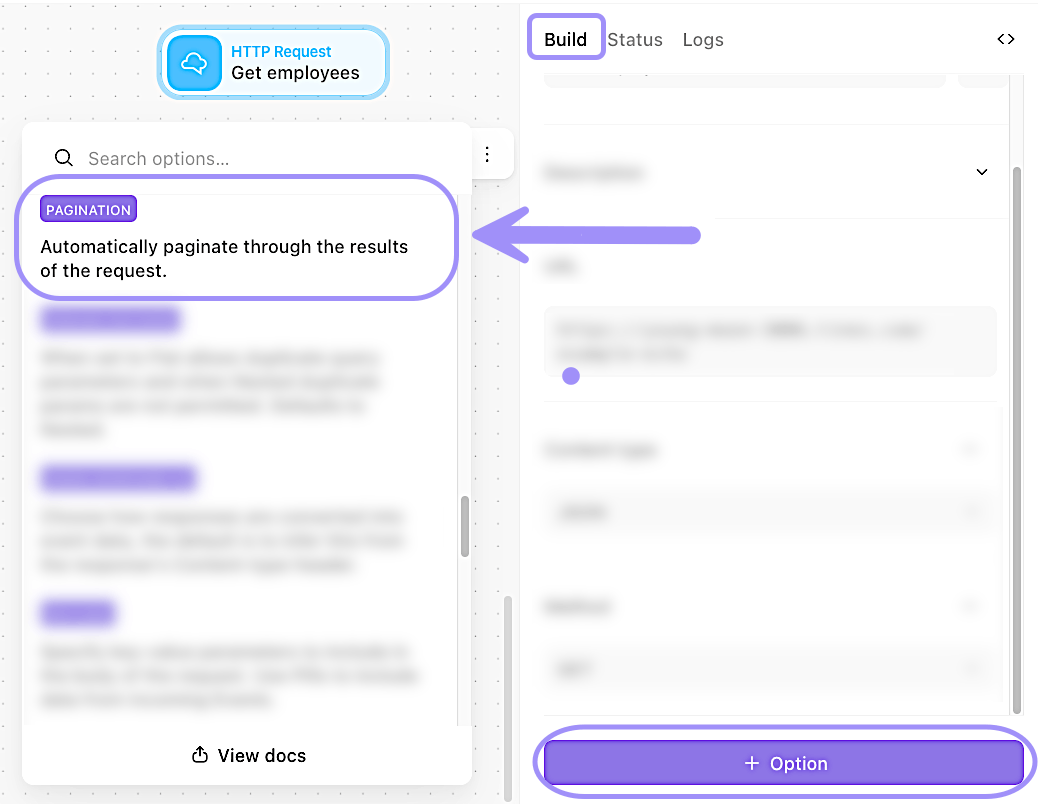
UI location to enable pagination for the HTTP request action.
Output options: Single event vs. multiple events
By default, a pagination-enabled HTTP request action emits a separate event for each page. This is useful when you want to process each page individually or when you're working with large datasets that would exceed event size limits if combined.
However, you can also choose to output all pages as a single event by enabling the Output as single setting in the Pagination option. When enabled, Tines will wait until all pages have been retrieved and then emit one event containing all the responses.
🖐️ Try this: Paginate example via PAGINATE
Choosing your pagination approach
Both story-based pagination and the PAGINATE variable can retrieve complete datasets, but each has its strengths:
Use story-based pagination when:
You need custom logic between page requests (complex transformations, conditional routing).
You want explicit control over delays and rate limiting.
You're learning pagination concepts and want to see each step.
Use the PAGINATE variable when:
The API has straightforward pagination (standard parameters and responses).
You are comfortable working with Tines functions.
You want cleaner, more maintainable stories with less complexity.
You're working with well-documented APIs that follow common pagination patterns.