Now that you understand the mechanics, let's talk about how to build effective sub-stories. Creating good sub-stories requires thinking about interfaces, contracts, and reusability.
Design the sub-story contract
A sub-story should have a clear contract: "Give me this input, I'll give you this output." This contract makes your sub-story predictable and consistent.
Define clear inputs
Your sub-story should expect a specific data structure. The best way to do this is by defining inputs in your sub-story settings. When you define inputs for your sub-story, you're creating a clear contract that tells users exactly what data to send. You can define Send to Story inputs via the sub-story's properties panel → Send to Story → Settings → Send to Story inputs:
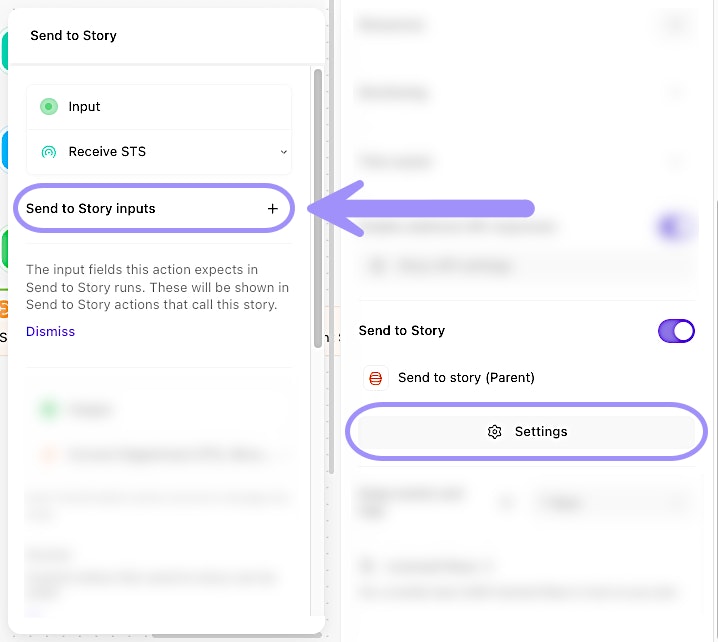
UI location to add Send to Story inputs.
🖐️ Try this: Define inputs for Send to Story
Define predictable outputs
Your sub-story's exit action should return a consistent structure. Parent stories depend on this format, so changes could break multiple workflows.
Test sub-stories
Sub-stories should be tested independently before using them in production workflows.
Use Workbench
Workbench is perfect for testing sub-stories. You can:
Send test payloads directly to your sub-story's entry action.
Verify the output structure matches your contract.
Test edge cases without affecting production workflows.
Iterate quickly without building a full parent story.
Use a test parent story
Create a simple test story that calls your sub-story with various test cases:
Valid data
Missing optional fields
Edge cases (empty strings, very long values, special characters)
Invalid data (to test error handling)
This helps you ensure your sub-story handles all scenarios gracefully.