Identify a story use case
Before you start building in Tines, it's important to recognize which processes make good candidates for automation. The best Tines stories typically address these scenarios:
Repetitive manual tasks
Look for processes that team members perform frequently and follow consistent steps. For example:
Creating tickets based on email requests
Gathering information from multiple systems
Sending notifications or updates to stakeholders
Multi-system workflows
Processes that require jumping between different tools or platforms are perfect for Tines:
Collecting data from one system and updating another
Enriching alerts with information from various sources
Coordinating actions across your tech stack
Decision-based processes
Tasks that follow "if this, then that" logic:
Routing requests to different teams based on content
Prioritizing incidents based on severity
Approving or rejecting requests based on specific criteria
💡Note
Map your process
One of the most important skills in story design is planning your workflow before you start building. This approach saves time and helps create more logical, maintainable stories. Start by creating a simple flowchart of your process:
Identify the starting point. What triggers the workflow?
List each step in sequence.
Note decision points where the flow might branch.
Identify the end goal(s).
Story planning techniques
It helps to make a visual of what you want your story to accomplish first before digging into building.
Pen and paper: Sometimes the simplest approach works best! Sketch your workflow on paper to visualize the complete process.
Mock story: Use the storyboard visuals to your advantage! Map out the actions you think you'll need and connect them to each other to see how the story looks, without going into the technical configuration.
Notes: On the storyboard, we offer Notes that let you place informational tiles onto your storyboard to map out your workflow and document how each step works.
Example: Plan an alert processing story
Here's a simple use case:
When the security team receives an alert, they need to extract the necessary information from it, including its severity level. If it's a high-severity alert, the IT team must be immediately notified. Otherwise, the security team can add the alert to their end-of-day report.
Now let's write this use case into numbered steps:
Receive an alert.
Pull out the alert information needed.
Check the severity of the alert.
If it's a high alert, send an email to the IT team. If anything else, add it to the daily report.
Let's take a look at how these steps might come alive within a story:
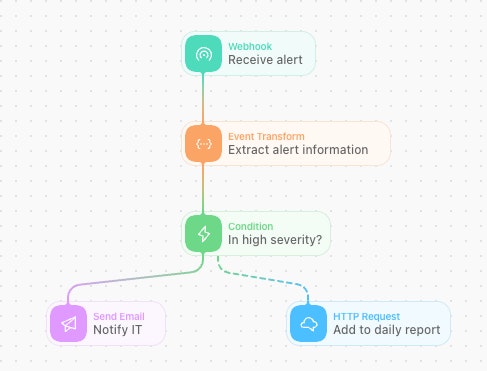
We can review how these two story design concepts combine:
Receive an alert. (Webhook action)
Pull out the alert information needed. (Event Transform action)
Check the severity of the alert. (Condition action)
Send an email to IT (Send Email action), or add to the daily report (HTTP Request action).
By visualizing this flow first, you can spot potential issues and optimize your approach before building.