This section covers general guidance that applies whether you're using Ask mode or Build mode, helping you get the most value from Story copilot.
Manage conversation history
Story copilot maintains a conversation history for each story, allowing you to return to previous conversations and continue where you left off.
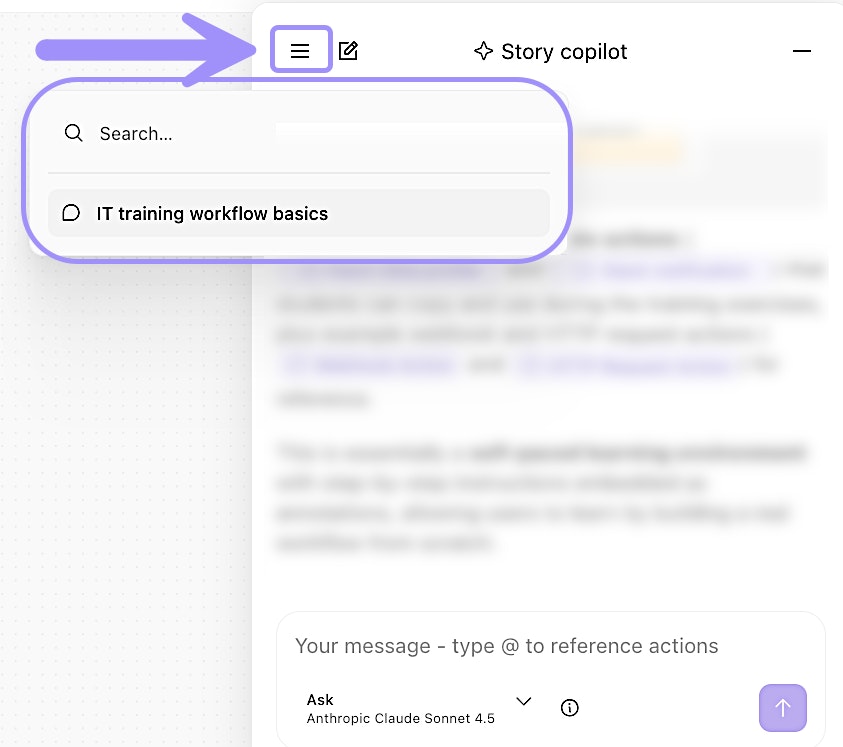
UI location of Story copilot conversation history lookup.
How conversation history helps:
Ongoing development: Work on a story over several days, making incremental improvements. Each time you return, Story copilot remembers the context of your previous conversations.
Team collaboration: If a teammate made changes using Story copilot, review the conversation history to understand what was done and why.
Learning from past decisions: When you encounter a similar problem in a different story, reference how you solved it before.
Tracking changes: The conversation history serves as a log of what was changed and when, helpful for troubleshooting or auditing.
Learn from Story copilot
One of the most valuable aspects of Story copilot is its educational value. As you work with it, you'll learn Tines patterns, discover features you didn't know existed, and understand best practices.
Maximize learning by:
Ask "why" questions: When Story copilot does something you don't understand, ask for an explanation. Example: "Why did you use an Trigger action here instead of a formula? What are the advantages of this approach?"
Experiment with different approaches: Try describing the same workflow in different ways and compare the results. Example: First ask Story copilot to build a workflow one way, then start a new conversation and describe it differently. See how the approaches differ.
Review generated formulas: Look at the formulas Story copilot creates and make sure you understand how they work. Example: "Can you explain this formula step by step? I want to understand the logic."
Try to recreate manually: After Story copilot generates something, try to build a similar workflow manually to reinforce your understanding.
Study the patterns: Pay attention to how Story copilot structures workflows, handles errors, and organizes logic. These patterns represent Tines best practices.
Roles and permissions
Story copilot respects your role and permissions in Tines. You cannot do something with Story copilot that you cannot do yourself.
Viewer roles: Have access to Ask mode only. They can understand and analyze stories but cannot make changes.
Tenant owner, Editor, and Team admin roles: Have access to both Ask and Build modes. They can create, modify, and optimize workflows.
Monitor usage and costs
Story copilot usage can be monitored at the conversation level.
❗️Important
Click the Information icon (ⓘ) within Story copilot to see token usage for the current conversation. This appears after you've started the conversation with Story copilot.
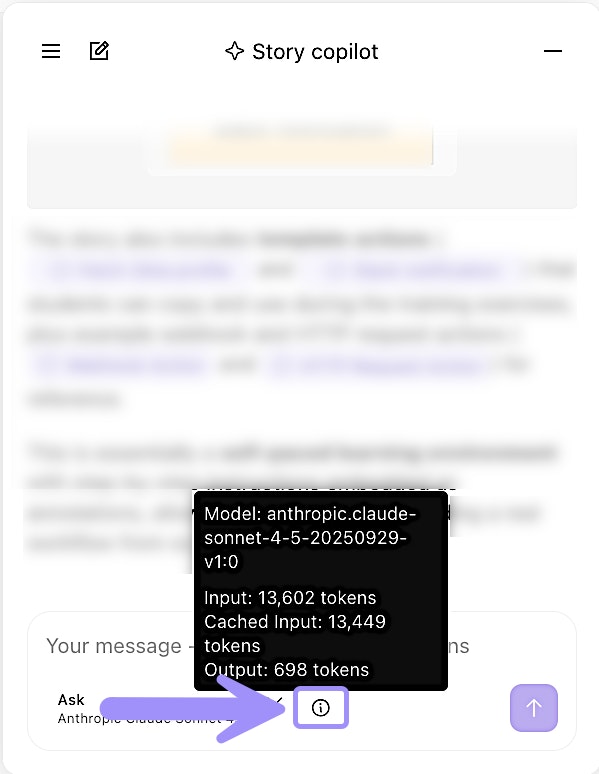
UI location of Story copilot's Information icon to view current conversation token usage.