Quick refresher on Tines formulas
Before we dive into auto generate, let's quickly refresh on what Tines formulas are and why they're so useful in your workflows.
Formulas are how you reference and transform data in your stories. Think of them like formulas in a spreadsheet. Just as you might use a formula in Excel to calculate values or manipulate text, you use Tines formulas to work with data from upstream actions.
Formulas let you:
Reference upstream event data from previous actions (i.e., get_user.body.email).
Transform data using functions (like converting text to uppercase or extracting values from arrays).
Make decisions based on conditions (like checking if a status equals "critical").
Combine multiple pieces of data into a single output.
Functions are the building blocks of formulas to manipulate data exactly how you need it. Tines has a library of formula functions that handle everything from basic text manipulation to complex, cryptographic operations.
🪄Tip
Auto generate formulas
The auto generate formulas feature is an AI-powered feature that lives right in your storyboard. Instead of memorizing formula syntax or searching through documentation, you can describe what you want to accomplish in plain English, and Tines generates the appropriate formula for you.
Think of it as having a formula expert looking over your shoulder. You tell them what you need (like "extract the email domain" or "format this date"), and they write the formula syntax for you.
The feature works directly in the pill editor throughout the storyboard. Whenever you're building an action and need to reference or transform data, you'll see the auto generate option available when creating a Value or Tag pill. You don't need to switch to a different tool or window; everything happens right where you're working.
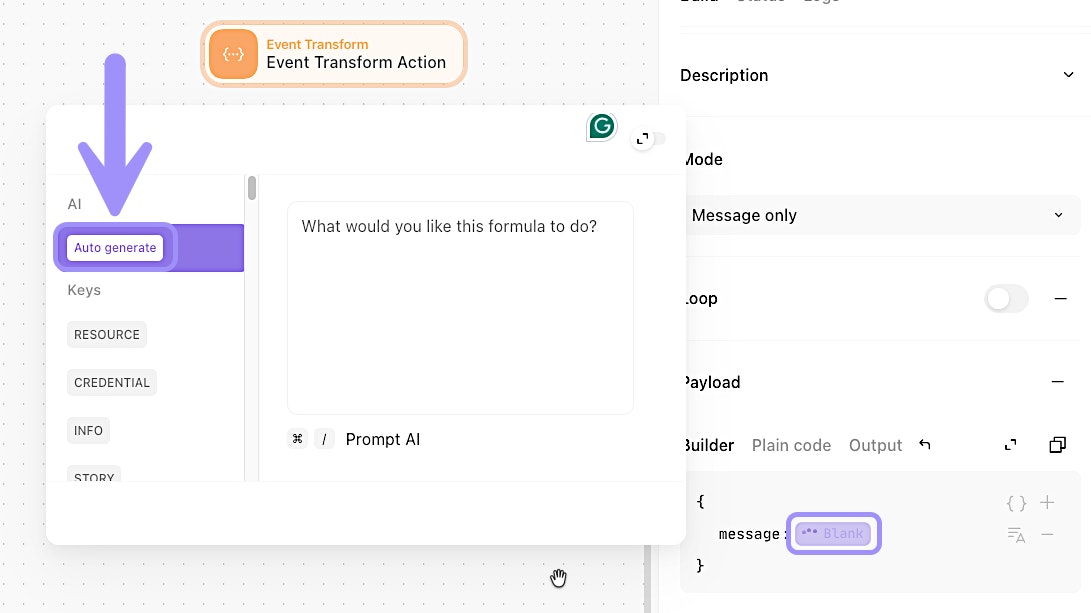
UI location of the auto generate feature.
What makes auto generate useful
Auto generate formulas shines in a few key scenarios:
If you're new to Tines formulas, it helps you learn by showing you how experienced builders would solve common data transformation problems.
If you're working with complex data structures, it can save you time figuring out the right combination of functions to extract or transform what you need.
If you can't remember the exact syntax for a specific formula function, you can simply describe what you want instead of looking it up.
When to use auto generate
The auto generate formulas feature is particularly helpful when you need to:
Extract specific values from nested JSON objects or arrays.
Transform dates and timestamps into different formats.
Parse and manipulate text (like extracting domains from email addresses).
Filter or map arrays based on specific criteria.
Combine multiple data points into a single output.
You'll find it most useful during the building phase when you're configuring actions and need to reference upstream data. It's a build-time feature, meaning it helps you create formulas while you're designing your story, not during story execution.
How auto generate differs from other AI features
The auto generate formulas feature is focused on a specific task: creating Tines formula syntax. Unlike the AI Agent action (which you'll learn about later), it doesn't make decisions or perform multi-step reasoning. It simply translates your natural language description into the appropriate Tines formula. Just as a reminder, the auto generate feature does not consume AI credits, unlike its runtime counterparts, the AI Agent action and Workbench.